EducationSoftwareStrategy.com
StrategyCommunity

Knowledge Base

Product

Community

Knowledge Base

TopicsBrowse ArticlesDeveloper Zone

Product

Download SoftwareProduct DocumentationSecurity Hub

Education

Tutorial VideosSolution GalleryEducation courses

Community

GuidelinesGrandmastersEvents
x_social-icon_white.svglinkedin_social-icon_white.svg
Strategy logoCommunity

© Strategy Inc. All Rights Reserved.

LegalTerms of UsePrivacy Policy
  1. Home
  2. Topics

KB10076: Profile folders of new users are not available in MicroStrategy Desktop


Stefano Antonellis

Principal Product Specialist • Strategy


Symptom

When a new user is created, their profile folder is not visible by the Administrator in Strategy Developer.
 

Cause

Profile folders of newly created users are not visible by the Administrator in Strategy Developer until the user has logged into a project source and expands the project. This behavior is working as designed.
 
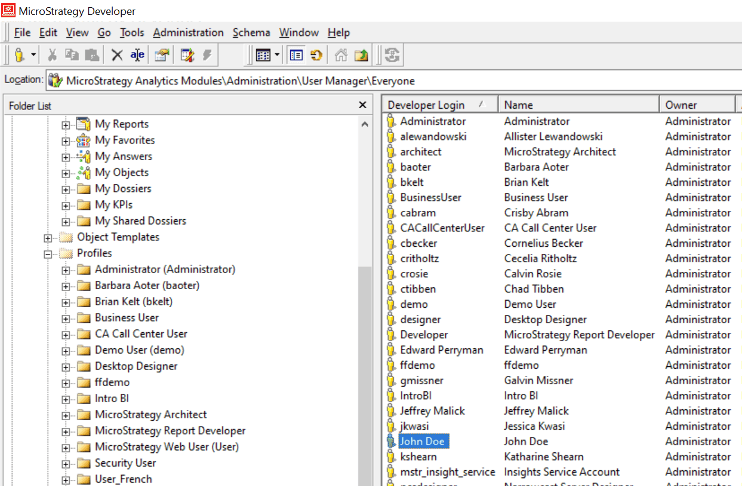
For example, an administrator creates a new user 'John Doe'. However, after checking the profiles folder, there is no profile folder for John Doe, as illustrated below:
ka04W000000OcWKQA0_0EM4W000006HvvM.jpeg


Action

In order for the administrator to see the new profile folder, log into the project as the new user and expand the project.
 
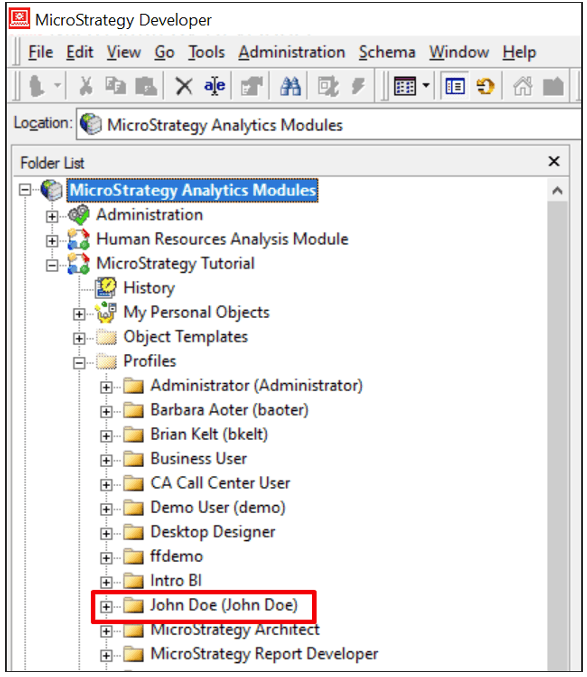
The Administrator should now see John Doe's profile folder under "Profiles", as shown below:
ka04W000000OcWKQA0_0EM4W000006HvvW.jpeg


Comment

0 comments

Details

Knowledge Article

Published:

May 16, 2017

Last Updated:

December 22, 2022