EducationSoftwareStrategy.com
StrategyCommunity

Knowledge Base

Product

Community

Knowledge Base

TopicsBrowse ArticlesDeveloper Zone

Product

Download SoftwareProduct DocumentationSecurity Hub

Education

Tutorial VideosSolution GalleryEducation courses

Community

GuidelinesGrandmastersEvents
x_social-icon_white.svglinkedin_social-icon_white.svg
Strategy logoCommunity

© Strategy Inc. All Rights Reserved.

LegalTerms of UsePrivacy Policy
  1. Home
  2. Topics

KB10079: How to move objects from development to production systems in MicroStrategy Narrowcast Server


Community Admin

• Strategy


This article describes how to move objects from development to production systems in MicroStrategy Narrowcast Server.

To move objects between production and development environments, the system IDs of both systems must be distinct otherwise the Strategy Narrowcast Console will treat both systems as the same system thereby rendering the transfer of objects between production and development impossible.
 
To accomplish a successful transfer using Narrowcast Server Object Manager, users must perform the following steps:
  • Create a new (empty) system. To do this, perform the following:
    • Open the Strategy Narrowcast Administrator Console, under the production machine.
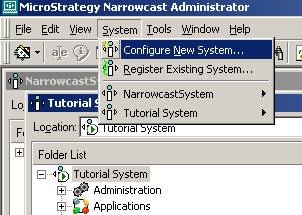
    • Configure a new system by selecting the menu item "Configure New System…" under the "System" menu, as shown below:
ka04W000000ObT4QAK_0EM440000002BqE.jpeg
    • Specify where the Strategy Narrowcast Server system will be located and its name.
    • Specify the Narrowcast Server Subscription Book's location.
    • Configure the clustering of the system's components.
    • Define the information sources that gather information from the data sources.
    • Define the information transmitters to send content via the channels.
  • Register the development system. For more information on registering multiple systems in Strategy Narrowcast Server, refer to the following Strategy Knowledge Base document:
    • KB7616: How to register multiple systems in Strategy Narrowcast Server 9.x
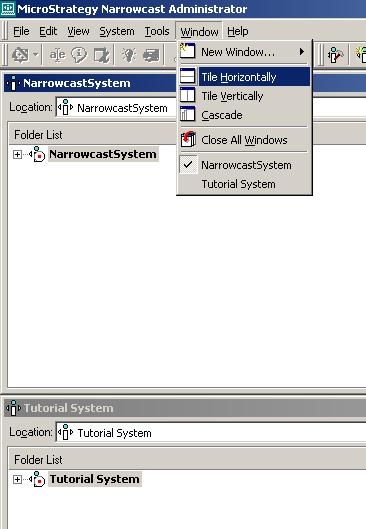
  • Place both Strategy Narrowcast systems side by side to simplify dragging objects from one system to another. Placing both systems side by side (when only two systems are registered) can be achieved by using "Tile Horizontally" or "Tile Vertically" under the Window menu. The following figure shows "Tile Horizontally":
ka04W000000ObT4QAK_0EM440000002BqG.jpeg
  • Move all desired objects from the development system into the production system by using drag-and-drop. For more information on moving objects between systems, refer to the following Strategy Knowledge Base article:
    • KB7615: How to move objects between systems in Strategy Narrowcast Server 9.x
  • Administrators of the Strategy Narrowcast Server System can move the Subscription Book Repository by using database utilities to backup and restore the database on another machine. To achieve this, perform the following steps:
    • Create a backup of the Subscription Book Repository. This is the backup that should be restored on the Production Machine. As a precaution, do not overwrite the backup created.
    • Restore the backup in the production database.

      NOTES:
      The following Strategy Knowledge Base article can also be used to copy entire repository:
    • KB12409 (KB6200-801-1318): Copy Repository Tool functionality in Strategy Narrowcast Server 9.x

Comment

0 comments

Details

Knowledge Article

Published:

June 2, 2017

Last Updated:

June 2, 2017