SYMPTOM:
A user wishes to perform another level of aggregation on the results of a compound metric. For example, in the Strategy Tutorial project, the user creates the following objects:
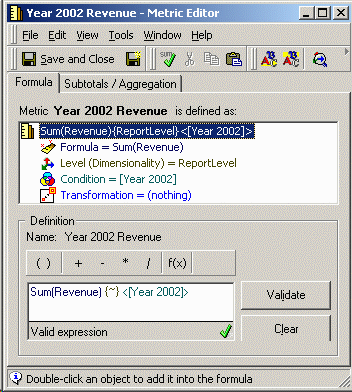

In the last two metrics, the default metric join type and formula join type are both set to Outer join. The settings are available in the Tools menu in the metric editor. Formula join type is in the Advanced submenu.
Formula join type is the setting that determines how different tables will be joined within a single metric calculation. In this case, it would apply to the addition operation between the two conditional metrics.

When running a report with the Year and Month attributes and all four metrics, the year level metric comes back empty. Note that the join type for all the metrics must be set to outer join in Report data options for the report to return any results at all. This is because there are no attribute elements in common between the intermediate tables for the Year 2002 and Year 2003 metrics.

The report SQL shows that in the pass calculating the fourth metric, an inner join is performed even though the formula join type is "outer join":
select a11.MONTH_ID MONTH_ID,
sum(a11.TOT_DOLLAR_SALES) WJXBFS1
into #ZZMD00
from MNTH_CATEGORY_SLS a11
join LU_MONTH a12
on (a11.MONTH_ID = a12.MONTH_ID)
where a12.YEAR_ID in (2002)
group by a11.MONTH_ID
select a11.MONTH_ID MONTH_ID,
sum(a11.TOT_DOLLAR_SALES) WJXBFS1
into #ZZMD01
from MNTH_CATEGORY_SLS a11
join LU_MONTH a12
on (a11.MONTH_ID = a12.MONTH_ID)
where a12.YEAR_ID in (2003)
group by a11.MONTH_ID
select a11.YEAR_ID YEAR_ID,
sum((ISNULL(pa1.WJXBFS1, 0) + ISNULL(pa2.WJXBFS1, 0))) WJXBFS1
into #ZZMD02
from
#ZZMD00 pa1
join LU_MONTH a11
on (pa1.MONTH_ID = a11.MONTH_ID)
group by a11.YEAR_ID
select pa3.YEAR_ID YEAR_ID,
coalesce(pa1.MONTH_ID, pa2.MONTH_ID) MONTH_ID,
a11.MONTH_DESC MONTH_DESC,
pa1.WJXBFS1 WJXBFS1,
pa2.WJXBFS1 WJXBFS2,
(ISNULL(pa1.WJXBFS1, 0) + ISNULL(pa2.WJXBFS1, 0)) WJXBFS3,
pa3.WJXBFS1 WJXBFS4
from #ZZMD00 pa1
full outer join #ZZMD01 pa2
on (pa1.MONTH_ID = pa2.MONTH_ID)
join LU_MONTH a11
on (coalesce(pa1.MONTH_ID, pa2.MONTH_ID) = a11.MONTH_ID)
left outer join #ZZMD02 pa3
on (a11.YEAR_ID = pa3.YEAR_ID)
CAUSE:
This is a known issue prior to Strategy SQL Engine 9.x. This issue has been addressed starting in Strategy 9.x.
Beginning with Strategy SQL Engine 9.0, a VLDB property is available to control the join behavior between component metrics in a nested compound metric: "Nested Aggregation Outer Join," located under Joins in the VLDB property editor.
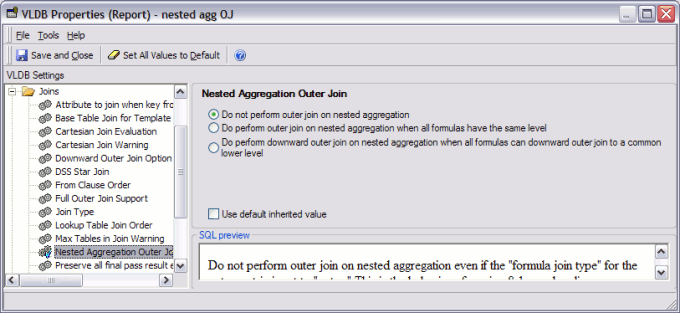
The available options are:
Note that the "Do perform..." override compound metric's Formula Join Type. If the metric specifies an inner join between component metrics, the inner join is replaced by an outer join if "Do perform..." is selected and the required conditions are met.
Exception: There is one case where the Formula Join Type is used with nested aggregation in all supported versions. If the component metrics come from different fact tables, they are considered "split metrics." SQL Engine logic in this case is to join the metrics into an intermediate table first before performing the compound metric and nested aggregation calculations. The intermediate table joining the split metrics uses the compound metric's Formula Join Type, even if "Nested Aggregation Outer Join" is set to "Do not perform outer join."
WORKAROUND:
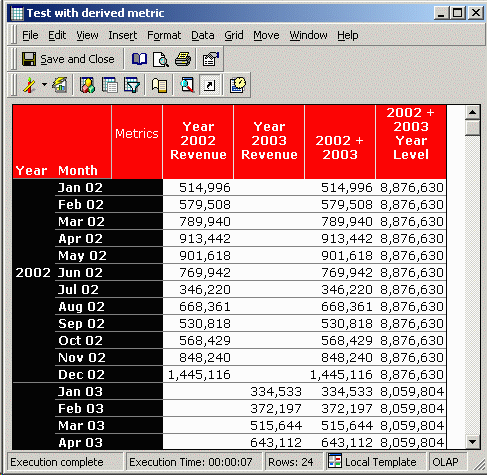
If the nested metric is recast as a derived metric using OLAP Services functionality, the outer join will be executed as desired. The user must have OLAP Services privileges to create such a report:

The report will now generate the desired results:
join #ZZMD01 pa2
on (pa1.MONTH_ID = pa2.MONTH_ID)
