EducationSoftwareStrategy.com
StrategyCommunity

Knowledge Base

Product

Community

Knowledge Base

TopicsBrowse ArticlesDeveloper Zone

Product

Download SoftwareProduct DocumentationSecurity Hub

Education

Tutorial VideosSolution GalleryEducation courses

Community

GuidelinesGrandmastersEvents
x_social-icon_white.svglinkedin_social-icon_white.svg
Strategy logoCommunity

© Strategy Inc. All Rights Reserved.

LegalTerms of UsePrivacy Policy
  1. Home
  2. Topics

KB10179: How to use Design Mode in MicroStrategy Web to set the order of evaluation in a report filter


Community Admin

• Strategy


This technical note describe how to use Design Mode in MicroStrategy Web to set the order of evaluation in a report filter

When creating a report filter with multiple elements, the order of evaluation in the filter becomes very important. To manipulate the grouping and order of evaluation in the filter, Strategy provides arrow buttons to graphically control the grouping and order of evaluation.
 
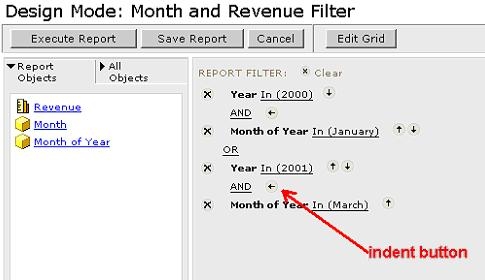
To group and ungroup elements, the indent button is used. For example, to create the filter:
 
(Month: January AND Year: 2000) OR (Month: March AND Year: 2001)
Year and Month of Year are grouped by using the indent button, as shown below:
ka04W000000OeGrQAK_0EM440000002FvP.jpeg

 
If no indentation arrow appears, as is the case with the OR operator directly above the arrowed example, it is by design. This occurs when it is not possible to change the order of operation. It can be resolved by un-indenting the surrounding operators.
 
Below is the result of a report run with the filter above. It shows January 2000 and March 2001:

 

ka04W000000OeGrQAK_0EM440000002FvV.jpeg


Comment

0 comments

Details

Knowledge Article

Published:

June 12, 2017

Last Updated:

June 12, 2017