EducationSoftwareStrategy.com
StrategyCommunity

Knowledge Base

Product

Community

Knowledge Base

TopicsBrowse ArticlesDeveloper Zone

Product

Download SoftwareProduct DocumentationSecurity Hub

Education

Tutorial VideosSolution GalleryEducation courses

Community

GuidelinesGrandmastersEvents
x_social-icon_white.svglinkedin_social-icon_white.svg
Strategy logoCommunity

© Strategy Inc. All Rights Reserved.

LegalTerms of UsePrivacy Policy
  1. Home
  2. Topics

KB10188: In MicroStrategy 9.x - 10.x, how to get the difference between a previous date value and a current date value that are both mapped to the same column in the warehouse?


Stefan Zepeda

Salesforce Solutions Architect • Strategy


This technical note provides the steps to get the difference between a previous date value and a current date value that are both mapped to the same column in the warehouse

Users would like to determine the difference between a previous date value and a current date value that are both mapped to the same column in the warehouse.
However, Strategy does not have a built-in analytical function, such as Previous, to capture the previous column value. Nor does the date type allow numeric computation. However, the following procedure demonstrates how to determine these date values:

ka02R000000kXMFQA2_0EM440000002Fw9.jpeg


  1. Map to the column as a fact and use the ApplySimple expression Year:
    Year( <date column>) * 1000 + DayOfYear(<date column>)
  2. This converts 1/1/2004 to 2004001.

Call this Fact A and create an attribute that maps to the same date column. Call this Juliandate.
 

  • Update the schema.
  • Create a metric out of Sum of Fact A and call this Metric B:
ka02R000000kXMFQA2_0EM440000002Fvt.jpeg
  • Create a MovingSum of Metric B with a window of two and sort by the attribute "JulianDates." Call this Metric C:
ka02R000000kXMFQA2_0EM440000002Fvz.jpeg
  • Create an intermediate metric, Metric D, which is Metric B - Metric C:
ka02R000000kXMFQA2_0EM440000002Fw2.jpeg
  • Build a metric that calculates Metric B - Metric D to obtain the difference of days:
ka02R000000kXMFQA2_0EM440000002Fvv.jpeg
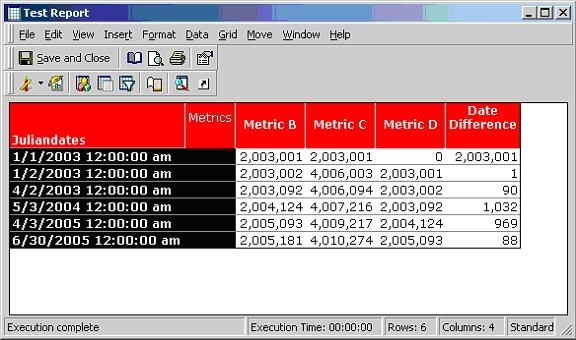
  • Build a report that has the attribute "Juliandates," Metric B, C, D and Date Difference:
ka02R000000kXMFQA2_0EM440000002Fvx.jpeg
  •  
    NOTE:
    The first row has no previous value so the date difference can be ignored. The subsequent rows show the correct date difference where each row must be a unique row.
     
    For more information, refer to the following Strategy Knowledge Base document:
    • KB5200-071-0061 - How to create a metrics that show data from the previous row in Strategy SQL Generation Engine 8.x

Comment

0 comments

Details

Knowledge Article

Published:

June 16, 2017

Last Updated:

June 16, 2017