EducationSoftwareStrategy.com
StrategyCommunity

Knowledge Base

Product

Community

Knowledge Base

TopicsBrowse ArticlesDeveloper Zone

Product

Download SoftwareProduct DocumentationSecurity Hub

Education

Tutorial VideosSolution GalleryEducation courses

Community

GuidelinesGrandmastersEvents
x_social-icon_white.svglinkedin_social-icon_white.svg
Strategy logoCommunity

© Strategy Inc. All Rights Reserved.

LegalTerms of UsePrivacy Policy
  1. Home
  2. Topics

KB10200: How to filter on the values returned for subtotals in MicroStrategy Developer


Stefan Zepeda

Salesforce Solutions Architect • Strategy


How to filter on the values returned for subtotals in MicroStrategy Developer

The metric created on the level of an attribute with the same function as subtotal allows users to filter on the value of that subtotal.
The following procedure describes how to filter on the values returned for the subtotal:
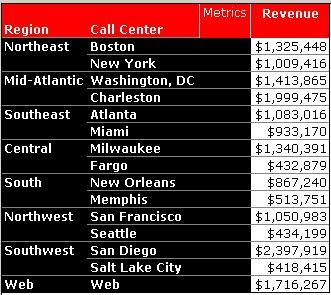
 

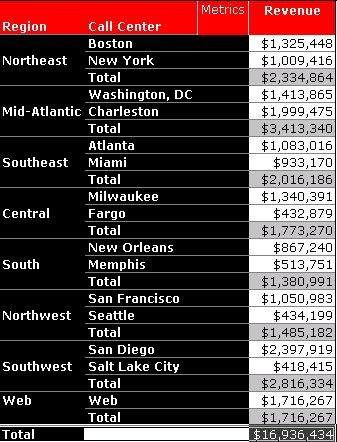
  • Create a report with the attribute 'Region' and 'Call Center', and the metric, 'Revenue,' as shown below:
ka02R000000kXpjQAE_0EM440000002Fw6.jpeg
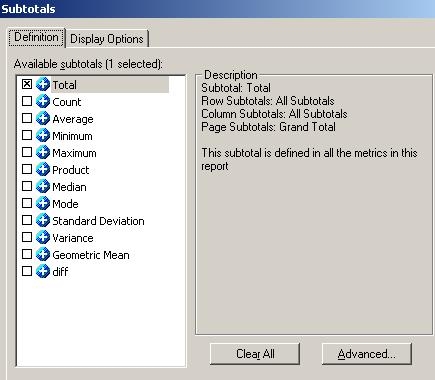
  • Add subtotals for 'Region':
ka02R000000kXpjQAE_0EM440000002Fw4.jpeg
  •  
    The subtotal, Total, uses the sum function, as illustrated below:
     
ka02R000000kXpjQAE_0EM440000002FwL.jpeg
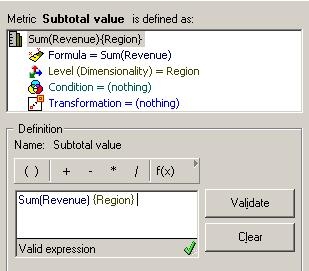
  • Create a Sum of Revenue metric at the 'Region' level, leaving filtering and grouping standard while removing report level. The purpose of this metric is to simulate the subtotal of Revenue per Region.
ka02R000000kXpjQAE_0EM440000002Fw7.jpeg
  •  
    Sum(Revenue){Region}
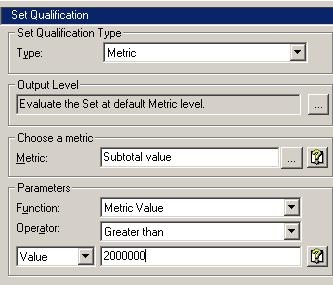
  • Create a filter on the metric from Step 1:
ka02R000000kXpjQAE_0EM440000002FwB.jpeg

The filter is applied on the value of the subtotal. In this example, it displays Region whose revenue subtotal is greater that 2,000,000:
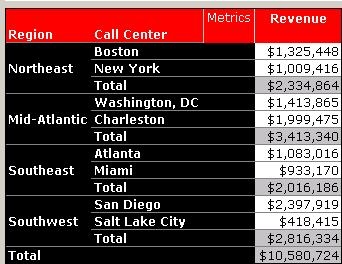
 

ka02R000000kXpjQAE_0EM440000002FwN.jpeg


Comment

0 comments

Details

Knowledge Article

Published:

June 13, 2017

Last Updated:

June 13, 2017