SYMPTOM:
When warehouse partitioning is used, a prequery is run against the Partition Mapping Table (PMT) to locate the Partition Base Tables (PBT) that contain data for the report. If the report has a filter on an attribute that has a parent-child relationship with the partition level attribute, a WHERE clause will be included in the prequery. Below is an example in the Strategy Tutorial project demonstrating how the prequery is generated to find the correct PBT and how the report filter affects the WHERE clause of the prequery.
Example:
Create a report with the following template and report filter:
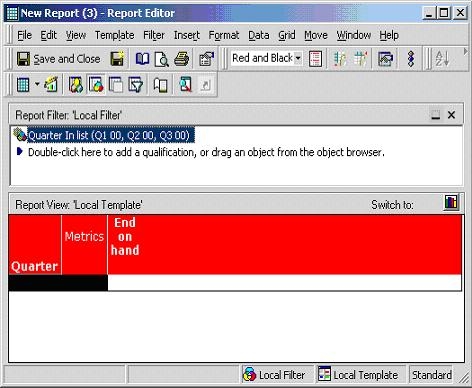
The SQL for this report is shown below:
select distinct a11.PBTNAME PBTNAME
from PMT_INVENTORY a11
where a11.QUARTER_ID in (20001, 20002, 20003)
create table ZZPO00(
QUARTER_ID NUMBER(5),
MONTH_ID NUMBER(10),
WJXBFS1 NUMBER)
create table ZZPO00 nologging as
select a12.QUARTER_ID QUARTER_ID,
a11.MONTH_ID MONTH_ID,
sum(a11.EOH_QTY) WJXBFS1
from {Partition_Base_Table } a11,
LU_MONTH a12
where a11.MONTH_ID = a12.MONTH_ID
and a12.QUARTER_ID in (20001, 20002, 20003)
group by a12.QUARTER_ID,
a11.MONTH_ID
create table ZZPO00 nologging as
select a12.QUARTER_ID QUARTER_ID,
a11.MONTH_ID MONTH_ID,
sum(a11.EOH_QTY) WJXBFS1
from { Partition_Base_Table } a11,
LU_MONTH a12
where a11.MONTH_ID = a12.MONTH_ID
and a12.QUARTER_ID in (20001, 20002, 20003)
group by a12.QUARTER_ID,
a11.MONTH_ID
create table ZZMB01 nologging as
select pa1.QUARTER_ID QUARTER_ID,
max(pa1.MONTH_ID) WJXBFS1
from ZZPO00 pa1
group by pa1.QUARTER_ID
select distinct pa1.QUARTER_ID QUARTER_ID,
a11.QUARTER_DESC QUARTER_DESC,
pa1.WJXBFS1 WJXBFS1
from ZZPO00 pa1,
ZZMB01 pa2,
LU_QUARTER a11
where pa1.MONTH_ID = pa2.WJXBFS1 and
pa1.QUARTER_ID = pa2.QUARTER_ID and
pa1.QUARTER_ID = a11.QUARTER_ID
The pass in bold is the prequery and is run against the PMT to locate the correct PBT. Since the report filter is on Quarter, which is the partition level attribute of the PMT, a WHERE clause is included in the prequery. In fact, the report filter will be included in the prequery if both of the following conditions are met:
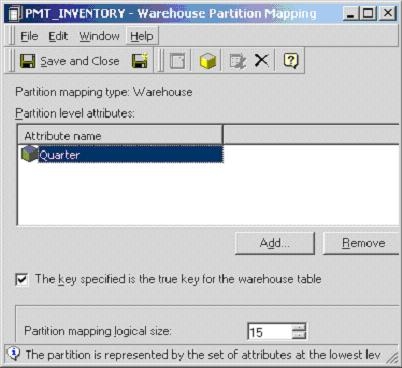
For more information about how to set up a project using warehouse partitioning in Strategy Architect, refer to the following Strategy Knowledge Base document:
For more information about how Strategy SQL Generation Engine includes filter in the prequery, refer to the following Strategy Knowledge Base document:
If a user changes the column alias of the 'Quarter' attribute from QUARTER_ID to CATEGORY_ID, the prequery includes a WHERE clause on CATEGORY_ID even though the report filter is still on the 'Quarter' attribute.
select distinct a11.PBTNAME PBTNAME
from PMT_INVENTORY a11
where a11.CATEGORY_ID in (20001, 20002, 20003)
Since the partition mapping table in the warehouse contains a column QUARTER_ID but not CATEGORY_ID, the report fails in the Query Engine.
With the change of column alias, users find another problem. If they open the partition mapping object, PMT_INVENTORY, remove QUARTER attribute and then attempt to re-add it, the following error message appears:
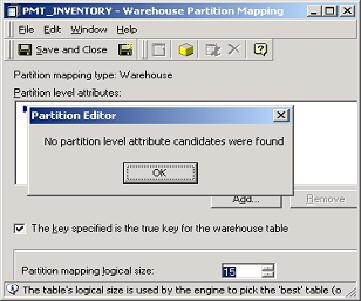
No partition level attribute candidates were found
CAUSE:
Column aliases of a partition level attribute is used in two occasions:
If a partition level attribute has a column alias that is different from the corresponding column name in the PMT, the attribute can't be resolved as a partition level attribute candidate in a partition mapping object. Also, if a report filter must be included in the prequery, SQL statements generated by the engine contain a column that doesn't exist in the PMT and ultimately causes failure in the query engine.
ACTION:
When warehouse partitioning is used, users must ensure column aliases of partition level attributes are the same as the Attribute_ID column in the Partition Mapping Table.
