SYMPTOM:
In the Strategy SQL Engine, metrics using transformations may exhibit erratic behavior if one or more attributes share the same ID columns in the warehouse. Specifically, if the ID column for the attribute undergoing the transformation also defines a second attribute, users will see incorrect SQL and incorrect results.
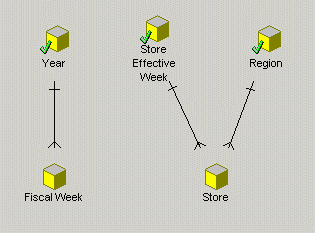
Consider the following simplified schema, with two hierarchies (Time and Region). A fact table also exists, with Fiscal week and Store as its keys.
Fiscal Week and Store Effective Week are defined on the same table, LU_FISCAL_WEEK, with the same ID and description forms, as shown below:
In this schema, a user creates a transformation, two metrics, and a report as described below:
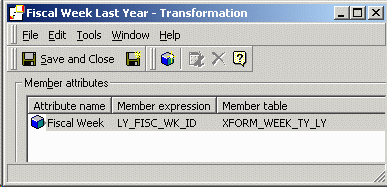
Transformation:
Metrics:
Report:
With no report filter, this report will generate the correct SQL. However, if the user adds a report filter <Year = 2004>, then the transformation metric will return no data.
IS_TRANS_DESC | IS_TRANS_DESC |
a11.FISCAL_WEEK_ID FISCAL_WEEK_ID, sum(a11.FACT_VALUE) WJXBFS1 into #ZZMD00 from FACT_TABLE a11 join LU_STORE a12 on (a11.STORE_ID = a12.STORE_ID) group by a12.REGION_ID, a11.FISCAL_WEEK_ID | a11.FISCAL_WEEK_ID FISCAL_WEEK_ID, sum(a11.FACT_VALUE) WJXBFS1 into #ZZMD00 from FACT_TABLE a11 join LU_STORE a12 on (a11.STORE_ID = a12.STORE_ID) join LU_FISCAL_WEEK a13 on (a11.FISCAL_WEEK_ID = a13.FISCAL_WEEK_ID) where a13.YEAR_ID = 2004 group by a12.REGION_ID, a11.FISCAL_WEEK_ID |
a12.FISCAL_WEEK_ID FISCAL_WEEK_ID, sum(a11.FACT_VALUE) WJXBFS1 into #ZZMD01 from FACT_TABLE a11 on (a11.FISCAL_WEEK_ID = a12.LY_FISC_WK_ID) join LU_STORE a13 on (a11.STORE_ID = a13.STORE_ID) group by a13.REGION_ID, a12.FISCAL_WEEK_ID | a12.FISCAL_WEEK_ID FISCAL_WEEK_ID, sum(a11.FACT_VALUE) WJXBFS1 into #ZZMD01 from FACT_TABLE a11 on (a11.FISCAL_WEEK_ID = a12.LY_FISC_WK_ID) join LU_STORE a13 on (a11.STORE_ID = a13.STORE_ID) on (a11.FISCAL_WEEK_ID = a14.FISCAL_WEEK_ID and a12.FISCAL_WEEK_ID = a14.FISCAL_WEEK_ID) where a14.YEAR_ID = 2004 group by a13.REGION_ID, a12.FISCAL_WEEK_ID |
pa1.REGION_ID REGION_ID, a12.REGION_DESC REGION_DESC, pa1.FISCAL_WEEK_ID FISCAL_WEEK_ID, a11.FISCAL_WEEK_DESC FISCAL_WEEK_DESC, pa1.WJXBFS1 WJXBFS1, pa2.WJXBFS1 WJXBFS2 from #ZZMD00 pa1 join #ZZMD01 pa2 on (pa1.FISCAL_WEEK_ID = pa2.FISCAL_WEEK_ID and pa1.REGION_ID = pa2.REGION_ID) join LU_FISCAL_WEEK a11 on (pa1.FISCAL_WEEK_ID = a11.FISCAL_WEEK_ID) join LU_REGION a12 on (pa1.REGION_ID = a12.REGION_ID) | pa1.REGION_ID REGION_ID, a12.REGION_DESC REGION_DESC, pa1.FISCAL_WEEK_ID FISCAL_WEEK_ID, a11.FISCAL_WEEK_DESC FISCAL_WEEK_DESC, pa1.WJXBFS1 WJXBFS1, pa2.WJXBFS1 WJXBFS2 from #ZZMD00 pa1 join #ZZMD01 pa2 on (pa1.FISCAL_WEEK_ID = pa2.FISCAL_WEEK_ID and pa1.REGION_ID = pa2.REGION_ID) join LU_FISCAL_WEEK a11 on (pa1.FISCAL_WEEK_ID = a11.FISCAL_WEEK_ID) join LU_REGION a12 on (pa1.REGION_ID = a12.REGION_ID) |
Because the filter is at the year level and the fact table is at the week level, the metric calculation passes must join to the fiscal week table in order to retrieve the year ID for filtering. In the second pass, this join is performed on the fiscal week ID columns from both the fact table and the transformation table.
a11[fact].FISCAL_WEEK_ID = a14[lu].FISCAL_WEEK_ID and
a12[xform].FISCAL_WEEK_ID = a14[lu].FISCAL_WEEK_ID
This can be true only if a11.FISCAL_WEEK_ID = a12.FISCAL_WEEK_ID. But, an earlier join condition in the pass states that a11.FISCAL_WEEK_ID = a12. LY_FISC_WK_ID, which may be presumed to be different from a12. FISCAL_WEEK_ID. Therefore, the fiscal week ID columns in a11 and a12 must be different, and the join condition to the lookup table will always fail. Hence, no data will be returned.
In the above SQL statements, the Fiscal week attribute is mapped to all the tables containing a FISCAL_WEEK_ID column. Even stranger SQL will be generated for the unfiltered report if the Fiscal week attribute disables the possible attribute mapping to the transformation table:

select a12.REGION_ID REGION_ID,
a11.FISCAL_WEEK_ID FISCAL_WEEK_ID,
sum(a11.FACT_VALUE) WJXBFS1
into #ZZMD00
from FACT_TABLE a11
join LU_STORE a12
on (a11.STORE_ID = a12.STORE_ID)
group by a12.REGION_ID,
a11.FISCAL_WEEK_ID
select a13.REGION_ID REGION_ID,
sum(a11.FACT_VALUE) WJXBFS1
into #ZZMD01
from FACT_TABLE a11
join XFORM_WEEK_TY_LY a12
on (a11.FISCAL_WEEK_ID = a12.LY_FISC_WK_ID)
join LU_STORE a13
on (a11.STORE_ID = a13.STORE_ID)
group by a13.REGION_ID
select distinct a11.YEAR_ID YEAR_ID,
pa1.REGION_ID REGION_ID,
a12.REGION_DESC REGION_DESC,
pa1.FISCAL_WEEK_ID FISCAL_WEEK_ID,
a11.FISCAL_WEEK_DESC FISCAL_WEEK_DESC,
pa1.WJXBFS1 WJXBFS1,
pa2.WJXBFS1 WJXBFS2
from #ZZMD00 pa1
join #ZZMD01 pa2
on (pa1.FISCAL_WEEK_ID = pa2.FISCAL_WEEK_ID and
pa1.REGION_ID = pa2.REGION_ID)
join LU_FISCAL_WEEK a11
on (pa1.FISCAL_WEEK_ID = a11.FISCAL_WEEK_ID)
join LU_REGION a12
on (pa1.REGION_ID = a12.REGION_ID)
The Strategy SQL Engine fails to generate the fiscal week ID key in the second pass (transformation metric). However, the engine attempts to join the two metric calculation passes on both the fiscal week and region IDs. This will generate an ODBC error because the fiscal week ID column does not exist in the intermediate table for the transformation metrics.
CAUSE:
This behavior occurs because the Store Effective Week attribute also uses the fiscal week lookup table as its lookup. This constitutes a use of attribute roles, or attributes that share a lookup table but are used for different purposes. One lookup table serves multiple roles.
In this case, the schema uses role attributes because the attributes were created with automatic table mapping, and some of the attributes (Fiscal Week and Store Effective Week) share an ID column name. This creates an inappropriate mapping from the Store Effective Week attribute to the fiscal week lookup table.
Note also that the guilty attribute, Store Effective Week, does not need to be on the template to affect SQL generation for transformation metrics.
ACTION:
When constructing a new project in Strategy, project architects should be aware of role attributes present in the schema. After the initial creation of attributes (whether manually or using the attribute creation wizard), the architects should check each role attribute to ensure each one uses a different lookup table.
The preferred way to handle attribute roles is to create a table alias for the lookup table to be shared. To achieve this, perform the following steps:


Now, the two attributes are treated as distinct entities in terms of the Strategy logical SQL, although they will use the same physical table in SQL generation (with different table aliases).
With the table alias in place, Strategy generates the correct transformation SQL:
select a12.REGION_ID REGION_ID,
a11.FISCAL_WEEK_ID FISCAL_WEEK_ID,
sum(a11.FACT_VALUE) WJXBFS1
into #ZZMD00
from FACT_TABLE a11
join LU_STORE a12
on (a11.STORE_ID = a12.STORE_ID)
join LU_FISCAL_WEEK a13
on (a11.FISCAL_WEEK_ID = a13.FISCAL_WEEK_ID)
where a13.YEAR_ID = 2004
group by a12.REGION_ID,
a11.FISCAL_WEEK_ID
select a13.REGION_ID REGION_ID,
a12.FISCAL_WEEK_ID FISCAL_WEEK_ID,
sum(a11.FACT_VALUE) WJXBFS1
into #ZZMD01
from FACT_TABLE a11
join XFORM_WEEK_TY_LY a12
on (a11.FISCAL_WEEK_ID = a12.LY_FISC_WK_ID)
join LU_STORE a13
on (a11.STORE_ID = a13.STORE_ID)
join LU_FISCAL_WEEK a14
on (a12.FISCAL_WEEK_ID = a14.FISCAL_WEEK_ID)
where a14.YEAR_ID = 2004
group by a13.REGION_ID,
a12.FISCAL_WEEK_ID
select a11.YEAR_ID YEAR_ID,
pa1.REGION_ID REGION_ID,
a12.REGION_DESC REGION_DESC,
pa1.FISCAL_WEEK_ID FISCAL_WEEK_ID,
a11.FISCAL_WEEK_DESC FISCAL_WEEK_DESC,
pa1.WJXBFS1 WJXBFS1,
pa2.WJXBFS1 WJXBFS2
from #ZZMD00 pa1
join #ZZMD01 pa2
on (pa1.FISCAL_WEEK_ID = pa2.FISCAL_WEEK_ID and
pa1.REGION_ID = pa2.REGION_ID)
join LU_FISCAL_WEEK a11
on (pa1.FISCAL_WEEK_ID = a11.FISCAL_WEEK_ID)
join LU_REGION a12
on (pa1.REGION_ID = a12.REGION_ID)
Alternative:
Alternately, there is a VLDB property, "Engine attribute role options," which will allow the Strategy SQL Engine to attempt to determine automatically when attribute roles are present in the schema and generate SQL accordingly.
Refer to the document below for details of this VLDB setting:
KB14470 - How does the Engine Attribute Role Recognition feature resolve conflicts in attribute mapping in MicroStrategy SQL Generation Engine?
Note: This VLDB property may not work for all schemas.

