EducationSoftwareStrategy.com
StrategyCommunity

Knowledge Base

Product

Community

Knowledge Base

TopicsBrowse ArticlesDeveloper Zone

Product

Download SoftwareProduct DocumentationSecurity Hub

Education

Tutorial VideosSolution GalleryEducation courses

Community

GuidelinesGrandmastersEvents
x_social-icon_white.svglinkedin_social-icon_white.svg
Strategy logoCommunity

© Strategy Inc. All Rights Reserved.

LegalTerms of UsePrivacy Policy
  1. Home
  2. Topics

KB10299: “Error 1058: The service cannot be started…” error message appears when attempting to start MicroStrategy services.


Community Admin

• Strategy


Article overview a reason why the error message 'Error 1058: The service cannot be started, either because it is disabled or because it has no enabled devices associated with it' may be returned upon trying to start a MicroStrategy Service via Service Manager.

SYMPTOM:
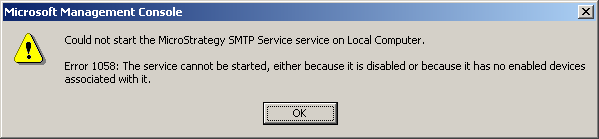
Strategy administrators receive the following error message when attempting to start any of the Strategy services, for example the Strategy SMTP Service:
 

ka04W000000OhcLQAS_0EM440000002HYL.gif

 
Error 1058: The service cannot be started, either because it is disabled or because it has no enabled devices associated with it.
CAUSE:
This behavior is by design and occurs when the service is disabled for the hardware profile that is currently used.
 
ACTION:
To resolve this issue, perform the following steps:
 

  • Go to Start > Control Panel > Administrative Tools > Services.
  • Double-click the service that did not start.
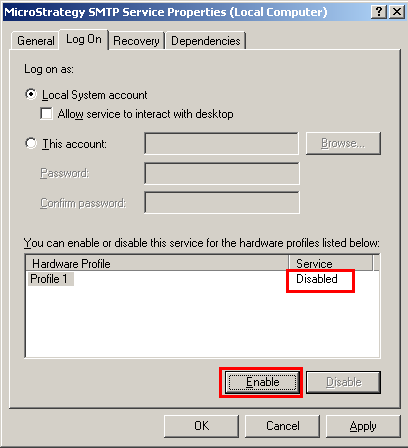
  • Click the 'Log On' tab.
  • Verify that the service has not been disabled for the hardware profile that is being used. If it has, click Enable, as shown below:
ka04W000000OhcLQAS_0EM440000002HYM.gif
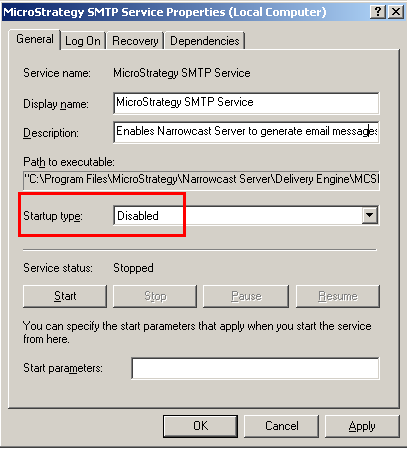
  • Click the General tab and verify that the service has not been disabled in the Startup Type box. If it has, click Automatic to have it start when the machine is started:
ka04W000000OhcLQAS_0EM440000002HYF.gif

NOTE:
If a service is set to start automatically, but the service has been disabled for the hardware profile being used, the service is not started and no error message is generated.


Comment

0 comments

Details

Knowledge Article

Published:

May 8, 2017

Last Updated:

May 8, 2017