EducationSoftwareStrategy.com
StrategyCommunity

Knowledge Base

Product

Community

Knowledge Base

TopicsBrowse ArticlesDeveloper Zone

Product

Download SoftwareProduct DocumentationSecurity Hub

Education

Tutorial VideosSolution GalleryEducation courses

Community

GuidelinesGrandmastersEvents
x_social-icon_white.svglinkedin_social-icon_white.svg
Strategy logoCommunity

© Strategy Inc. All Rights Reserved.

LegalTerms of UsePrivacy Policy
  1. Home
  2. Topics

KB10338: What governing settings in the MicroStrategy Intelligence Server and Project levels are most important from a MicroStrategy Narrowcast Server perspective?


Community Admin

• Strategy


This article explains which governing settings in the MicroStrategy Intelligence Server and Project levels are most important for MicroStrategy Narrowcast Server.

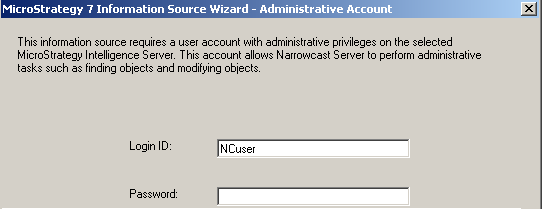
Strategy Narrowcast Server connects to a Strategy Intelligence Server using the user account specified in the 'Administrative Account' section of the Information Source definition, as shown below:
ka04W000000OhlUQAS_0EM440000002BpH.gif

 
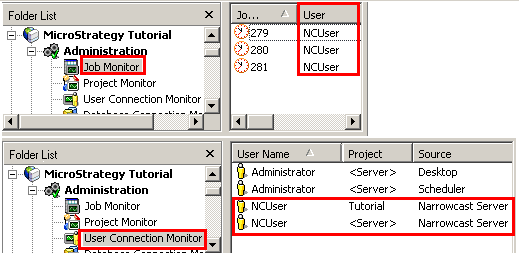
This is the user account that appears in the Job Monitor and User Connection Monitor in the Strategy Intelligence Server when a Narrowcast Server service is executed:
ka04W000000OhlUQAS_0EM440000002BpD.gif

 
This user account is subject to every governing setting at the Strategy Intelligence Server and Project levels as any other user account in that Intelligence Server.
 
A single Narrowcast Server service can potentially submit hundreds of job requests to the Strategy Intelligence Server at once. Therefore, it becomes critical that Intelligence Server governing settings are appropriate to handle the job load coming from Strategy Narrowcast Server. Governing settings that are too low prevent Strategy Narrowcast Server services from executing successfully.
 
To estimate the number of job requests a Narrowcast Server service will generate, refer to the following article in the Strategy Knowledge Base:

  • KB11592 - How to use Performance Monitor to estimate the number of jobs and user sessions generated by a Strategy Narrowcast Server service

 
The following Intelligence Server governing settings are the most important from a Strategy Narrowcast Server perspective:
Server-Level Governing:
  • User session idle time:
    • This setting limits how long Strategy Narrowcast Server jobs can stay in the Project Monitor waiting to execute. This setting must be greater than the time that it takes to run all jobs associated with the longest running Narrowcast Server service.
  • Maximum number of interactive jobs:
    • This setting limits the number of concurrent jobs that may exist on a Strategy Intelligence Server. This setting must be greater than x x x 2.
  • Maximum number of user sessions:
    • This setting limits the number of user sessions or connections for a Strategy Intelligence Server. Each executing segment in the Narrowcast Server establishes one session or connection to the Intelligence Server. This setting must be greater than the maximum number of concurrent executing segments.
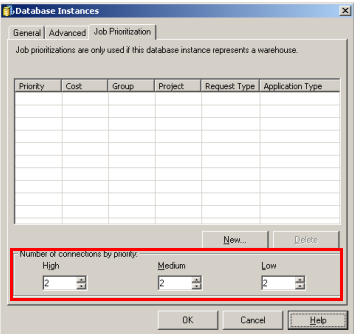
  • Number of database instance threads:
    • This setting limits the number of concurrent connections to the warehouse. If there are more job requests than there are database instance threads, then those jobs must wait in the Job Monitor for execution. The governing setting 'User session idle time' applies while those jobs wait for execution:
ka04W000000OhlUQAS_0EM440000002BpC.gif

 
Project-Level Governing:

  • Intelligence Server Elapsed Time (sec) for Interactive reports:
    • This setting limits the time a report request is allowed to take before it is canceled. This setting accounts for total time spent resolving prompts, executing SQL, analytical calculation, and preparing report results. Time spent waiting in the Job Monitor counts towards this limit. This setting must be greater than the longest running job for each service + the estimated time that it may wait in the Job Monitor.
  • Jobs per user account:
    • This setting limits the number of concurrent job requests for a given user account and project. Jobs waiting for execution count towards this limit. Each Narrowcast Information Object in a segment creates two jobs on the Strategy Intelligence Server: one for the parent job, and one for the report itself. Narrowcast Server attempts to minimize the number of job requests by looking at the subscribers in a segment and grouping together those subscriptions having identical preferences, security objects, and authentication objects so that a single job can be submitted to the Strategy Intelligence Server for execution. The worst case scenario occurs when every subscription within a segment is unique. Therefore, to accommodate for the worst-case scenario, this setting must be greater than the x x x 2 .
  • Jobs per user session:
    • This setting limits the number of concurrent jobs a user may have during a given session or connection. Each segment executing in the Strategy Narrowcast Server establishes one session or connection to the Strategy Intelligence Server. This setting must be greater than x x 2.
  • Interactive jobs per project:
    • This setting limits the number of concurrent jobs that the project can process at a time. This setting must be greater than the number of Information Objects] x x x 2.
  • Executing jobs per user:
    • This setting limits the number of concurrent jobs a single user account may have executing in the project. If the number of jobs requested by a given user account exceeds this limit, those jobs will wait for execution in the Job Monitor even though there are available database instance threads.
  • User sessions per project:
    • This setting limits the number of user sessions or connections that are allowed in the project. Each executing segment creates a session or connection in the Strategy Intelligence Server. This setting must be greater than the largest number of executing segments.

Comment

0 comments

Details

Knowledge Article

Published:

April 14, 2017

Last Updated:

April 14, 2017