EducationSoftwareStrategy.com
StrategyCommunity

Knowledge Base

Product

Community

Knowledge Base

TopicsBrowse ArticlesDeveloper Zone

Product

Download SoftwareProduct DocumentationSecurity Hub

Education

Tutorial VideosSolution GalleryEducation courses

Community

GuidelinesGrandmastersEvents
x_social-icon_white.svglinkedin_social-icon_white.svg
Strategy logoCommunity

© Strategy Inc. All Rights Reserved.

LegalTerms of UsePrivacy Policy
  1. Home
  2. Topics

KB10343: How to control the default appearance of an Outline mode report in box Web and Developer


Stefan Zepeda

Salesforce Solutions Architect • Strategy


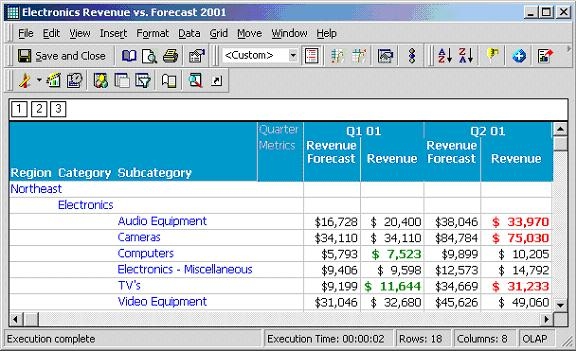
By default, an Outline Mode report appears in its fully expanded format.

By default, an Outline Mode report appears in its fully expanded format, as shown in the following screen shot:
ka02R000000kbiwQAA_0EM440000002Fv5.jpeg

 
However, report designers may choose to have a different level of expansion to the Outline mode.
 
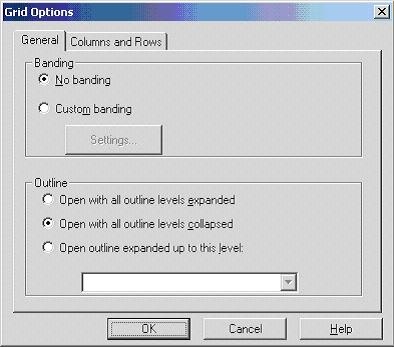
The Grid Options window, shown below, will allow for the designation of a particular level of expansion each time a report is executed. This window is located in the Grid Menu at the top of the report:
ka02R000000kbiwQAA_0EM440000002Fv2.jpeg

 
The Outline setting for "Open with all outline levels collapse," which will create the following results upon report execution, renders an identical report a different look when executed using these Grid Options:

ka02R000000kbiwQAA_0EM440000002Fv4.jpeg


Comment

0 comments

Details

Knowledge Article

Published:

June 9, 2017

Last Updated:

June 9, 2017