EducationSoftwareStrategy.com
StrategyCommunity

Knowledge Base

Product

Community

Knowledge Base

TopicsBrowse ArticlesDeveloper Zone

Product

Download SoftwareProduct DocumentationSecurity Hub

Education

Tutorial VideosSolution GalleryEducation courses

Community

GuidelinesGrandmastersEvents
x_social-icon_white.svglinkedin_social-icon_white.svg
Strategy logoCommunity

© Strategy Inc. All Rights Reserved.

LegalTerms of UsePrivacy Policy
  1. Home
  2. Topics

KB10370: How to create custom subtotals with count(x) such that cross tab nulls are also counted in MicroStrategy Developer (formerly Desktop)


Stefan Zepeda

Salesforce Solutions Architect • Strategy


Article outlines how to create custom subtotals with count(x) such that cross tab nulls are also counted in MicroStrategy Developer (formerly Desktop)

Consider the following report in Strategy Developer (formerly Desktop) which has crosstab nulls in the empty cells. Applying the Count subtotal to the grid returns a count of the existing metric values, not a count of the rows.

ka02R000000kYQaQAM_0EM440000002FtA.gif

 
NOTE: Cross tab nulls may result when the attributes on the rows (Employee) and the attribute in the column (Call Center) are related in a hierarchy.
 
The Count subtotal by definition cannot include crosstab nulls. The Count function in Strategy does have a parameter to include or exclude nulls, but including nulls can only count rows that exist in the result set. The result set for this report contains five rows: three for San Diego and two for New Orleans. When the subtotal is calculated for the San Diego column, the Analytical Engine has only three rows to consider, so its value can never be greater than three.
 
If a custom subtotal is defined to count the attribute level of the rows, then the subtotal will yield a count of the rows displayed as a result of cross tabulation -- for this example report, 5. To create a such custom subtotal, perform the following steps. Note that it is not technically correct to say that this custom subtotal counts crosstab nulls along with the existing values. Rather, it counts a different entity that produces the desired subtotal value.
 

  • Create a custom subtotal (custom_count) and enter count (x).
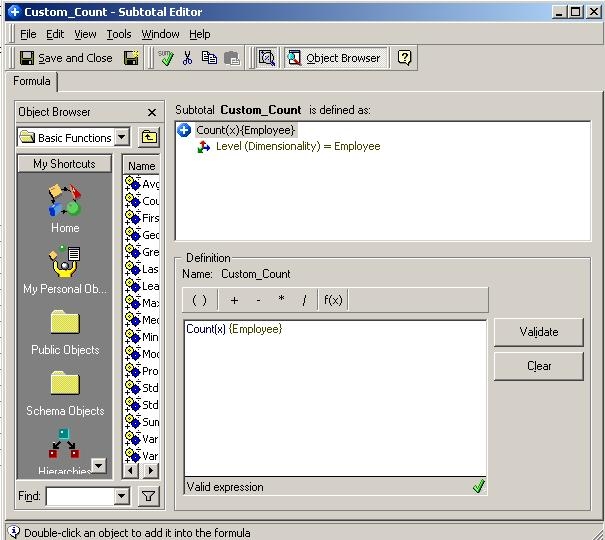
  • Validate the formula. The level will then appear for the count with a default option; remove this default option.
  • Include the attribute(s) in the rows as the dimensionality of the new subtotal:
ka02R000000kYQaQAM_0EM440000002Ft6.jpeg
  • The final subtotal will appear as follows:
ka02R000000kYQaQAM_0EM440000002Ft8.jpeg
  • Apply this subtotal to the metric, Revenue for this example, on the report:
  • In the report, go to the Subtotals menu and Select the advanced settings of the custom_count to the following: By Position Rows: Grand Total; Columns: None; Pages: None
ka02R000000kYQaQAM_0EM440000002Fsu.jpeg

The report will now display Employee Count in the subtotals. All rows are counted, even those without metric values.
 

ka02R000000kYQaQAM_0EM440000002Ft4.gif


Comment

0 comments

Details

Knowledge Article

Published:

June 8, 2017

Last Updated:

June 8, 2017