SYMPTOM:
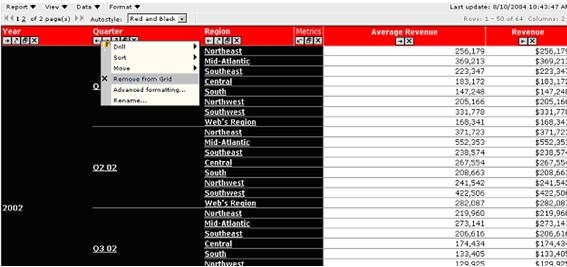
In certain occasions, users attempt to remove an attribute from the Grid View of Strategy Web, as shown below:
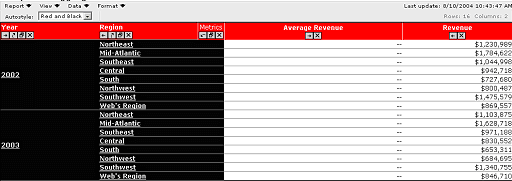
However, one or more metrics on the report are displayed as double dashes (--), as illustrated below:
CAUSE:
This issue occurs because of Dynamic Aggregation. Dynamic Aggregation is a function within OLAP Services that dictates the behavior of reports that are aggregated within the Intelligent Cube. In the example above, when Quarter was removed from the report, the Metric Average Revenue had to be calculated at the Year level. Such an action would require new SQL to be generated, and results to be calculated with data from the Data Warehouse.
However, when users remove an object from the Grid View in Strategy Web, new SQL is not generated, which forces the engine to try to calculate the metric inside of the report's Objects Cube. In this instance, values for most metrics will simply be summed. However, in the example report above, the engine is aware that simply summing the values will produce erroneous results, since the metric calculates average. Therefore, the engine produces temporary null values for this metric. These null values are then replaced by dashes on the report.
ACTION:
To resolve this issue, perform the following steps:
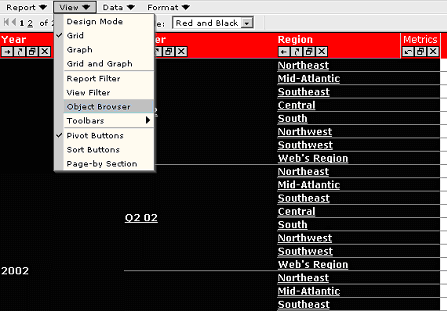
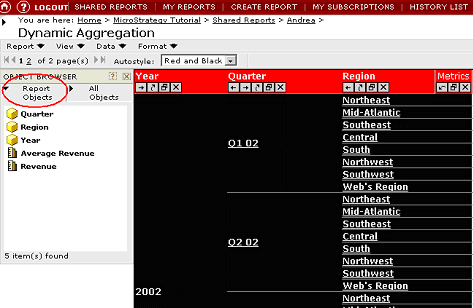
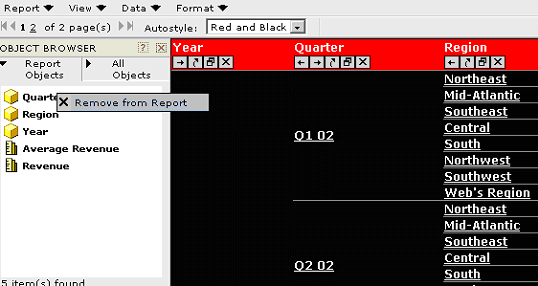
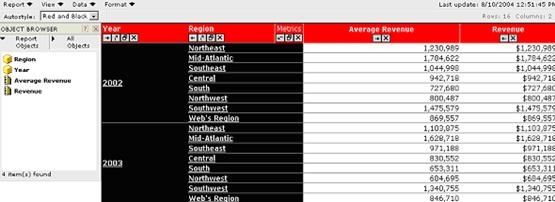
Users will notice that by deleting Quarter from the Object Browser, new SQL was generated against the warehouse and therefore, the values for the metric were correctly calculated for the Year level. The dashes no longer appear:
Note:
In the case of some metrics, such as Average, Count, Mean and others, there is an additional resolution for the dynamic aggregation issue. This solution is presented in the following Strategy Knowledge Base document:
However, this solution does not apply for all types of metrics, i.e., metrics of text type.
Product Packaging Disclaimer
Strategy reserves the right to modify the behavior, capabilities, packaging and licensing for our software products at any time. Contact your Strategy Account Executive to obtain additional information regarding any particular software products.
