EducationSoftwareStrategy.com
StrategyCommunity

Knowledge Base

Product

Community

Knowledge Base

TopicsBrowse ArticlesDeveloper Zone

Product

Download SoftwareProduct DocumentationSecurity Hub

Education

Tutorial VideosSolution GalleryEducation courses

Community

GuidelinesGrandmastersEvents
x_social-icon_white.svglinkedin_social-icon_white.svg
Strategy logoCommunity

© Strategy Inc. All Rights Reserved.

LegalTerms of UsePrivacy Policy
  1. Home
  2. Topics

KB10429: What does the ‘Database Name’ option in the MicroStrategy Narrowcast System Configuration Wizard do?


Community Admin

• Strategy


This knowledge base article explains what the ‘Database Name’ option in the MicroStrategy Narrowcast System Configuration Wizard does.

The 'Database Name' option is located in System Configuration Wizard > System or Subscription Book > Specify Connection Information:
 

ka04W000000OdLmQAK_0EM440000002Bp0.gif

 
The 'Database Name' option allows the Strategy Narrowcast administrator to create the Object Repository or the Subscription Book Repository in any of the databases that exist in the database server pointed to by the Data Source Name (DSN). For example:
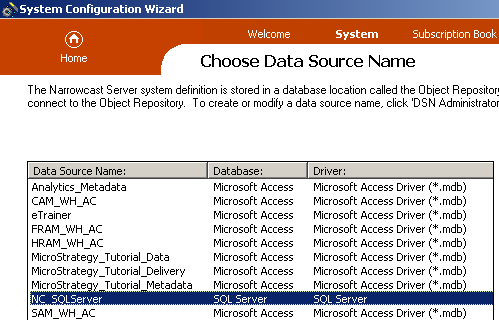
 

  • The administrator selects the DSN 'NC_SQLServer' in the section 'Choose Data Source Name' of the System Configuration Wizard:
ka04W000000OdLmQAK_0EM440000002Bp6.gif
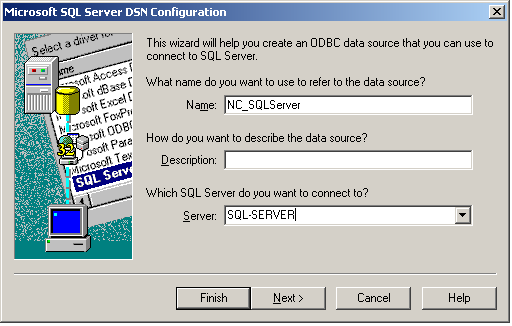
  • This DSN points to a database server named 'SQL-Server':
ka04W000000OdLmQAK_0EM440000002Bp3.gif
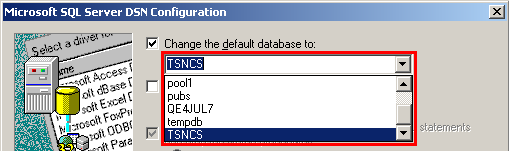
  • The default database for this DSN is 'TSNCS':
ka04W000000OdLmQAK_0EM440000002Bp2.gif
  • The database server contains other databases, as illustrated below:
ka04W000000OdLmQAK_0EM440000002Bp8.gif

If the administrator leaves the field 'Database Name' blank, the Object Repository will be created in the default database for the DSN, 'TSNCS'.
 
If the administrator enters in the field 'Database Name' any of the other databases that exist in the database server, for example 'tempdb,' the Object Repository will be created in that database instead.
 
The following error message appears when the administrator enters in the field 'Database Name' a database name that does not exist in the database server:

ka04W000000OdLmQAK_0EM440000002Bp1.gif

 
Unable to connect to the database. Please make sure the login, password, and database name are correct.
For more information about the option 'Database Name,' refer to the topic 'Why would I specify the database name?' on the Online Help, which is accessed by clicking on the question-mark icon:
 

ka04W000000OdLmQAK_0EM440000002BpA.gif


Comment

0 comments

Details

Knowledge Article

Published:

June 22, 2017

Last Updated:

June 22, 2017