EducationSoftwareStrategy.com
StrategyCommunity

Knowledge Base

Product

Community

Knowledge Base

TopicsBrowse ArticlesDeveloper Zone

Product

Download SoftwareProduct DocumentationSecurity Hub

Education

Tutorial VideosSolution GalleryEducation courses

Community

GuidelinesGrandmastersEvents
x_social-icon_white.svglinkedin_social-icon_white.svg
Strategy logoCommunity

© Strategy Inc. All Rights Reserved.

LegalTerms of UsePrivacy Policy
  1. Home
  2. Topics

KB10459: Incorrect SQL is generated when a report is defined with a non-aggregatable metric containing a transformation and a report filter.


Community Admin

• Strategy


Consider a report that contains a non-aggregatable metric that returns "End-of-hand," with the Last Quarter transformation. Notice that the level of the metric for LastQuarterEndOfHand is set as Time Hierarchy with filtering set to standard, and grouping set to ending(lookup)

SYMPTOM:
Consider a report that contains a non-aggregatable metric that returns "End-of-hand," with the Last Quarter transformation.
Notice that the level of the metric for LastQuarterEndOfHand is set as Time Hierarchy with filtering set to standard, and grouping set to ending(lookup), as shown below:

ka04W000000OhBvQAK_0EM440000002FtD.jpeg

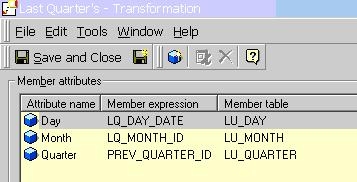
Last Quarter Transformation is defined at the Day, Month, and Quarter levels:
ka04W000000OhBvQAK_0EM440000002Ftk.jpeg

Notice that Q1 01 is not shown with a report filter for "year = 2001":

ka04W000000OhBvQAK_0EM440000002FtF.jpeg

CAUSE:
The SQL forPass5 on this report returns no data because the query is against the table INVENTORY_Q4_2000 while the filter in the subquery is for 2001. The inventory fact tables are partitioned.


Pass5 - Duration: 0:00:00.06
insert into ZZT0F010036PO000 
select a15. AS CATEGORY_ID,
 a13. AS QUARTER_ID,
 3 AS XKYCGT,
 sum(a11.) AS WJXBFS1
from  a11, 
  a12, 
  a13, 
  a14, 
  a15
where a11. = a12. and 
 a12. = a13. and 
 a11. = a14. and 
 a14. = a15.
 and (a15. in (1)
 and a13. in (2001)
 and ((a11.)
 in (select max(c11.)
 from  c11
 where c11. in (2001)
 group by c11.)))
group by a15.,
 a13.


ACTION:
In order to generate the correct SQL for the report, change the level of the metric to lower than that of the report. In this case, it is "Month," as shown below:

ka04W000000OhBvQAK_0EM440000002Ftx.jpeg

Notice the value for Q1 2001 is now visible:

ka04W000000OhBvQAK_0EM440000002Ftl.jpeg

After adjusting the metric level, there are 15 more SQL passes because the transformation is now being calculated at the Month level ( =.).
By including these extra steps, the SQL returns the proper value for last quarter's value and no longer conflicts with the report filter.


Comment

0 comments

Details

Knowledge Article

Published:

May 31, 2017

Last Updated:

May 31, 2017