SYMPTOM
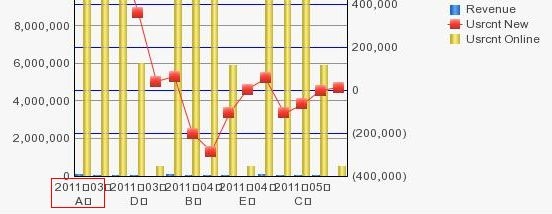
Chinese characters in the data label of a graph report does not display correctly in Strategy Web 9.x and 10.x
The Chinese characters are displayed as "口", as shown in the image below:
CAUSE
The Chinese fonts are not installed in Strategy Intelligence Server machine.
ACTION
Install true type Chinese fonts in Strategy Intelligence Server machine. In a Windows Intelligence Server machine, install fonts by copying fonts files to the fonts path, e.g.C:\WINDOWS\Fonts, in a Unix Intelligence Server machine, follow the steps in the technical note below to install fonts:
Third Party Software Installation:
WARNING:
The third-party product(s) discussed in this technical note is manufactured by vendors independent of Strategy. Strategy makes no warranty, express, implied or otherwise, regarding this product, including its performance or reliability.
Article Reference Number: KB10475 KB10475
