The priority settings located in the Drill Map page in Strategy Developer 9.4.x-10.x affect how the drill path is displayed in a report including context menu drilling and hyperlinks. The drill map is edited through the Strategy Developer Report Editor, as shown below:
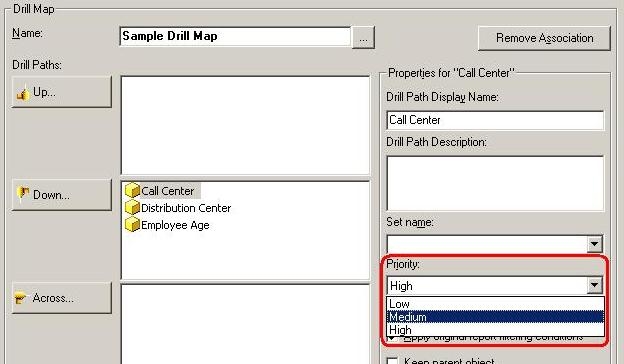
These three priorities of Low, Medium, and High impact drilling options in the following ways:
Low:
The drill path is available as a right-click menu option in a Strategy Developer report. In Strategy Web, this drill path is not available.
Medium:
The drill path is available as a right-click menu option in both Strategy Developer and Web.
High:
In Strategy Developer , this setting creates the default drill path that is accessed when the user double-clicks an object in a report. In Strategy Web, this setting also creates the hyperlink drill that is accessed when the user clicks an object in a report.
