If there are multiple filter conditions in a Filter Definition, Boolean operators (i.e., AND, OR, AND NOT, OR NOT) are used to relate one filter condition to another. In the following scenarios, three filter conditions have been placed in the filter definition area. The filter conditions are related by Boolean operators that rest between each condition. If the middle filter condition is deleted, Strategy Developer will be forced to choose a logical operator to use between the existing filter conditions. The following demonstrates how Strategy Desktop chooses the logical operators when presented with this type of scenario:
Scenario 1: "AND" & "AND NOT"
In the following scenario, three filter conditions are placed in the filter definition area. Separating the filter conditions are the logical operators "AND" & "AND NOT":
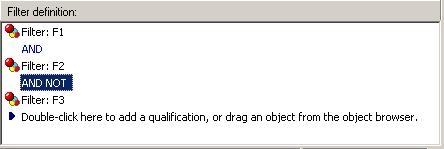
If Filter F2 is deleted, "AND NOT" is removed. In this situation, the "AND" operator is always chosen, as shown below:

Note that it will not matter whether "AND NOT" was located above "AND." The same result will apply:

The result after deleting F2:

Scenario 2: "OR" & "OR NOT"
"OR" and "OR NOT" operators also work the same as "AND" and "AND NOT" operators. It always chooses "OR" over "OR NOT" regardless of its order.
In summary, the operators "AND" & "OR" take precedence when the engine must choose the default operator.
Scenario 3 - "AND" & "OR": "AND" Operator is indented.
Note that when AND & OR are placed together, one of the operators will always be indented. Therefore, deleting the middle condition will remove the indented operator, as shown below:
In this example, the "AND" operator is indented between F1 and F2. The "OR" operator exists between F2 and F3:

If Filter F2 is deleted, the indented "AND" operator is removed. The "OR" operator will take precedence in this case:

Scenario 4 - "AND" & "OR": "OR" Operator is indented
In this scenario, the "AND" operator exists between F1 and F2. The "OR" operator is indented between F2 and F3:

If Filter F2 is deleted, the indented "OR" operator is removed. The "AND" operator will take precedence in this case:

