SYMPTOM:
A report cache is not hit when a certain user executes a cached report. However, a valid report cache exists for this report and can be hit by other users and the Administrator. Further investigation reveals that this issue applies only to certain users, for both prompted and non-prompted reports. The issue occurs in both Strategy Web and through 3-tier Strategy Desktop connections.
CAUSE:
One of the possible causes of this behavior is an Access Control List (ACL) permission assigned to an object used in the report. If a user does not have enough permissions to access an object, such as a metric in a report, different SQL will be generated for this report and that user will never be able to hit an existing cache for the report, nor will a new cache be created.
For example, this user, "UserA," is denied access to the metric "Revenue," as shown in the screen shot below:
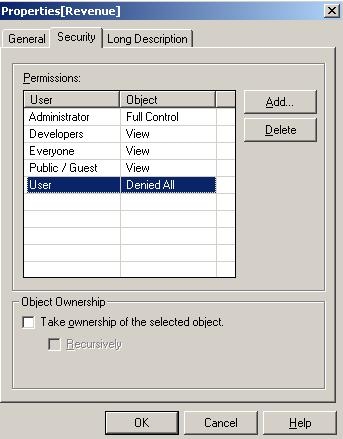
The report includes Category, Revenue and Cost on the template. If the report is executed by a user with full access to all objects in the report, the following SQL will be generated, and the report cache will be hit:
a12.CATEGORY_DESC CATEGORY_DESC,
sum(a11.TOT_DOLLAR_SALES) WJXBFS1,
sum(a11.TOT_COST) WJXBFS2
DU_CATEGORY a12
a12.CATEGORY_DESC
select a11.CATEGORY_ID CATEGORY_ID,
from YR_CATEGORY_ELS a11, where a11.CATEGORY_ID = a12.CATEGORY_ID group by a11.CATEGORY_ID,
However, if this report is executed by "UserA", the following SQL is generated and the cache is not hit:
a12.CATEGORY_DESC CATEGORY_DESC,
sum(a11.TOT_COST) WJXBFS1
DU_CATEGORY a12
a12.CATEGORY_DESC
select a11.CATEGORY_ID CATEGORY_ID,
from YR_CATEGORY_ELS a11, where a11.CATEGORY_ID = a12.CATEGORY_ID group by a11.CATEGORY_ID,
This behavior is by design for non-OLAP Reports. When the report has objects for which the user does not have access, that object is taken out from the report definition. This leads to the report being marked as dirty. Once a report is marked as dirty, it prohibits the cache manager from either using or creating new caches.
In the case of an OLAP Report, the SQL will still include the metric object, but the metric's values will not be displayed to end users that do not have access. This logic allows the OLAP Report to hit cache.
ACTION:
There are two ways to resolve this issue:
