EducationSoftwareStrategy.com
StrategyCommunity

Knowledge Base

Product

Community

Knowledge Base

TopicsBrowse ArticlesDeveloper Zone

Product

Download SoftwareProduct DocumentationSecurity Hub

Education

Tutorial VideosSolution GalleryEducation courses

Community

GuidelinesGrandmastersEvents
x_social-icon_white.svglinkedin_social-icon_white.svg
Strategy logoCommunity

© Strategy Inc. All Rights Reserved.

LegalTerms of UsePrivacy Policy
  1. Home
  2. Topics

KB10613: What events are logged into the Microsoft Windows event viewer during a startup or shutdown sequence of MicroStrategy Intelligence Server?


Community Admin

• Strategy


Many tools exist to monitor the Microsoft Windows event log and provide alerts to administrators for specific events.
 
The following events are logged by the Strategy Intelligence Server, respectively, for a normal startup sequence, a normal shutdown, and an unexpected shutdown:
 
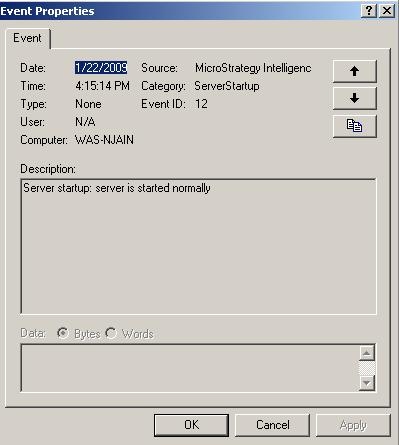
Normal startup (logged into application log):
ka04W000000OhhXQAS_0EM440000002Bnx.jpeg

Source: Strategy Intelligence Server
Category: ServerStartup
Event ID: 12
Description: Server startup: server is started normally
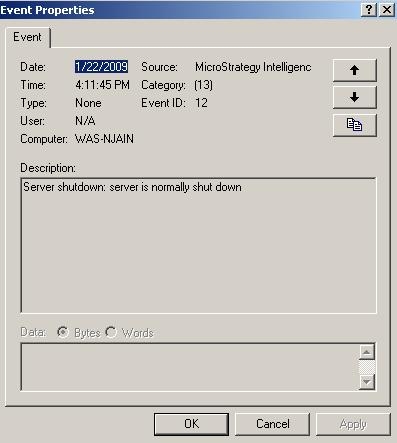
Normal shutdown (logged into application log):
ka04W000000OhhXQAS_0EM440000002Bnz.jpeg

Source: Strategy Intelligence Server
Category: (13)
Event ID: 12
Description: Server shutdown: server is normally shut down
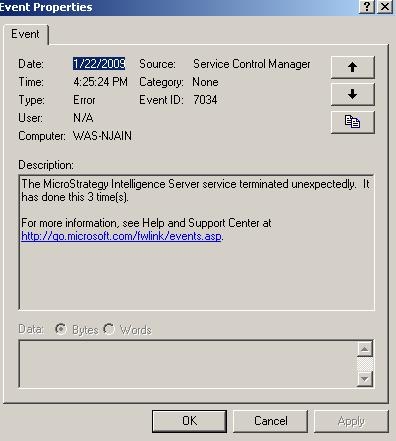
Unexpected shutdown (logged into system log - may be due to an unexpected exception, memory depletion, or other fatal error condition):
ka04W000000OhhXQAS_0EM440000002Bnv.jpeg

Source: Service Control Manager
Category: None
Event ID: 7034
Description: The Strategy Intelligence Server service terminated unexpectedly. It has done this 3 time(s).
For more information, see Help and Support Center at http://go.microsoft.com/fwlink/events.asp.
The following are just a few possible uses for these events. Administrators may find other applications.

  • Automatic alerts to administrators when the Strategy Intelligence Server shuts down unexpectedly.
  • Recording the startup and shutdown times of the Strategy Intelligence Server to monitor system uptime.
  • Verification that scheduled restart sequences are running as expected.

 
A useful technique to simulate an unexpected shutdown for testing purposes can be achieved by performing the following steps:

  1. Open the Windows command prompt.
  2. Navigate to the drive and folder containing the Intelligence Server executable:
    U:\>c:
    C:\>cd \program files\Strategy\intelligence server
  3. Execute the command "kill mstrsvr.exe":
    C:\Program Files\Strategy\Intelligence Server>kill mstrsvr.exe
    process #3156 killed

Comment

0 comments

Details

Knowledge Article

Published:

April 22, 2017

Last Updated:

April 22, 2017