SYMPTOM:
When a project user attempts to log report statistics, the following error appears in the DSS Errors log:
2014-08-17 11:01:22.187-08:00 Execute Query failed. Error type: Odbc error. Odbc operation attempted: SQLExecDirect. ORA-01401: inserted value too large for column
2014-08-17 11:01:22.187-08:00 Connection String: DSN=DSNDW2_Metadata;UID=dssadmin;DBQ=DBQDW2_METADATA.FOXINC.COM;DBA=W;APA=T
;EXC=F;FEN=T;QTO=T;FRC=10;FDL=10;LOB=T;RST=T;GDE=F;FRL=F;BAM=IfAllSuccessful;
MTS=F;MDI=F;CSR=F;FWC=F;PFC=10;TLO=0;. SQL Statement: insert into IS_REPORT_STATS values (5796, `13E0223F4B5B163B8FA9B48CCD866CDD`, `BA02CFDA44EB47DD7F7BE6AEA1BADF32`, `FFEPLMSDB03Q`, `FFEPLMSDB03Q`, `8A77CE7140BD1E42FFDF43B50CF25CBC`, `54F3D26011D2896560009A8E67019608`, `F37035B14ECEBED89978B78E24F7EE34`, `373CF1774B90D804EEE145A59A563B69`, 1, `DF4FC2D247E71FC317E637824D22D0B8`, 1, -1, `B2DCE6534E457CD5020F6BAFF6AF7CB9`, `DB LOGIN USER ID WHICH IS LONGER THAN 32`, 0, To_Date(`17-08-14 11:01:17`, `DD-MM-YY HH24:MI:SS`), 0, 0, 625, 1, 3, 0, 0, 0, 0, 0, 0, 0, 0, 1, 999, 0, 1,SYSDATE)
CAUSE:
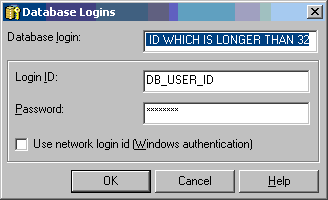
The maximum length of the DBUSERID column in the IS_REPORT_STATS table is 32. This column is populated from the Database Login name which is located in the Database Instance. When logging report statistics, the database login name is inserted into the DBUSERID column of IS_REPORT_STATS. If the name exceeds 32 characters, then the error above will appear in the DSS Errors log:
ACTION:
Change the Default Database Login Name in the Database Connections screen to shorter than, or equal to, 32 characters.
To do this, perform the following steps:
