EducationSoftwareStrategy.com
StrategyCommunity

Knowledge Base

Product

Community

Knowledge Base

TopicsBrowse ArticlesDeveloper Zone

Product

Download SoftwareProduct DocumentationSecurity Hub

Education

Tutorial VideosSolution GalleryEducation courses

Community

GuidelinesGrandmastersEvents
x_social-icon_white.svglinkedin_social-icon_white.svg
Strategy logoCommunity

© Strategy Inc. All Rights Reserved.

LegalTerms of UsePrivacy Policy
  1. Home
  2. Topics

KB10625: Fonts do not appear correctly in Report Services documents when executed in MicroStrategy Web 9.x.


Community Admin

• Strategy


Fonts do not appear correctly in Report Services documents when executed in MicroStrategy Web 9.x.

SYMPTOM:
 
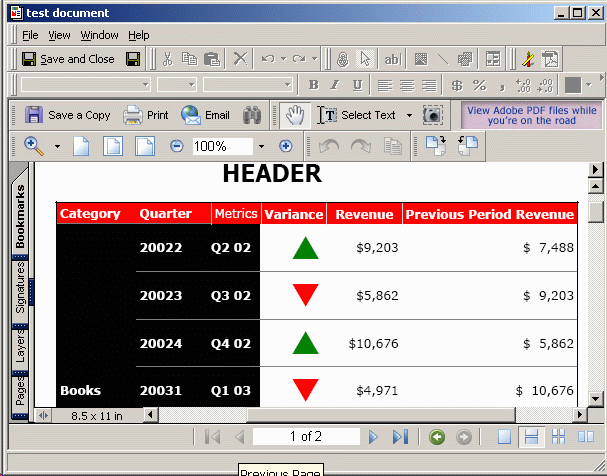
A user designs a Report Services document using special fonts. In the following document, for instance, a threshold is defined on a metric using the Wingdings 3 font to indicate an upward or downward trend for a particular category.
 
Running the document in Strategy Desktop produces the desired display, but in Strategy Web, the Wingdings characters revert to the default Courier font:
Strategy Desktop output:
 

ka04W000000Oh5mQAC_0EM44000000291Y.gif

 
Strategy Web output:
 

ka04W000000Oh5mQAC_0EM44000000291h.gif

 
CAUSE:
 
Strategy Technical Support has observed this behavior after the following sequence of events:
 

  1. The document designer installs the Wingdings font on the Strategy Intelligence Server and Web Server machines.
  2. The designer creates the document in Strategy Desktop on the Strategy Intelligence Server machine.

Many applications do not automatically detect the installation or deinstallation of fonts. These applications must be relaunched for new fonts to be recognized.
 
It has also been observed where the Strategy Intelligence Server fails to recognize fonts that are installed on the machine during PDF generation simply because the server had not been restarted.
 
ACTION:
 
In these cases, restarting the Strategy Intelligence Server has been sufficient to produce the correct appearance in the PDF results.
 
If this does not resolve the issue, contact Strategy Technical Support.


Comment

0 comments

Details

Knowledge Article

Published:

June 5, 2017

Last Updated:

June 5, 2017