SYMPTOM:
Users have an attribute form whose value is obtained by using an ApplySimple function on the values of a specific column in the warehouse. The datatype for that column is numeric and contains a value such as 200424. The first four digits in that example represent the year, and the last two represent the week.
The format displayed on the report should be yyyy-ww (e.g., 2004-24). The following ApplySimple function is used:
ApplySimple(`#0 + `-` + #1`; SubStr(Date; 1,0; 4,0); SubStr(Date; 5,0; 2,0))
When users create a prompt on the attribute and execute it in Web, the values displayed in the 'Available' and 'Selected' boxes are displayed correctly, as shown below:
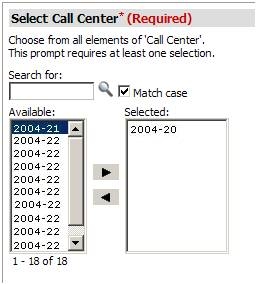
However, when a report is reprompted, the prompt page is returned, as follows:
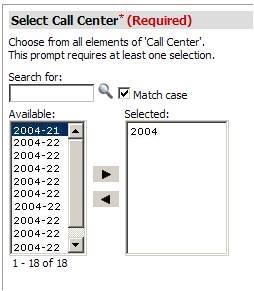
Note that when re-executing the report, the results displayed are correct and this is merely a visualization issue.
CAUSE:
The cause of this issue is due to the Format type of the attribute form containing the ApplySimple statement. If the attribute form is defined as a Number, as illustrated below, the error occurs:
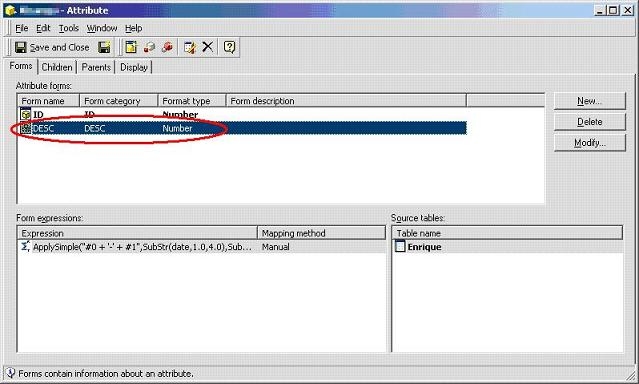
However, note that Strategy does issue two warning messages prior to allowing users to save the attribute form as a Number:

As well as:

ACTION:
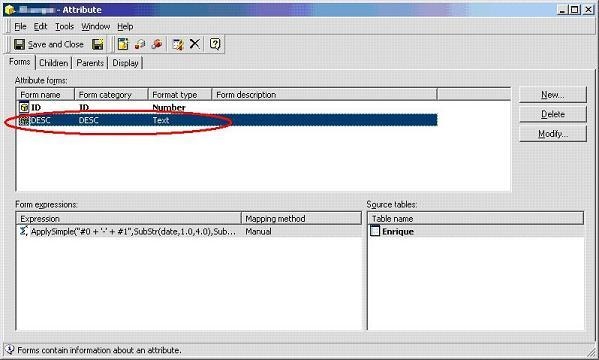
In order to resolve this issue, edit the attribute form, and change the format type back to 'Text,' as shown below. Users must then update the schema before running the report again:
WORKAROUND:
Alternatively, if users decide to keep the Format type of the attribute form as a Number, they can use a different XSL for the prompt. If users must select multiple values, they may want to select one of the following:
