EducationSoftwareStrategy.com
StrategyCommunity

Knowledge Base

Product

Community

Knowledge Base

TopicsBrowse ArticlesDeveloper Zone

Product

Download SoftwareProduct DocumentationSecurity Hub

Education

Tutorial VideosSolution GalleryEducation courses

Community

GuidelinesGrandmastersEvents
x_social-icon_white.svglinkedin_social-icon_white.svg
Strategy logoCommunity

© Strategy Inc. All Rights Reserved.

LegalTerms of UsePrivacy Policy
  1. Home
  2. Topics

KB10695: In MicroStrategy Architect 9.x -10.x, how to create an attribute by extracting date and time elements from a datetime column in a SQL Server warehouse


Stefan Zepeda

Salesforce Solutions Architect • Strategy


In MicroStrategy Architect 9.x -10.x, how to create an attribute by extracting date and time elements from a datetime column in a SQL Server warehouse

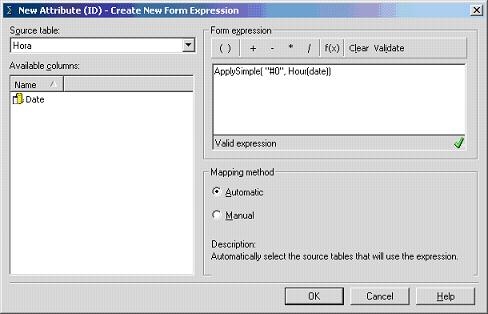
If using a datetime column in SQL Server, various elements can be extracted such as the hour, month or year. The example in this document explains how to extract the hour using the following ApplySimple statement:
ApplySimple("#0", Hour(date))
The attribute definition should now appear as follows:
ka02R000000kcLNQAY_0EM440000002Fpi.jpeg

 
The following data may also be extracted from a datetime column by replacing the 'Hour' in the ApplySimple, with any of the following:

  • CurrentDate
  • CurrentDateTime
  • CurrentTime
  • DayofMonth
  • DayofWeek
  • DayofYear
  • Hour
  • Millisecond
  • Minute
  • Month
  • Quarter
  • Second
  • Week
  • Year

Comment

0 comments

Details

Knowledge Article

Published:

May 9, 2017

Last Updated:

May 9, 2017