SYMPTOM:
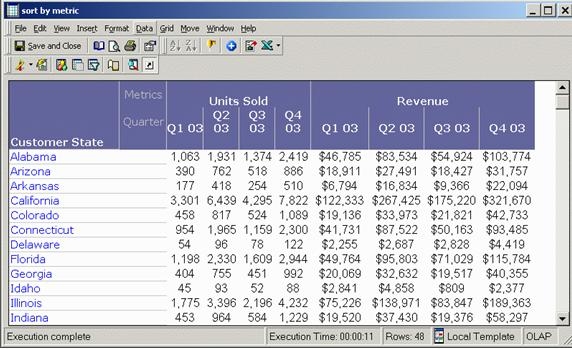
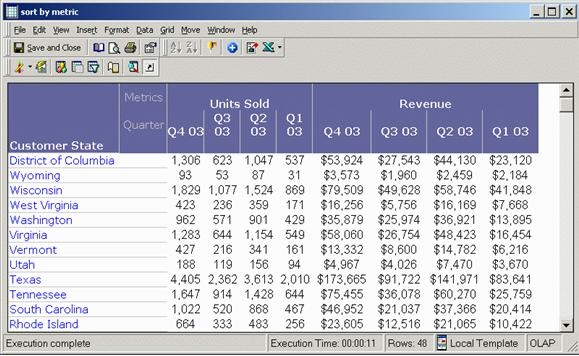
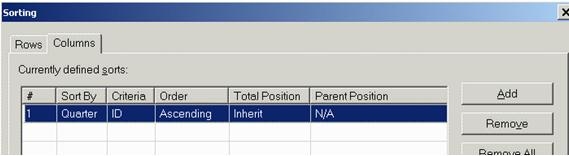
Users cannot perform an Advanced Sort by a Metric Row without breaking the order of metrics. In the example below, created using the Strategy Tutorial project, the attribute Quarter is placed on the report column beneath two metrics. By default, the columns are sorted by metric, and Ascending by quarter within each metric. If an Advanced Sort is added to the report, and Quarter sort is set to Descending, the report column order is altered.
Perform the following steps to reproduce this issue:
CAUSE:
The order of the metrics is broken and the columns are no longer sorted by metric, and by quarter within each metric. Removing the Advanced Sort restores the previous display but the attributes default sort order is applied (Ascending). There is no functionality presently available to change the attribute sort within the report.
This is a known issue logged with Strategy.
ACTION:
Strategy will continue to investigate and post updates as soon as they are available.
WORKAROUND:
To workaround this issue, change the default sort at the attribute level. Note that this could impact the display of any report that uses this attribute:
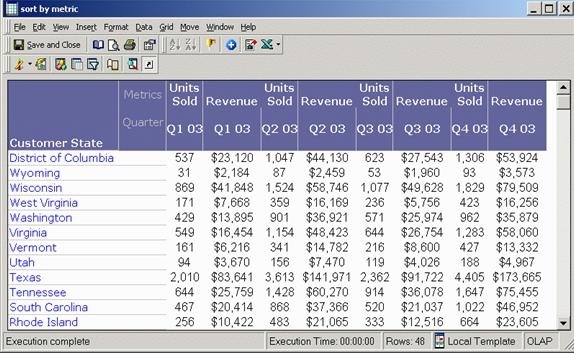
The report column is now sorted by metric, and within each metric, 'Quarter' is displayed in an ascending sort order: