EducationSoftwareStrategy.com
StrategyCommunity

Knowledge Base

Product

Community

Knowledge Base

TopicsBrowse ArticlesDeveloper Zone

Product

Download SoftwareProduct DocumentationSecurity Hub

Education

Tutorial VideosSolution GalleryEducation courses

Community

GuidelinesGrandmastersEvents
x_social-icon_white.svglinkedin_social-icon_white.svg
Strategy logoCommunity

© Strategy Inc. All Rights Reserved.

LegalTerms of UsePrivacy Policy
  1. Home
  2. Topics

KB10821: The "Wrap Text" setting doesn't function correctly in MicroStrategy Web


Community Admin

• Strategy


The "Wrap Text" setting doesn't function correctly in MicroStrategy Web 9.4.x-10.x

SYMPTOM:
Users notice after unchecking the "Wrap Text" setting in Strategy Web 9.4.x-10.x that the text is still wrapped.
Follow the steps below to reproduce this issue using the Strategy Tutorial project:
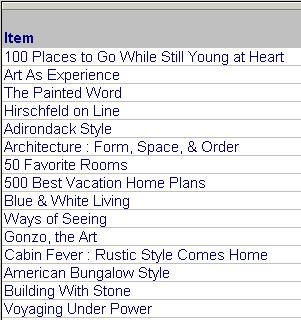
  • Create the following report in Strategy Developer:
ka04W000000Of3lQAC_0EM44000000291P.jpeg
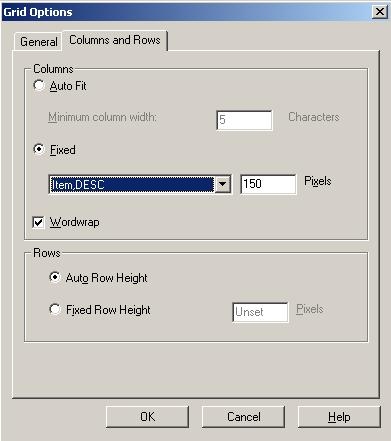
  • Go to Grid menu > Options and change 'Auto column widths' to 'Fixed column widths.' Then, decrease the pixel number for Item, as shown below:
ka04W000000Of3lQAC_0EM44000000291S.jpeg
  • Click OK and notice the Item element is wrapped:
ka04W000000Of3lQAC_0EM44000000291O.jpeg
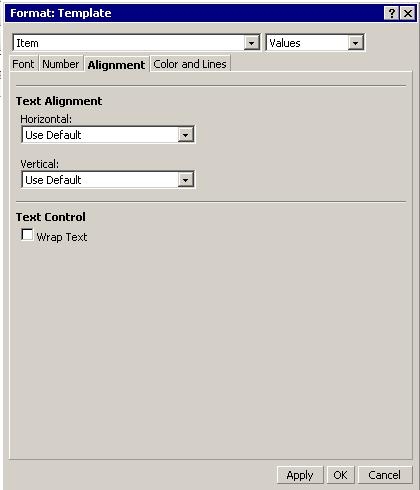
  • Go to Strategy Web and execute the report above. Go to Advance Formatting > Alignment, uncheck "Wrap Text," and then click 'Apply,' as shown below:
ka04W000000Of3lQAC_0EM44000000291M.jpeg

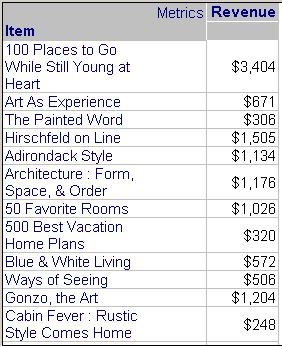
Users will notice now that the text is still wrapped.
 
CAUSE:
Word wrapping is a Cascading Style Sheet (CSS) feature that is implemented by the browser itself. The implementation in Internet Explorer browsers is currently designed so that the width of the column will take precedence over the Wrap Text option. This is why there are unexpected results when using Internet Explorer.
 
Moreover, some browsers, such as Mozilla Firefox, have not implemented this CSS feature so headers will never wrap regardless of the formatting selection.
 
ACTION:
This formatting behavior is particular to the browser used and is currently a limitation of the 3rd party browser itself.
 
The Wrap Text option remains part of the advanced formatting dialogue for use with additional interfaces, such as exporting to Excel and PDF.
 
Third Party Software Installation
WARNING:
The third-party product(s) discussed in this technical note is manufactured by vendors independent of Strategy. Strategy makes no warranty, express, implied or otherwise, regarding this product, including its performance or reliability.


Comment

0 comments

Details

Knowledge Article

Published:

June 12, 2017

Last Updated:

June 12, 2017