EducationSoftwareStrategy.com
StrategyCommunity

Knowledge Base

Product

Community

Knowledge Base

TopicsBrowse ArticlesDeveloper Zone

Product

Download SoftwareProduct DocumentationSecurity Hub

Education

Tutorial VideosSolution GalleryEducation courses

Community

GuidelinesGrandmastersEvents
x_social-icon_white.svglinkedin_social-icon_white.svg
Strategy logoCommunity

© Strategy Inc. All Rights Reserved.

LegalTerms of UsePrivacy Policy
  1. Home
  2. Topics

KB10841: How to sort a MicroStrategy Report Services 9.x document by a metric which is not displayed on the document


Stefan Zepeda

Salesforce Solutions Architect • Strategy


How to sort a MicroStrategy Report Services 9.x document by a metric which is not displayed on the document

When executing a report in Strategy 9.x, users are unable to sort a report by a metric which is not on the report, regardless of whether it can be found in the Report Objects or not.
 
However, if using Strategy Report Services 9.x, the following steps can be implemented to achieve this functionality:
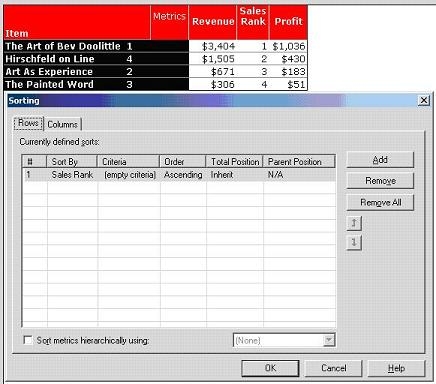
 

  • Create a report in Strategy Developer or Web 9.x. This report is sorted by Sales Rank in ascending order:
ka02R000000kX05QAE_0EM440000002Fmw.jpeg
  • Create a new Report Services document, and add the report created in Step 1.
     
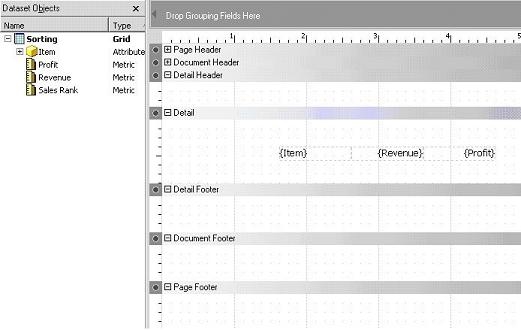
  • Add the Dataset Objects to the report into the 'Detail' section, as shown below:
ka02R000000kX05QAE_0EM440000002Fn1.jpeg
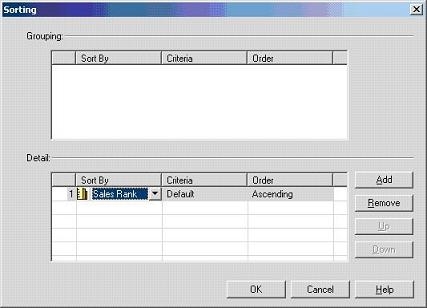
  • Go to Data > Sorting and sort by Sales Rank, as shown below:
ka02R000000kX05QAE_0EM440000002Fmy.jpeg
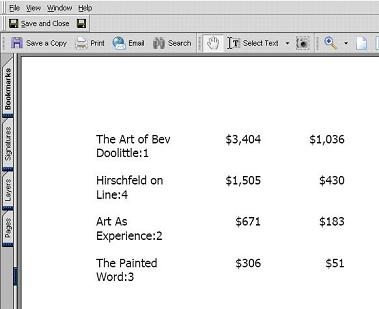
  • Execute the document and the following report will be generated:
ka02R000000kX05QAE_0EM440000002Fn7.jpeg

Note that the sorting order is the same as the report with the metric in the Report Objects window. Furthermore, the design of the document may be modified so that it resembles the grid report closely.


Comment

0 comments

Details

Knowledge Article

Published:

April 12, 2017

Last Updated:

April 12, 2017