EducationSoftwareStrategy.com
StrategyCommunity

Knowledge Base

Product

Community

Knowledge Base

TopicsBrowse ArticlesDeveloper Zone

Product

Download SoftwareProduct DocumentationSecurity Hub

Education

Tutorial VideosSolution GalleryEducation courses

Community

GuidelinesGrandmastersEvents
x_social-icon_white.svglinkedin_social-icon_white.svg
Strategy logoCommunity

© Strategy Inc. All Rights Reserved.

LegalTerms of UsePrivacy Policy
  1. Home
  2. Topics

KB10887: How to turn on the Verbose Garbage collection logging for the Java Virtual Machine


Community Admin

• Strategy


Follow these steps to enable verbose garbace collect (GC) logging:

  • Add -verbose:gc to the OtherOptions value in the following location in the registry:
    
    HKEY_LOCAL_MACHINE\SOFTWARE\Strategy\JNI Bridge\Configuration\JVM Options

    OtherOptions is designed to be a semicolon-separated list of JVM start-up options. Therefore, if there is more than one option, the value would appear like "
    -Xrs;-verbose:gc
    ".
  • Restart IIS.
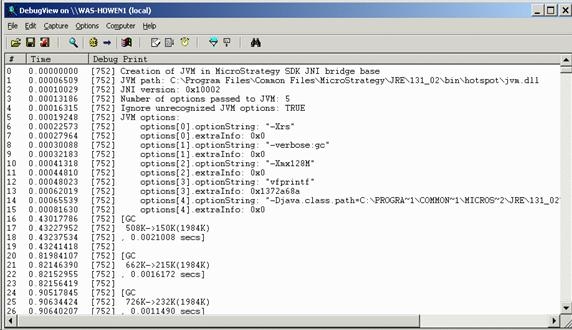
  • Open a debug monitor application, such as DebugView. DebugView is an application that allows users to monitor debug output on the local system, or any computer on the network that can be reached via TCP/IP. It is capable of displaying both kernel-mode and Win32 debug output, so a debugger isn't necessary to catch the debug output the applications or device drivers generate, nor do the applications or drivers require modification to use non-standard debug output APIs. The Strategy components have configured the JVM to send -verbose output to the debug monitor.
  • Connect to Strategy Web and begin using the web application. -verbose:gc output should appear in the debug monitor when garbage collections occur. If it does not, ensure that the user context under which the virtual directory is running has permissions to output to the debug monitor.
ka04W00000148AVQAY_0EM44000000291N.jpeg

 
Registry Modification:
WARNING:
Modifying registry values incorrectly may cause serious, system-wide problems that may require the re-installation of Microsoft Windows NT. Any edit of the registry is done at the user`s own risk. Since these are user-initiated changes, they are not covered by any Strategy warranty. If using Microsoft Windows NT, the user should backup the registry and/or update an Emergency Repair Disk (ERD) prior to alterations.
 
Third Party Software Installation:
WARNING:
The third-party product(s) discussed in this technical note is manufactured by vendors independent of Strategy. Strategy makes no warranty, express, implied or otherwise, regarding this product, including its performance or reliability.


Comment

0 comments

Details

Knowledge Article

Published:

June 12, 2017

Last Updated:

September 30, 2021