EducationSoftwareStrategy.com
StrategyCommunity

Knowledge Base

Product

Community

Knowledge Base

TopicsBrowse ArticlesDeveloper Zone

Product

Download SoftwareProduct DocumentationSecurity Hub

Education

Tutorial VideosSolution GalleryEducation courses

Community

GuidelinesGrandmastersEvents
x_social-icon_white.svglinkedin_social-icon_white.svg
Strategy logoCommunity

© Strategy Inc. All Rights Reserved.

LegalTerms of UsePrivacy Policy
  1. Home
  2. Topics

KB10933: What is the "RAM swap multiplier" setting in MicroStrategy Intelligence Server 9.x?


Community Admin

• Strategy


This Knowledge Base document explains what the "RAM swap multiplier" setting is in MicroStrategy Intelligence Server 9.x.

In Strategy Intelligence Server 9.x, when Maximum RAM usage reserved for report caches is low and there is a high concurrency of cache requests, some of the reports may be re-executed against the warehouse even though the caches for the reports exist on disk. The following sequence describes what occurs on the Strategy Intelligence Server side:

  1. Maximum RAM usage setting for report caches, accessible from Project Configuration > Caching > Reports (general), is set low and is filled with report caches.
  2. Two requests, A and B, are submitted to the Intelligence Server. Request A matches Cache 1 and request B matches Cache 2. Both Cache 1 and 2 are stored on disk but not in the memory of the Intelligence Server machine.
  3. Before caches can be used to satisfy report requests, they must be swapped into Intelligence Server memory. If the Intelligence Server memory doesn't have enough free space for swapped-in caches, the least recently used caches in memory are swapped out. The least recently used cache(s) are unloaded to disk to make room for Cache 1. This is part of the swapping process for Cache 1.
  4. Intelligence Server locates free memory space created in Step 3 and loads Cache 2 from disk to memory.
  5. Intelligence Server attempts to load Cache 1 to finish the swapping process and finds no free space in memory. The swapping attempt for Cache 1 fails.
  6. After the first swapping attempt fails, Intelligence Server re-executes the report for request A and updates Cache 1 with execution results.

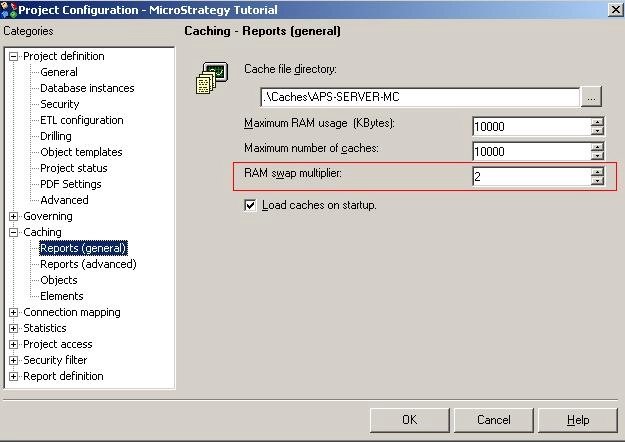
The "RAM swap multiplier" setting is designed to reduce the possibility of the above-described scenario. It is accessible from Project Configuration > Caching > Reports (general), as shown below:
ka04W000001MKvVQAW_0EM440000002BnP.jpeg

The "RAM swap multiplier" setting controls how many times more memory can be swapped out of memory to disk when the RAM reserved for report caches is full and a cache must be swapped into memory from disk. The value of the setting can vary from integer 1 to 99 and its default is 2. If set to the default, a cache of 20K requiring a swap will cause 40K (20K * 2) of the oldest used cache(s) to be swapped out of memory.


Comment

0 comments

Details

Knowledge Article

Published:

April 4, 2017

Last Updated:

April 4, 2017