SYMPTOM:
The following message appears in the DELog/System Messages when the Information Source Module (ISM) Level Trace is enabled:
CAUSE:
This message is not a service execution error, but a message indicating that the QRAChunkSize has not been defined. The QRAChunkSize setting controls the size of the XML sent to the Document Formatting Module (DFM). If the QRAChunkSize has not been defined, then Strategy Narrowcast Server defaults to 1000 rows.
Defining the QRAChunkSize setting is not required in most scenarios and should be changed only when appropriate. An example of a scenario of when and why the QRAChunkSize setting should be enabled is discussed in the following Strategy Knowledge Base document:
ACTION:
To enable the QRAChunkSize setting so the message no longer appears, users should follow the steps below:
Note: There may be a cost with regards to performance when using larger sizes. On clustered Execution Engines, the change should be made on each Execution Engine machine.
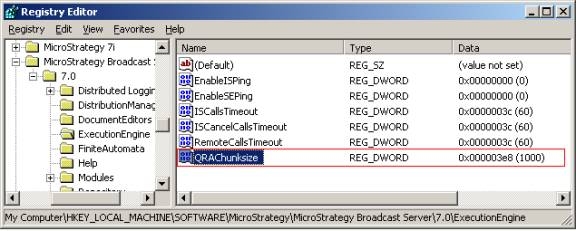
Registry Modification:
Modifying registry values incorrectly may cause serious, system-wide problems that may require the re-installation of Microsoft Windows NT. Any edit of the registry is done at the user's own risk. Since these are user-initiated changes, they are not covered by any Strategy warranty. If using Microsoft Windows NT, the user should backup the registry and/or update an Emergency Repair Disk (ERD) prior to alterations.
