EducationSoftwareStrategy.com
StrategyCommunity

Knowledge Base

Product

Community

Knowledge Base

TopicsBrowse ArticlesDeveloper Zone

Product

Download SoftwareProduct DocumentationSecurity Hub

Education

Tutorial VideosSolution GalleryEducation courses

Community

GuidelinesGrandmastersEvents
x_social-icon_white.svglinkedin_social-icon_white.svg
Strategy logoCommunity

© Strategy Inc. All Rights Reserved.

LegalTerms of UsePrivacy Policy
  1. Home
  2. Topics

KB10980: In MicroStrategy 9.x and 10.x, how can users create ad-hoc grid reports within a MicroStrategy Report Services document?


Stefan Zepeda

Salesforce Solutions Architect • Strategy


KB10980: In MicroStrategy 9.x and 10.x, how can users create ad-hoc grid reports within a MicroStrategy Report Services document?

Once users have a document that contains the main dataset, they can create ad-hoc grid reports using objects from the main dataset. Consider the following example:
 
STEPS TO IMPLEMENT:
In the document illustrated below, a dataset report has been added and is named "Test." Once this dataset has been defined, users have the ability to create a grid report through the document editor.
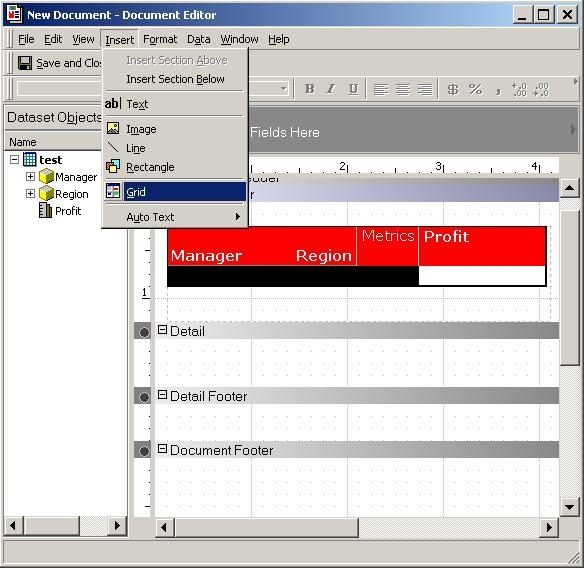
 

  • Click on the "Insert" menu and select "Grid" while in the document editor.
  • Users now get a selector to draw a blank grid in the required sections of the document.
    Note: It is not possible to draw a grid in the "detail" section of the document, just as it is not possible to drag a dataset into the "detail" section of the document
ka02R000000kYAzQAM_0EM440000002Fp3.jpeg
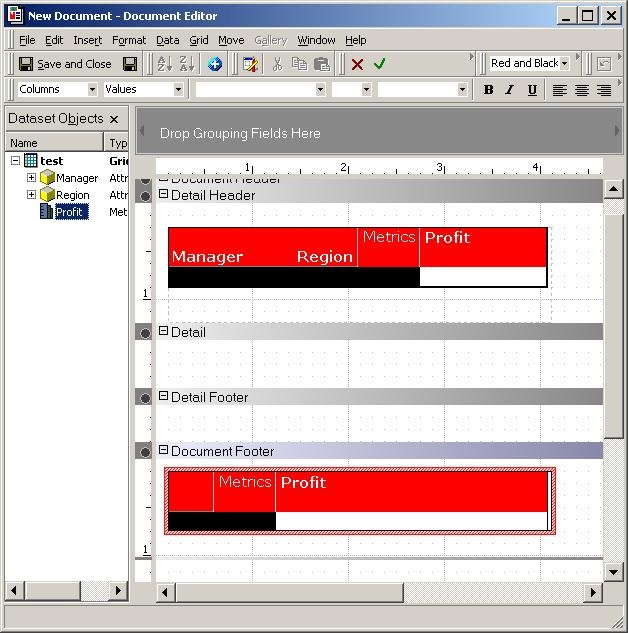
  • Once a blank grid has been added to the document, users can drag and drop attributes and metrics from the main dataset onto the blank grid. In the document below, the metric "Profit" has been dragged and dropped onto the grid:
ka02R000000kYAzQAM_0EM440000002Foz.jpeg
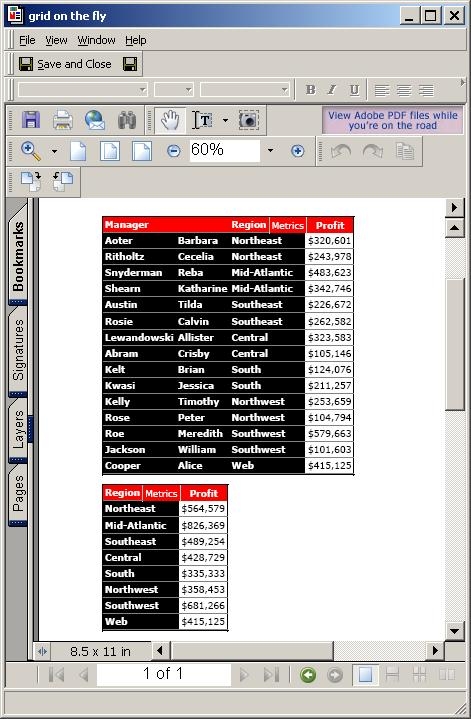
  • Once all the desired attributes and metrics have been added to the grid, the document can be executed:
ka02R000000kYAzQAM_0EM440000002Fp0.jpeg

Comment

0 comments

Details

Knowledge Article

Published:

June 9, 2017

Last Updated:

June 9, 2017