EducationSoftwareStrategy.com
StrategyCommunity

Knowledge Base

Product

Community

Knowledge Base

TopicsBrowse ArticlesDeveloper Zone

Product

Download SoftwareProduct DocumentationSecurity Hub

Education

Tutorial VideosSolution GalleryEducation courses

Community

GuidelinesGrandmastersEvents
x_social-icon_white.svglinkedin_social-icon_white.svg
Strategy logoCommunity

© Strategy Inc. All Rights Reserved.

LegalTerms of UsePrivacy Policy
  1. Home
  2. Topics

KB11040: An invalid data type is used to create the warehouse column when generating a datamart table through running a MicroStrategy Report.


Community Admin

• Strategy


This article notes how the column alias controls the datatype for tables in the database

SYMPTOM:
 
When creating a data mart table from a report, an incorrect data type is used to create a column for an attribute on the report.
 
CAUSE:
 
This issue occurs because an incorrect data type is specified for the column alias of the attribute form referenced in the SQL.
 
ACTION:
 
To resolve this issue, perform the following steps:
 

  • Open the attribute in the Attribute Editor:
ka04W000000OcAEQA0_0EM440000002FoV.jpeg
  • Select the necessary attribute form and select Modify, as below:
ka04W000000OcAEQA0_0EM440000002Fof.jpeg
  • Select the Column Alias tab:
ka04W000000OcAEQA0_0EM440000002FoX.jpeg
  • Click Modify:
ka04W000000OcAEQA0_0EM440000002FoZ.jpeg
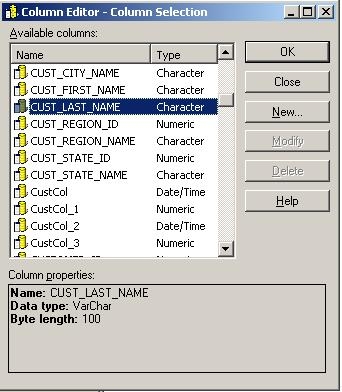
  • Select the appropriate column from the table, as shown below, or create a new column alias that is appropriate for the data:
ka04W000000OcAEQA0_0EM440000002FoW.jpeg
  • Click OK and then Update Schema:
ka04W000000OcAEQA0_0EM440000002Foh.jpeg

Comment

0 comments

Details

Knowledge Article

Published:

May 25, 2017

Last Updated:

May 25, 2017