The following example demonstrates the use of the VLDB property "Compute Non-Agg before/after OLAP functions (e.g. Rank) calculated in Analytical Engine" found under the 'Metrics' folder in the list of VLDB properties. This property exists at the Database instance, Report and Metric levels:
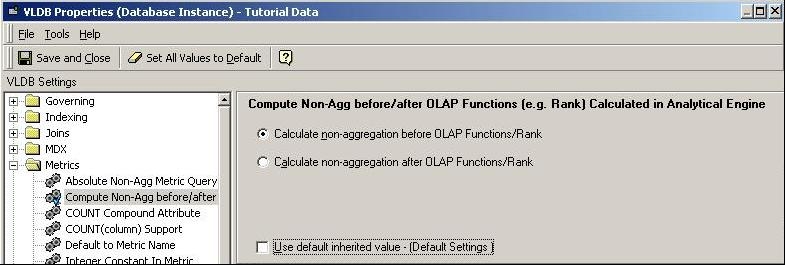
In contrast to what the name may imply, the VLDB setting is not related to the non-aggregating functions (such as Log(), Max(), Min()) but instead to non-aggregating metrics. A non-aggregating metric is a metric for which it does make sense to aggregate the values for calculation; Inventory metrics that calculate the beginning or ending values of inventory over a period of time are the most prominent examples. Non-aggregatable metrics are defined in Strategy using the metric dimensionality Grouping = Beginning or Ending (fact or lookup) settings.
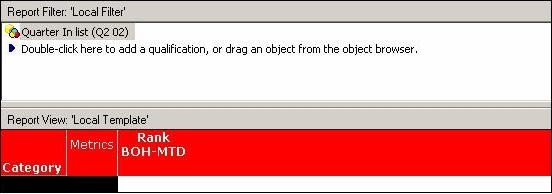
Consider the following reporting example where the report is defined by slightly altering the existing objects within the Strategy Tutorial project:
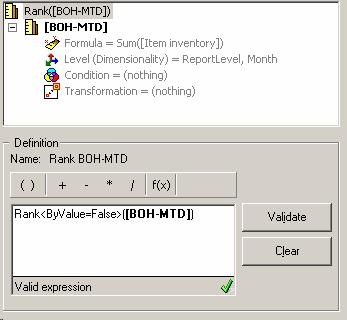
A new metric, Rank(BOH-MTD), is created by applying the Rank() function on the existing 'BOH-MTD' (Beginning On Hand-Month To Date) metric within the project. The following is the definition for this new metric. Note that the Sort By Value property of Rank is set to 'False.' The original BOH-MTD metric definition is depicted along with this metric as follows:
This report definition would result in the following SQL and the following intermediate and final result sets:
Certified: MD, WH, ST | Certified: MD, WH, ST |
select distinct a11.PBTNAME PBTNAME select a11.MONTH_ID MONTH_ID, create table ZZTQ6003SWQNB000( insert into ZZTQ6003SWQNB000 values (200204, 1, 1273, .166666666666667) create table ZZTQ6003SWQMB001 nologging as select distinct pa2.CATEGORY_ID CATEGORY_ID, | |
Looking at the intermediate result set, one can see that the percent rank is calculated across all 12 entries. Thus, the value 1273 is the second largest value amongst the 12 entries making its percent rank 2/12*100=16.67%. Similarly, the value 11809 is the 8th largest value amongst the 12 entries making its percent rank 8/12*100=66.67%. Also note that the SQL qualifies on the first month of the quarter due to the dimensionality and the beginning-on-hand nature of the metric.
If the VLDB setting is changed to 'Calculate non-aggregation after OLAP functions/Rank,' the result set(s) change as follows:
|
|
select distinct a11.PBTNAME PBTNAME create table ZZTQ6003SMVPO000 nologging as create table ZZTQ6003SMVMB001 nologging as select distinct pa1.CATEGORY_ID CATEGORY_ID, | |
With the altered VLDB setting, the percent rank is calculated after the BOH-MTD metric is calculated. Thus, the values are ranked amongst the 4 entries rather than the 12 values. The value 1273 is the lowest amongst the 4 values making its percent rank 1/4*100=25%. Although it is not reflected in the SQL, the metric BOH-MTD is included in the report to display the corresponding values.
