EducationSoftwareStrategy.com
StrategyCommunity

Knowledge Base

Product

Community

Knowledge Base

TopicsBrowse ArticlesDeveloper Zone

Product

Download SoftwareProduct DocumentationSecurity Hub

Education

Tutorial VideosSolution GalleryEducation courses

Community

GuidelinesGrandmastersEvents
x_social-icon_white.svglinkedin_social-icon_white.svg
Strategy logoCommunity

© Strategy Inc. All Rights Reserved.

LegalTerms of UsePrivacy Policy
  1. Home
  2. Topics

KB11067: What is an adaptive metric in MicroStrategy?


Community Admin

• Strategy


This article describes what adaptive metrics are in MicroStrategy.

It is sometimes desirable to choose a different metric dynamically depending on the database table against which the Strategy SQL Engine issues SQL if the two tables contain a column with the same name with values at different levels. A practical example would involve the Sum() and Count() metrics where users may want to issue Count() against the column in a detail level table while they may want to issue Sum() against the same column in the corresponding aggregate level table.
This can be accomplished using a combination of ApplySimple() and ApplyAgg() functions at the Fact and Metric definitions, respectively. The following example is created within the Strategy Tutorial project, specifically using the ORDER_DETAIL and ORDER_FACT tables.
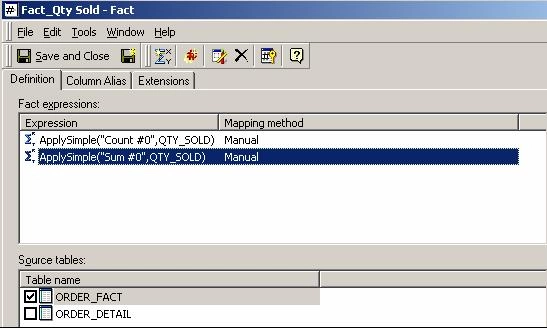
Create a Fact using two expressions with ApplySimple() definitions as follows:
Fact_Qty Sold: ApplySimple("Count #0", QTY_SOLD)
against the ORDER_DETAIL table:

ka04W00000148l2QAA_0EM440000002FoJ.jpeg

Fact_Qty Sold: ApplySimple("Sum #0", QTY_SOLD)
against the ORDER_FACT table:
 

ka04W00000148l2QAA_0EM440000002Fo6.jpeg

Create a metric using the ApplyAgg() function on Fact_Qty Sold as follows:
M_Qty Sold:ApplyAgg("#0", Fact_Qty Sold)

ka04W00000148l2QAA_0EM440000002Fo7.jpeg

The Strategy SQL Engine then correctly selects the underlying form expression for the Fact depending on the corresponding source table:


Column NameData TypeDefault ValueUSER_IDINT USER_NAMEVARCHAR(50) DEPT_IDINT0REGION_IDINT0LASTMODIFIEDTIMESTAMP1900-01-01USER_IDUSER_NAMEDEPT_IDREGION_IDLASTMODIFIED456Turing, Alan15211900-01-011731Hellman, Martin152371945-10-021892Rivest, Ronald2312004-08-172645Babbage, Charles12351900-01-014654Diffie, Whitfield156571900-01-014789Dijkstra, Edsger Wybe31472002-08-067859Gosling, James34541955-05-19Form nameForm categoryFormat typeExpressionIDIDNumberUSER_IDNameDESCTEXTUSER_NAMELast ModifiedNoneDatetimeLASTMODIFIEDUSERLASTMODIFIEDTuring, Alan Hellman, Martin1945-10-02Rivest, Ronald2004-08-17Babbage, Charles Diffie, Whitfield Dijkstra, Edsger Wybe2002-08-06Gosling, James1955-05-19STORE_ITEM_00STORE_IDCLASS_IDITEM_IDFact columnsSQLReport Definition

 
Column NameData TypeDefault ValueUSER_IDINT USER_NAMEVARCHAR(50) DEPT_IDINT0REGION_IDINT0LASTMODIFIEDTIMESTAMP1900-01-01USER_IDUSER_NAMEDEPT_IDREGION_IDLASTMODIFIED456Turing, Alan15211900-01-011731Hellman, Martin152371945-10-021892Rivest, Ronald2312004-08-172645Babbage, Charles12351900-01-014654Diffie, Whitfield156571900-01-014789Dijkstra, Edsger Wybe31472002-08-067859Gosling, James34541955-05-19Form nameForm categoryFormat typeExpressionIDIDNumberUSER_IDNameDESCTEXTUSER_NAMELast ModifiedNoneDatetimeLASTMODIFIEDUSERLASTMODIFIEDTuring, Alan Hellman, Martin1945-10-02Rivest, Ronald2004-08-17Babbage, Charles Diffie, Whitfield Dijkstra, Edsger Wybe2002-08-06Gosling, James1955-05-19STORE_ITEM_00STORE_IDCLASS_IDITEM_IDFact columnsSQLReport Definition

select a11.ORDER_ID ORDER_ID,
a11.SHIP_DATE SHIP_DATE,
Sum a11.QTY_SOLD WJXBFS1
from ORDER_FACT a11
group by a11.ORDER_ID,
a11.SHIP_DATE


select a11.ORDER_ID ORDER_ID,
a11.PROMOTION_ID PROMOTION_ID,
a12.PROMO_SALE PROMO_SALE,
Count a11.QTY_SOLD WJXBFS1
from ORDER_DETAIL a11,
LU_PROMOTION a12
where a11.PROMOTION_ID = a12.PROMO_SALE_ID
group by a11.ORDER_ID,
a11.PROMOTION_ID,
a12.PROMO_SALE


Comment

0 comments

Details

Knowledge Article

Published:

April 10, 2017

Last Updated:

April 10, 2017