EducationSoftwareStrategy.com
StrategyCommunity

Knowledge Base

Product

Community

Knowledge Base

TopicsBrowse ArticlesDeveloper Zone

Product

Download SoftwareProduct DocumentationSecurity Hub

Education

Tutorial VideosSolution GalleryEducation courses

Community

GuidelinesGrandmastersEvents
x_social-icon_white.svglinkedin_social-icon_white.svg
Strategy logoCommunity

© Strategy Inc. All Rights Reserved.

LegalTerms of UsePrivacy Policy
  1. Home
  2. Topics

KB11078: “You cannot export this report because it has exceeded the limits that the Administrator has set for the maximum number of cells to export...” error message appears when exporting to Excel from MicroStrategy Web 2021 and above


Community Admin

• Strategy


“You cannot export this report because it has exceeded the limits that the Administrator has set for the maximum number of cells to export...” error message appears when exporting to Excel from MicroStrategy Web 2021 and above

SYMPTOM:
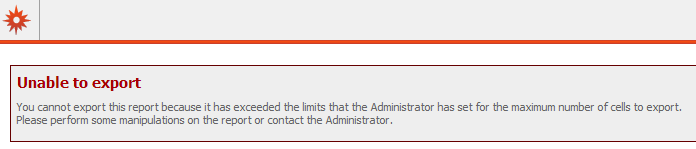
In Strategy Web 2021 and above, users receive the following error message when exporting directly to Excel:
ka0PW00000016eTYAQ_0EM44000000291H.png

 
You cannot export this report because it has exceeded the limits that the Administrator has set for the maximum number of cells to export. Please perform some manipulations on the report or contact your Administrator.
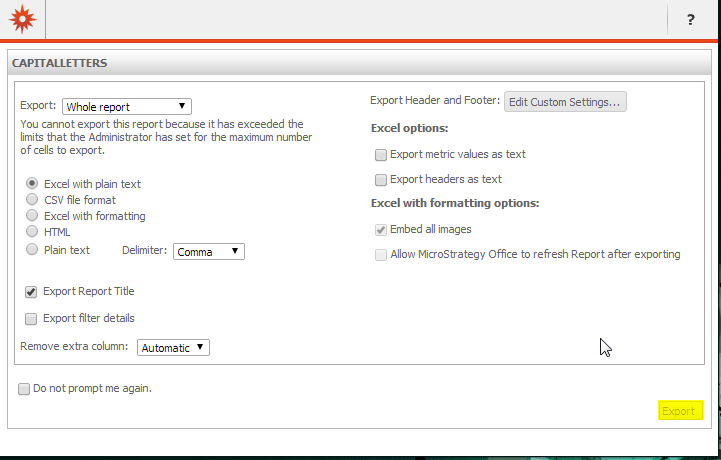
If the Export Options window is enabled, users may not see an error message, but will be unable to export due to the Export button being greyed out (highlighted in yellow):
ka0PW00000016eTYAQ_0EM44000000291G.png

 
CAUSE:
This issue occurs because of a limitation imposed on the number of cells that can be exported for a report.
 
ACTION:

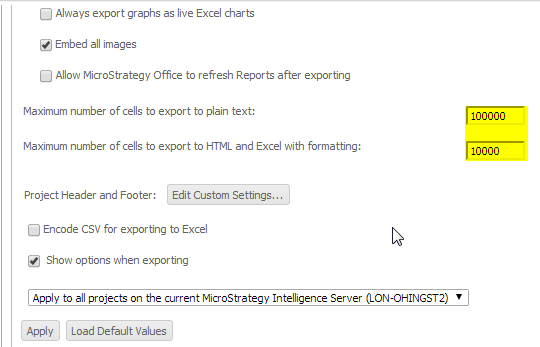
  • When exporting Excel with plain text, increase the values of the "Maximum number of cells to export to plain text" project export preferences to at least the equivalent of the number of cells in the report.
  • When exporting Excel with formatting, increase the values of the "Maximum number of cells to export to HTML" project export preferences to at least the equivalent of the number of cells in the report.

The following figure illustrates the two settings needed to change to regulate the maximum number of cells that are allowed to export to either plain text or HTML (in yellow):


ka0PW00000016eTYAQ_0EM44000000291F.png


Comment

0 comments

Details

Knowledge Article

Published:

May 19, 2017

Last Updated:

March 7, 2024