EducationSoftwareStrategy.com
StrategyCommunity

Knowledge Base

Product

Community

Knowledge Base

TopicsBrowse ArticlesDeveloper Zone

Product

Download SoftwareProduct DocumentationSecurity Hub

Education

Tutorial VideosSolution GalleryEducation courses

Community

GuidelinesGrandmastersEvents
x_social-icon_white.svglinkedin_social-icon_white.svg
Strategy logoCommunity

© Strategy Inc. All Rights Reserved.

LegalTerms of UsePrivacy Policy
  1. Home
  2. Topics

KB11085: Regular reports are listed as part of the <DELETED DOCUMENT> when the 'Document' and 'Report' attributes are on the template in MicroStrategy Enterprise Manager


Community Admin

• Strategy


Some changes need to be made to the report so that only true DELETED DOCUMENTS are seen

SYMPTOM:
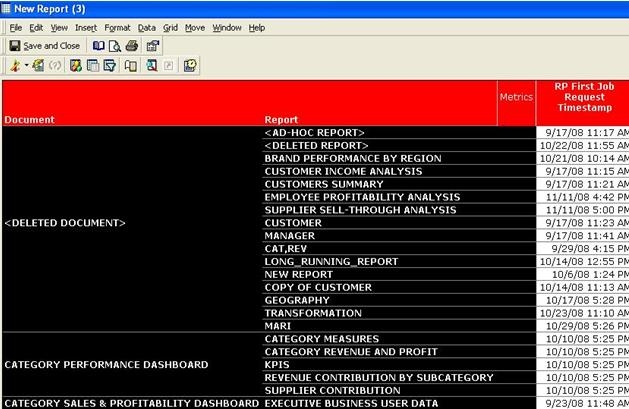
Users notice that the regular reports (i.e. reports which are not executed because of document executions) are listed as being run under the <DELETED DOCUMENT> when they execute the following report in Strategy Enterprise Manager.  The following report just has the attributes 'Document' and 'Report' and the metric 'RP First Job Request Timestamp'
ka04W000000OdjYQAS_0EM440000002Bmv.jpeg

 
The purpose of the <DELETED DOCUMENT> in IS_DOC is to be able to identify the truly deleted documents. For example, if a document is run and resulted in entries in the Statistics tables but is deleted before the first data load, this entry is used to encapsulate those statistics entries. However, as seen above, this report shows misleading information.
 
CAUSE:
This issue is caused by the join highlighted in the SQL below along with the way the IS_DOC_ID column is populated in the IS_REP_FACT table. Regular report executions are entered with a value of '-1' in the IS_DOC_ID column of the IS_REP_FACT table. The value '-1' is reserved for the <DELETED DOCUMENT> in the Lookup table IS_DOC.
 
select a11.IS_DOC_ID IS_DOC_ID,
max(a12.IS_DOC_NAME) IS_DOC_NAME,
a11.IS_REP_ID IS_REP_ID,
max(a13.IS_REP_NAME) IS_REP_NAME,
min(a11.IS_REP_REQ_TS) WJXBFS1
from IS_REP_FACT a11
join IS_DOC a12
on (a11.IS_DOC_ID = a12.IS_DOC_ID)
join IS_REP a13
on (a11.IS_REP_ID = a13.IS_REP_ID)
group by a11.IS_DOC_ID,
a11.IS_REP_ID
ACTION:
The following changes need to be made to the above report, so that only true DELETED DOCUMENTS are seen.
 

  • Add the attribute 'Document Job' to the report.If needed, this attribute can be removed from the template and just left in the report objects.
  • Add a filter on the 'Document Job' attribute such that the ID of the attribute is not equals to -1 (not in list (-1)), as shown below.
ka04W000000OdjYQAS_0EM440000002Bmu.jpeg
  • Executing the above report gives the following results. As seen in the screenshot below, only true 'DELETED DOCUMENTS' are shown. This is confirmed by the fact that there is a Document Job ID associated with this report execution.
ka04W000000OdjYQAS_0EM440000002Bms.jpeg

Comment

0 comments

Details

Knowledge Article

Published:

June 19, 2017

Last Updated:

June 19, 2017