SYMPTOM:
When a metric is calculated, the attribute specified in the metric dimensionality is not included in the SQL. The report calculates the metric at the report level.
For example, a metric is defined as follows:

Average Revenue = *
The Report Template appears as follows:

The following SQL is also generated. Note that the metric is calculated at the "Category" level, or Report level:
create table ZZOL00 (
CATEGORY_ID BYTE,
WJXBFS1 DOUBLE)
insert into ZZOL00
select a13. AS CATEGORY_ID ,
(avg(a11.) * sum(a11.)) AS WJXBFS1
from a11,
a12,
a13
where a11. = a12. and
a12. = a13.
group by a13.
select a11. AS CATEGORY_ID,
a11. AS CATEGORY_DESC,
pa1. AS WJXBFS1
from a11,
pa1
where a11. = pa1.
drop table ZZOL00
CAUSE:
The functionality of Strategy is such that the outer functions of metrics can only calculate to levels that are specified on the report. Therefore, if a metric is specified to calculate to an explicit attribute level and the attribute is not on the report template or in the Report Objects window, it will not calculate to that level, but rather to the Report Level.
In the above report scenario, without Item on the report template or in the Report Objects window, the metrics will calculate to the report level (i.e., group by Category). If the fact data is stored at a lower/different level (i.e., Item) the data will first be aggregated to the report level and then the metric formulas will be calculated.
ACTION:
To resolve this issue, perform either of the following actions:


WORKAROUND:
One possible workaround is to nest the metric functions from Units Sold and Revenue into another function to get the metric to calculate at the desired level. With nested aggregation, inner functions will calculate to the levels specified for those functions.
For example:
A new metric using nested aggregation is created as follows:
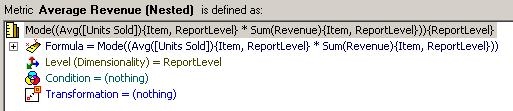
Mode((Sum() {, ~} * Avg() {, ~} )) {~}
Sum() and Avg() will both calculate to the Item level because these functions are nested inside of another function. Mode will calculate to the report level. Therefore, theoretically, as long as the outer function will not change the value of the inner function(s) when calculated at the report level, it should be able to achieve the same report results without the inner function attribute (i.e., Item) on the report. Essentially, the metric result should be the same regardless of the outer function calculation.
The above report is modified to use the metric using nested aggregation:

The following SQL is returned when executed:
create table ZZMD00 (
ITEM_ID SHORT,
WJXBFS1 DOUBLE,
WJXBFS2 DOUBLE)
insert into ZZMD00
select a11. AS ITEM_ID,
avg(a11.) AS WJXBFS1,
sum(a11.) AS WJXBFS2
from a11
group by a11.
create table ZZOL01 (
ITEM_ID SHORT,
WJXBFS1 DOUBLE)
insert into ZZOL01
select pa1. AS ITEM_ID,
IIF(ISNULL((pa1. * pa1.)), 0, (pa1. * pa1.)) AS WJXBFS1
from pa1
create table ZZOL02 (
ITEM_ID SHORT,
CATEGORY_ID BYTE)
insert into ZZOL02
select a11. AS ITEM_ID,
a12. AS CATEGORY_ID
from a11,
a12
where a11. = a12.
select pa3. AS CATEGORY_ID,
a12. AS CATEGORY_DESC,
pa3. AS ITEM_ID,
a11. AS ITEM_NAME,
pa2. AS WJXBFS1
from pa3,
pa2,
a11,
a12
where pa3. = pa2. and
pa3. = a11. and
pa3. = a12.
drop table ZZMD00
drop table ZZOL01
drop table ZZOL02
NOTE: If the mode function calculated at the report level will return the same data as the inner functions calculated at their respective levels then the above SQL should return the desired data without Item being on the report. If it does not return the same data or if there is not another function that will return the same data when calculated at the report level then it will not be possible to use nested aggregation as a workaround - the attribute must either be included on the report template or OLAP Services must be used.
Article Reference Number: KB11102
