EducationSoftwareStrategy.com
StrategyCommunity

Knowledge Base

Product

Community

Knowledge Base

TopicsBrowse ArticlesDeveloper Zone

Product

Download SoftwareProduct DocumentationSecurity Hub

Education

Tutorial VideosSolution GalleryEducation courses

Community

GuidelinesGrandmastersEvents
x_social-icon_white.svglinkedin_social-icon_white.svg
Strategy logoCommunity

© Strategy Inc. All Rights Reserved.

LegalTerms of UsePrivacy Policy
  1. Home
  2. Topics

KB11109: What is the IF() operator in MicroStrategy, and how is it different than the Case()/CaseV() functions?


Community Admin

• Strategy


This article describes the differences between the if and case/casev functions in MicroStrategy.

The Strategy Engine includes three built-in functions to handle conditional expressions: IF(), Case() and CaseV().
Case() and CaseV() functions are Analytical Engine functions, i.e., the result set is retrieved from the warehouse after which the conditional statements within these function definitions are applied. Consult the following Strategy Knowledgebase document for more information on Case() and CaseV().
KB7127: Case and CaseV functions in the MicroStrategy Analytical Engine
 
By contrast, IF() allows database side conditional functions to be leveraged without using ApplySimple() or ApplyAgg() functions.
When the IF() operator is used, a conditional statement will be generated as part of the SQL to be executed on the database as long as the calculation is not forced by the Analytical Engine (e.g., the metric defined using the IF() is not marked as 'smart'). The table at the end of this document lists which pattern will be generated against a given database platform.
 
The following example demonstrates the use of the IF() operator using the Strategy Tutorial project:
Create a metric as follows:
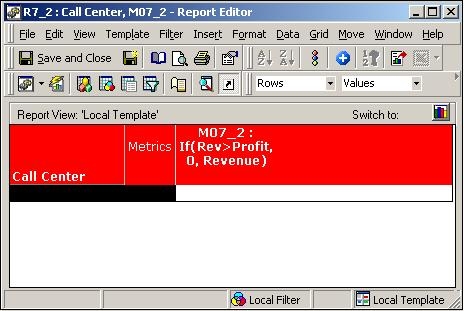
M07_2=IF(Revenue>Profit, 0, Revenue)
 
where 'Revenue' and 'Profit' are predefined metrics in the Strategy Tutorial project. A report that contains M07_2 and the attribute 'Call Center' will generate the following SQL against Microsoft SQL Server:
ka04W00000148ODQAY_0EM440000002Fnp.jpeg


select a12.CALL_CTR_ID CALL_CTR_ID,
   sum(a11.TOT_DOLLAR_SALES) WJXBFS1,
   sum((a11.TOT_DOLLAR_SALES - a11.TOT_COST)) WJXBFS2
into #ZZMD00
from ITEM_EMP_SLS a11
   join LU_EMPLOYEE a12
      on (a11.EMP_ID = a12.EMP_ID)
group by a12.CALL_CTR_ID

 
select distinct pa1.CALL_CTR_ID CALL_CTR_ID,
   a11.CENTER_NAME CENTER_NAME,
    (Case when pa1.WJXBFS1 > pa1.WJXBFS2 then 0.0 else pa1.WJXBFS1 end) WJXBFS1
from #ZZMD00 pa1
   join LU_CALL_CTR a11
      on (pa1.CALL_CTR_ID = a11.CALL_CTR_ID)

 
drop table #ZZMD00

 
Even though the above result could have been achieved via single pass SQL, Strategy SQL Engine generates multi-pass SQL to ensure that any metrics with conditionality/dimensionality are calculated correctly as the IF function is defined on the aggregated results of the revenue and profit metrics.
NOTE: Users should be careful when using the IF() operator within metrics inside Custom Groups where the length of the SQL can be a concern.
 
By definition, the IF() operator accepts three arguments; one conditional statement and two return values for the true and false outcomes. IF the users wish to implement a multi-layered conditional logic such as:
if <condition1> then
return1
else if <condition2> then
return2
else
return3
end;
 
then a convoluted metric definition as follows is NOT allowed:
IF(condition1, result1, (IF(condition2), result2, result3))
 
 
However, the calculation can be split into two separate metrics:

MetricA = IF(condition2, result2, result3)
MetricB = IF(condition1, result1, MetricA)

 
Nearly all database platforms render IF() as:

Case when #0 then #1 else #2 end


Microsoft Access and Excel data sources use iif(#0,#1,#2).
 
Database platforms that do not support IF() in SQL with Strategy are Composite 4.5.0, DB2 Information Integrator, Generic DBMS and OpenAccess ODBC connector. When IF() is used against these database platforms, the conditional expression will be evaluated in the Analytical Engine.


Comment

0 comments

Details

Knowledge Article

Published:

April 12, 2017

Last Updated:

April 12, 2017