When creating an attribute form it is possible to use custom expressions that will use the value column(s) in the data warehouse database. This will then create another value which may or may not be of the same type as the data warehouse column, such as an attribute form that extracts the month from a datetime column value. While the attribute form value may be a different data type than the column alias data type (i.e., number instead of datetime), Strategy may still attempt to perform SQL operations against the attribute as if it were the same data type as the column alias. Therefore, it will attempt to convert the data to the data type of the column alias, as in the following example:
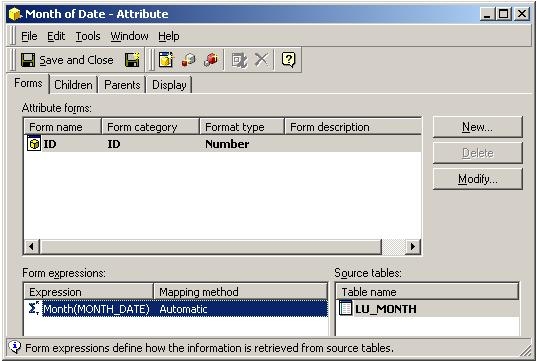
The above attribute has a custom attribute form expression which extracts month from a datetime value.
A report is created as follows:
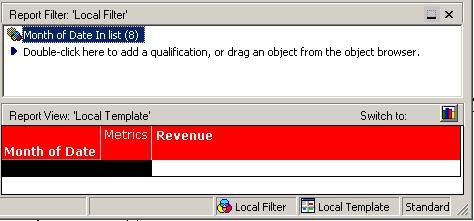
The filter within the report is created by selecting from an element list as follows:
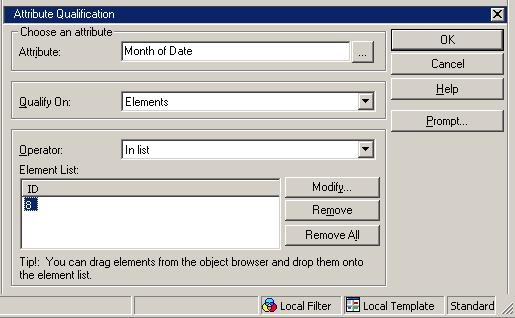
With the report created to filter on a specific Month of Date element selected from a list of elements, the following SQL is generated:
select DATEPART(MONTH, a12.MONTH_DATE) MONTH_DATE,
sum(a11.TOT_DOLLAR_SALES) WJXBFS1
from ITEM_MNTH_SLS a11
join LU_MONTH a12
on (a11.MONTH_ID = a12.MONTH_ID)
where DATEPART(MONTH, a12.MONTH_DATE) in (CONVERT(datetime, '1899-12-30 00:00:00', 120))
group by DATEPART(MONTH, a12.MONTH_DATE)
The conversion is attempted because Strategy will attempt to convert the element value specified in the filter to a datetime value since the column alias of the Month of Date attribute is of type datetime.
In order to generate the correct SQL, a custom expression filter must be used rather than an attribute qualification filter. Consider the report template where the filter is redefined as follows:
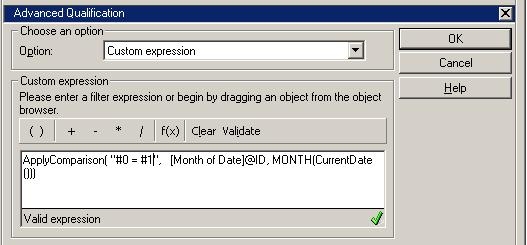
The following correct SQL is then generated:
select DATEPART(MONTH, a12.MONTH_DATE) MONTH_DATE,
sum(a11.TOT_DOLLAR_SALES) WJXBFS1
from ITEM_MNTH_SLS a11
join LU_MONTH a12
on (a11.MONTH_ID = a12.MONTH_ID)
where DATEPART(MONTH, a12.MONTH_DATE) = DATEPART(MONTH, GETDATE())
group by DATEPART(MONTH, a12.MONTH_DATE)
