Relationship filters allow filtering qualifications to be written in Strategy that do not depend on explicit attribute relationships. Such filters are commonly used for market basket analysis.
Relationship filters translate into correlated subqueries in a report's SQL. A correlated subquery most commonly appears in one of two forms:
select [columns]
from [table1]
where table1.column
in (select table2.column
from table2
where [condition])
or:
select [columns]
from [table1]
where (exists
(select table2.column1,
table2.column2
rom table2
where table1.column1 = table2.column1
and table1.column2 = table2.column2
and [condition]))
In both cases, rows from table1 are retained in the query only if corresponding rows can be found in the subquery.
Performance of subqueries on databases can vary dramatically, depending on the size of the tables and the complexity of the filtering conditions. In many cases, subqueries can run noticeably slower than expected. In such cases, it may be possible to improve performance by replacing the subqueries with intermediate SQL passes. Report-as-filter is one mechanism to achieve this.
For instance, the following example illustrates a very simple market basket report, calculating the revenue per quarter coming from customers who purchased both The Great Gatsby and New Beginning (though not necessarily in the same order).
Filter 1:
Relationship filter 1: Set of Customer where (Item in list (The Great Gatsby)) relate by the Fact Revenue
AND
Relationship filter 2: Set of Customer where (Item in list (Hirschfeld on Line)) relate by the Fact Revenue
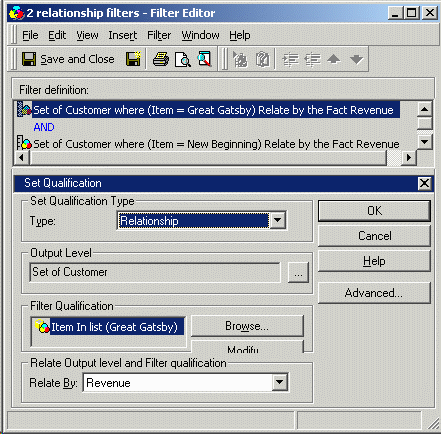
Both relationship filters should have the advanced option "Also apply this qualification independently of the relationship filter" deselected:
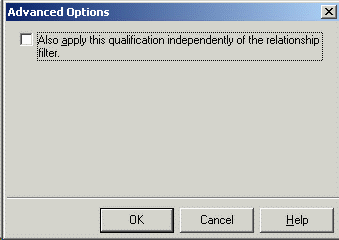
This filter first determines which customers bought The Great Gatsby, then which ones bought New Beginning, and then calculates the intersection between the two customer sets. The end result is only those customers who bought both.
Report:
Rows: Quarter
Columns: Revenue metric
Report filter: Filter 1
This report returns the following SQL:
select a13.QUARTER_ID QUARTER_ID,
max(a14.QUARTER_DESC) QUARTER_DESC,
sum(a11.ORDER_AMT) WJXBFS1
from ORDER_FACT a11
join LU_ORDER a12
on (a11.ORDER_ID = a12.ORDER_ID)
join LU_DAY a13
on (a11.ORDER_DATE = a13.DAY_DATE)
join LU_QUARTER a14
on (a13.QUARTER_ID = a14.QUARTER_ID)
where (((a12.CUSTOMER_ID)
in (select r12.CUSTOMER_ID
from ORDER_DETAIL r11
join LU_ORDER r12
on (r11.ORDER_ID = r12.ORDER_ID)
where r11.ITEM_ID in (39)))
and ((a12.CUSTOMER_ID)
in (select r12.CUSTOMER_ID
from ORDER_DETAIL r11
join LU_ORDER r12
on (r11.ORDER_ID = r12.ORDER_ID)
where r11.ITEM_ID in (316))))
group by a13.QUARTER_ID
Depending on the size of the warehouse tables, job concurrency on the database server, and any number of other factors, a query like the above may not perform quickly enough to be practically useful. This is a simple example, but it is conceivable to have far more than only two relationship filters.
Splitting the subqueries out into separate SQL passes may, in some situations, improve database performance. Consider the following report design:
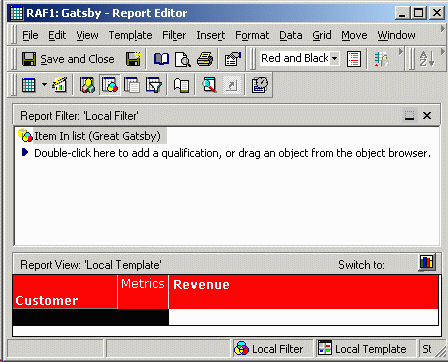
Report as filter 1:
Rows: Customer
Columns: Revenue metric
Report filter: Item in list (The Great Gatsby)
Note that all three elements of the relationship filter are present here: the output level (Customer attribute), the qualification (report filter), and the means of relating the two (the Revenue metric):
Report as filter 2:
Rows: Customer
Columns: Revenue metric
Report filter: Item in list (New Beginning)
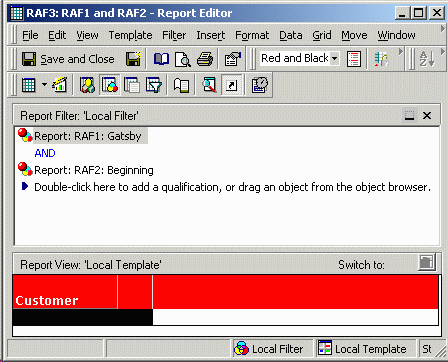
Report as filter 3:
Rows: Customer
Columns: Empty
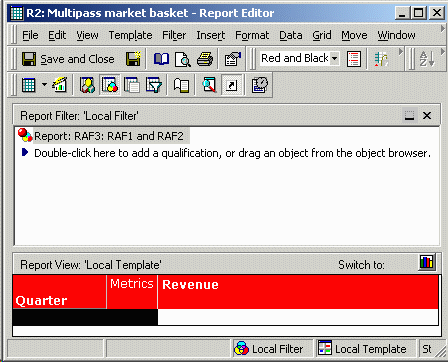
Report filter: Report as filter 1 AND Report as filter 2
Final report:
Rows: Quarter
Columns: Revenue metric
Report filter: Report as filter 3
select a12.CUSTOMER_ID CUSTOMER_ID,
sum((a11.QTY_SOLD * (a11.UNIT_PRICE - a11.DISCOUNT))) WJXBFS1
into #ZZMQ00
from ORDER_DETAIL a11
join LU_ORDER a12
on (a11.ORDER_ID = a12.ORDER_ID)
where a11.ITEM_ID in (39)
group by a12.CUSTOMER_ID
select a12.CUSTOMER_ID CUSTOMER_ID,
sum((a11.QTY_SOLD * (a11.UNIT_PRICE - a11.DISCOUNT))) WJXBFS1
into #ZZMQ01
from ORDER_DETAIL a11
join LU_ORDER a12
on (a11.ORDER_ID = a12.ORDER_ID)
where a11.ITEM_ID in (316)
group by a12.CUSTOMER_ID
select pa1.CUSTOMER_ID CUSTOMER_ID
into #ZZMQ02
from #ZZMQ00 pa1
join #ZZMQ01 pa2
on (pa1.CUSTOMER_ID = pa2.CUSTOMER_ID)
select a13.QUARTER_ID QUARTER_ID,
max(a14.QUARTER_DESC) QUARTER_DESC,
sum(a11.ORDER_AMT) WJXBFS1
from ORDER_FACT a11
join LU_ORDER a12
on (a11.ORDER_ID = a12.ORDER_ID)
join #ZZMQ02 pa3
on (a12.CUSTOMER_ID = pa3.CUSTOMER_ID)
join LU_DAY a13
on (a11.ORDER_DATE = a13.DAY_DATE)
join LU_QUARTER a14
on (a13.QUARTER_ID = a14.QUARTER_ID)
group by a13.QUARTER_ID
drop table #ZZMQ00
drop table #ZZMQ01
drop table #ZZMQ02
This query is functionally identical to the first, but it may run significantly faster depending on the database. Note that in the final pass, the fact table is joined against only one MQ (metric or set qualification) table, and that the two item filters are joined in the third pass using optimal, minimal SQL.
In the case of a very large fact table, joining against only one MQ may improve query performance by one or more orders of magnitude. However, this degree of improvement could indicate that the warehouse database is not well-tuned for the queries users expect to run. Database administrators might wish to re-examine table indexes to be sure they are ideal for the end-users' reporting needs.
Note: Similar SQL may be produced using the Very Large DataBase (VLDB) property "Sub Query Type" as in the following Strategy article. If it is desired to separate some relationship filter subqueries but leave others unaffected, the VLDB property cannot be used as it applies to an entire report.
KB3859: How to use the sub query VLDB setting to optimize performance for attribute relationship filtering in Strategy.
Note: Database-side set operators such as UNION, INTERSECT and EXCEPT are also supported to improve the performance of subquery filtering without remodeling the filters. Consult the following Strategy article for details about the option and the situations under which it applies.
KB13530: Feature in Strategy SQL Generation Engine: Set Operator Optimization
Note: Since performance of any query depends on factors outside Strategy's control (especially database tuning and indexing), Strategy cannot guarantee that there will be an improvement in performance using this technique. It is a worthwhile technique to complement, not replace, database tuning exercises.
Note: Other situations exist in which the Strategy SQL Generation Engine will produce a subquery, most notably when many-to-many relationships exist between attributes. Report-as-filter cannot be used to eliminate subqueries that are the result of any construction other than a relationship filter.
