EducationSoftwareStrategy.com
StrategyCommunity

Knowledge Base

Product

Community

Knowledge Base

TopicsBrowse ArticlesDeveloper Zone

Product

Download SoftwareProduct DocumentationSecurity Hub

Education

Tutorial VideosSolution GalleryEducation courses

Community

GuidelinesGrandmastersEvents
x_social-icon_white.svglinkedin_social-icon_white.svg
Strategy logoCommunity

© Strategy Inc. All Rights Reserved.

LegalTerms of UsePrivacy Policy
  1. Home
  2. Topics
  3. KB11122: What is the “Downward Outer Join” VLDB property in MicroStrategy SQL Generation Engine?

KB11122: What is the “Downward Outer Join” VLDB property in MicroStrategy SQL Generation Engine?


Community Admin

• Strategy


This article describes the purpose and functionality of the downward outer join VLDB property
"Downward outer join" refers to a solution implemented in MicroStrategy for performing an outer join between metrics calculated at different dimensionalities while ensuring data integrity.

In MicroStrategy it is possible to generate outer joins between metrics at different levels, but there was the possibility of report results that could vary in ways outside the user's control if a straight outer join was performed.

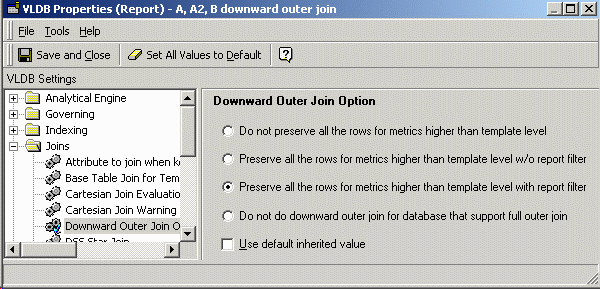
To address this issue, a VLDB property called "Downward Outer Join" should be used. It has the following five options:

  • Do not preserve all the rows for metrics higher than template level (default).
  • Preserve all the rows for metrics higher than template level without report filter.
  • Preserve all the rows for metrics higher than template level with report filter.
  • Do not do downward outer join for databases that support full outer join.
  • Do not do downward outer join for databases that support full outer join, and order temp tables in last pass by dimensionality.
This document describes the first three downward outer join settings. For more information on the "Do not do downward outer join" settings, review the following MicroStrategy Knowledge Base document:
  • KB11123 - What is the "Do not do downward outer join" VLDB property in MicroStrategy SQL Generation Engine?
Downward Outer Join
 When performing a simple outer join between three or more intermediate tables of different dimensionalities, the final result depends on the order in which the tables are joined. "Downward outer join" is an algorithm that eliminates this ambiguity by adjusting the dimensionality of higher-level metrics downward, to match report level dimensionality.

To illustrate, consider the following three intermediate tables:

pa1

Region

Quarter

Cost

Northeast

Q2 02

$281,203


Q3 02

$166,626

Mid-Atlantic

Q2 02

$418,401


Q4 02

$445,941

South

Q2 02

$157,539


Q3 02

$101,407

Northwest

Q2 02

$183,071


Q4 02

$169,697

pa2

Region

Quarter

Cost

Northeast

Q2 02

$281,203


Q4 02

$290,212

Mid-Atlantic

Q2 02

$418,401


Q4 02

$445,941

South

Q2 02

$157,539


Q3 03

$109,723

Northwest

Q2 02

$183,071


Q4 02

$169,697

pa3

Region

Units Sold

Northeast

56748

Central

42541

South

32500

Southwest

67948

Each table contains elements not present in the other two tables. To join all of them and preserve all the rows, outer joins will be necessary.

Full outer joining the tables in the order pa1, pa2, pa3 renders the correct results. For the Northeast and South regions, there are three quarters between the first two tables combined. The same number of units sold is expected to appear for each of these quarters, since Units Sold is calculated in pa3 without respect to Quarter:

select   coalesce(pa1.REGION_ID, pa2.REGION_ID, pa3.REGION_ID) REGION_ID,
   a12.REGION_NAME REGION_NAME,
   coalesce(pa1.QUARTER_ID, pa2.QUARTER_ID) QUARTER_ID,
   a11.QUARTER_DESC QUARTER_DESC,
   pa1.WJXBFS1 WJXBFS1,
   pa2.WJXBFS1 WJXBFS2,
   pa3.WJXBFS1 WJXBFS3
from   pa1
   full outer join   pa2
    on    (pa1.REGION_ID = pa2.REGION_ID and
      pa1.QUARTER_ID = pa2.QUARTER_ID)
   full outer join   pa3
    on    (coalesce(pa1.REGION_ID, pa2.REGION_ID) = pa3.REGION_ID)
   left outer join   LU_QUARTER   a11
    on    (coalesce(pa1.QUARTER_ID, pa2.QUARTER_ID) = a11.QUARTER_ID)
   left outer join   LU_REGION   a12
    on    (coalesce(pa1.REGION_ID, pa2.REGION_ID, pa3.REGION_ID) = a12.REGION_ID)
order by 1, 3 

    REGION ID

    REGION DESC

    QUARTER ID

    QUARTER DESC

    Cost (pa1)

    Cost (pa2)

    Units Sold

    1

    Northeast

    20022

    Q2 02

    281203.0

    281203.0

    56748.0

    1

    Northeast

    20023

    Q3 02

    166626.0

    ---

    56748.0

    1

    Northeast

    20024

    Q4 02

    ---

    290212.0

    56748.0

    2

    Mid-Atlantic

    20022

    Q2 02

    418401.0

    418401.0

    ---

    2

    Mid-Atlantic

    20024

    Q4 02

    445941.0

    445941.0

    ---

    4

    Central

    ---

    ---

    ---

    ---

    42541.0

    5

    South

    20022

    Q2 02

    157539.0

    157539.0

    32500.0

    5

    South

    20023

    Q3 02

    101407.0

    ---

    32500.0

    5

    South

    20033

    Q3 03

    ---

    109723.0

    32500.0

    6

    Northwest

    20022

    Q2 02

    183071.0

    183071.0

    ---

    6

    Northwest

    20024

    Q4 02

    169697.0

    169697.0

    ---

    7

    Southwest

    ---

    ---

    ---

    ---

    67948.0

    Joining the tables in the order pa1, pa3, pa2 causes the Units Sold values to be omitted for rows where there is a value for Cost in pa2 but not in pa1:


    select   coalesce(pa1.REGION_ID, pa2.REGION_ID, pa3.REGION_ID) REGION_ID,
       a12.REGION_NAME REGION_NAME,
       coalesce(pa1.QUARTER_ID, pa2.QUARTER_ID) QUARTER_ID,
       a11.QUARTER_DESC QUARTER_DESC,
       pa1.WJXBFS1 WJXBFS1,
       pa2.WJXBFS1 WJXBFS2,
       pa3.WJXBFS1 WJXBFS3
    from   pa1
       full outer join   pa3
        on    (pa1.REGION_ID = pa3.REGION_ID)
       full outer join   pa2
        on    (coalesce(pa1.REGION_ID, pa3.REGION_ID) = pa2.REGION_ID and
          pa1.QUARTER_ID = pa2.QUARTER_ID)
       left outer join   LU_QUARTER   a11
        on    (coalesce(pa1.QUARTER_ID, pa2.QUARTER_ID) = a11.QUARTER_ID)
       left outer join   LU_REGION   a12
        on    (coalesce(pa1.REGION_ID, pa2.REGION_ID, pa3.REGION_ID) = a12.REGION_ID)
    order by 1, 3 

      REGION ID

      REGION DESC

      QUARTER ID

      QUARTER DESC

      Cost (pa1)

      Cost (pa2)

      Units Sold

      1

      Northeast

      20022

      Q2 02

      281203.0

      281203.0

      56748.0

      1

      Northeast

      20023

      Q3 02

      166626.0

      ---

      56748.0

      1

      Northeast

      20024

      Q4 02

      ---

      290212.0

      MISSING

      2

      Mid-Atlantic

      20022

      Q2 02

      418401.0

      418401.0

      ---

      2

      Mid-Atlantic

      20024

      Q4 02

      445941.0

      445941.0

      ---

      4

      Central

      ---

      ---

      ---

      ---

      42541.0

      5

      South

      20022

      Q2 02

      157539.0

      157539.0

      32500.0

      5

      South

      20023

      Q3 02

      101407.0

      ---

      32500.0

      5

      South

      20033

      Q3 03

      ---

      109723.0

      MISSING

      6

      Northwest

      20022

      Q2 02

      183071.0

      183071.0

      ---

      6

      Northwest

      20024

      Q4 02

      169697.0

      169697.0

      ---

      7

      Southwest

      ---

      ---

      ---

      ---

      67948.0

      Considering the Northeast region only, in the first query, after joining pa1 and pa2 first (both at the level of Region and Quarter), three elements for Quarter are available: Q2 02, Q3 02, and Q4 02. There is only one value in pa3 for Northeast, and that value is copied across all three quarters for that region.

      In the second query, joining directly from pa1 to pa3 means that only Q2 02 and Q3 02 (the Quarter elements from pa1) are available to receive the Northeast value from pa3. Subsequently joining to pa2 introduces a new element for Quarter. However, the join to pa3 is already done, and the database will not retroactively look to pa3 and copy the Units Sold value again. As a result, there is a missing value in the final result table.

      When joining "upward" (that is, from a lower level table with more attribute keys and more detail to a higher-level table with fewer keys and less detail), the higher-level metric values can be propagated across only those elements for the lower-level attributes that already exist in the final result. For data integrity, it is necessary to ensure that all attribute elements exist in the final result before joining in metric values calculated at a level higher than the template level.

      Because cross-dimensional outer joins could produce different results, even for different executions of the same report, MicroStrategy does not allow simple outer joins to or from metrics higher than template level by default.

      Note: Users may create reports with metrics higher than template level, and they may set the metric join type in Report Data Options to outer join, but the SQL engine will treat these metrics as if they were set to inner join.


      The "Downward Outer Join" VLDB property allows higher-level metrics to be outer joined by constructing a table of all necessary attribute elements to be included early in the join path.

      The downward outer join pass performs a cross join between the higher-level metric pass and the lookup table(s) for the attribute(s) included in the report level dimensionality that are not present in the metric's dimensionality. This is the only certain way to guarantee that all the needed attribute elements are present in the downward outer join table.

      Because of the cross join against the lookup table, report results may be prohibitively large when there are lower-level attributes with a large number of elements. In the example below, there is no report filter; as a result, all the elements of the Quarter attribute are shown, even when none of the report-level metrics contain data.

      Note: Users are strongly encouraged to use the report filter to restrict the number of elements for attributes that are not present in all the metric dimensionalities.


      The following report uses the downward outer join setting with the above intermediate tables. The metric calculation passes are not shown, only the downward outer join pass and final result pass:
      ka0PW0000005jirYAA_0EM440000002FmW.gif
      select   a11.QUARTER_ID QUARTER_ID,
         pa3.REGION_ID REGION_ID
      into #ZZOG03
      from   #ZZMD02   pa3
         cross join   LU_QUARTER   a11

      select   coalesce(pa1.REGION_ID, pa4.REGION_ID) REGION_ID,
         a12.REGION_NAME REGION_NAME,
         coalesce(pa1.QUARTER_ID, pa4.QUARTER_ID) QUARTER_ID,
         a11.QUARTER_DESC QUARTER_DESC,
         pa1.WJXBFS1 WJXBFS1,
         pa2.WJXBFS1 WJXBFS2,
         pa3.WJXBFS1 WJXBFS3
      from   #ZZMD00   pa1
         full outer join   #ZZOG03   pa4
          on    (pa1.QUARTER_ID = pa4.QUARTER_ID and
         pa1.REGION_ID = pa4.REGION_ID)
         left outer join   #ZZMD01   pa2
          on    (coalesce(pa1.QUARTER_ID, pa4.QUARTER_ID) = pa2.QUARTER_ID and
         coalesce(pa1.REGION_ID, pa4.REGION_ID) = pa2.REGION_ID)
         left outer join   #ZZMD02   pa3
          on    (coalesce(pa1.REGION_ID, pa4.REGION_ID) = pa3.REGION_ID)
         left outer join   LU_QUARTER   a11
          on    (coalesce(pa1.QUARTER_ID, pa4.QUARTER_ID) = a11.QUARTER_ID)
         left outer join   LU_REGION   a12
          on    (coalesce(pa1.REGION_ID, pa4.REGION_ID) = a12.REGION_ID) 


        Metrics

        Cost (R, Q)

        Cost 2 (R, Q)

        Units (R)

        Region

        Quarter


        Northeast

        Q1 02


        50,304

        Northeast

        Q2 02


        281,203

        281,203

        50,304

        Northeast

        Q3 02


        166,626


        50,304

        Northeast

        Q4 02


        290,212

        50,304

        Northeast

        Q1 03


        50,304

        Northeast

        Q2 03


        50,304

        Northeast

        Q3 03


        50,304

        Northeast

        Q4 03


        50,304

        Mid-Atlantic

        Q2 02


        418,401

        418,401


        Mid-Atlantic

        Q4 02


        445,941

        445,941


        Central

        Q1 02


        37,923

        Central

        Q2 02


        37,923

        Central

        Q3 02


        37,923

        Central

        Q4 02


        37,923

        Central

        Q1 03


        37,923

        Central

        Q2 03


        37,923

        Central

        Q3 03


        37,923

        Central

        Q4 03


        37,923

        South

        Q1 02


        28,866

        South

        Q2 02


        157,539

        157,539

        28,866

        South

        Q3 02


        101,407


        28,866

        South

        Q4 02


        28,866

        South

        Q1 03


        28,866

        South

        Q2 03


        28,866

        South

        Q3 03


        109,723

        28,866

        South

        Q4 03


        28,866

        Northwest

        Q2 02


        183,071

        183,071


        Northwest

        Q4 02


        169,697

        169,697


        Southwest

        Q1 02


        60,378

        Southwest

        Q2 02


        60,378

        Southwest

        Q3 02


        60,378

        Southwest

        Q4 02


        60,378

        Southwest

        Q1 03


        60,378

        Southwest

        Q2 03


        60,378

        Southwest

        Q3 03


        60,378

        Southwest

        Q4 03


        60,378

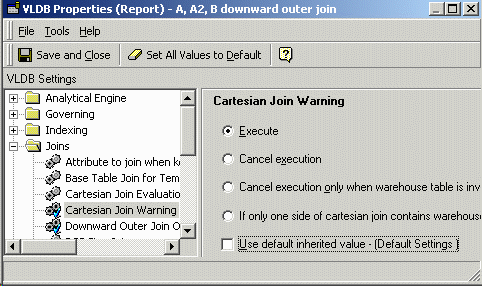
        Note: Because of the cross join, the Cartesian join warning VLDB property must be disabled for reports using the standard downward outer join:
        ka0PW0000005jirYAA_0EM440000002FmY.gif
        The cross-join-to-lookup approach does expand the result set, but it also guarantees that all the metric values will be preserved, even when there are more than two metric dimensionalities.

        It is also the only approach that will work reliably for reports that have more than two metrics, none of which are at report level. Recall that full outer joining intermediate passes at different dimensionalities requires all the needed attribute elements to be obtained before joining upward to higher-level metrics.

        When there are no report level metrics, producing this "master list" of attribute elements is not algorithmically possible without additional user input. Thus, when there are no report level metrics on the report and outer joins are required, the standard downward outer join described in this article should be used.

        For more information on bypassing the standard downward outer join algorithm and using simple full outer joins between metrics at different dimensionalities, consult the following MicroStrategy Knowledge Base document:

        • KB11123 - What is the "Do not do downward outer join" VLDB property in MicroStrategy SQL Generation Engine?

        Comment

        0 comments

        Details

        Knowledge Article

        Published:

        May 19, 2025

        Last Updated:

        May 19, 2025