The "Downward Outer Join" VLDB property in Strategy allows outer joins to be performed between metrics at different dimensionalities on the same report. The basic settings are described in detail in the following Strategy Knowledge Base document:
KB11122: What is the “Downward Outer Join” VLDB property in Strategy SQL Generation Engine?
The downward outer join algorithm introduces a cost, in terms of performance and an inflated number of result rows, in exchange for improved data reliability. For this reason, two additional options are provided:
Both of these options dispense with the dimensionality adjustment pass(es) in the standard downward outer join algorithm. Instead, they perform a simple full outer join between the intermediate passes. This results in a more concise result set and faster execution times in most cases; however, there remain some data modeling circumstances that require the use of the standard downward outer join algorithm.
As noted in KB11122, the report may yield different results depending on the order of intermediate tables in the final join pass. The two options described in this article use different means for controlling the order, both of which are appropriate for different scenarios.
This document describes the differences between these two settings, and guidelines for their use.
Note: Both of these settings require a database that supports full outer join syntax. These settings will have no effect, or will generate incorrect SQL, against databases that do not support full outer joins.
Do not do downward outer join for databases that support full outer join, and order temp tables in last pass by dimensionality.
KB11122 illustrates how data values for higher-level metrics may be missing from the final result set if higher-level intermediate tables are included in the final join pass prior to any of the lower level intermediate tables.
With this option, the final join pass takes the dimensionalities of the intermediate tables into account. All intermediate tables at report level will be joined first. Subsequent intermediate tables in the final join pass will have a decreasing number of attribute keys.
Note: This option requires at least one report level metric on the template.
Without a report level metric, the engine cannot determine the optimal order for the intermediate tables. In that situation, it is recommended to use the standard downward outer join algorithm described in KB11122. Alternately, users may improve performance using the "Do not do downward outer join" setting that does not automatically order the intermediate tables, and controlling the order of tables in the final pass using the order of template objects. There is the risk of data loss with this approach; however, the user can exert some influence using template ordering of metrics.
One scenario in which automatic ordering of the intermediate tables in the final pass is especially important is that of multiple contribution (% to total) metrics. For example:
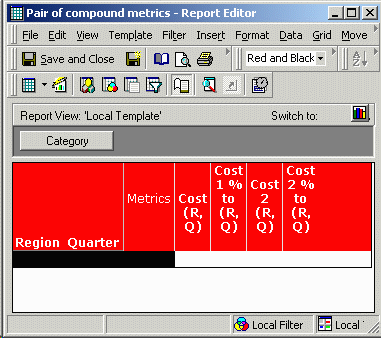
In this report, Cost 1 % to (R, Q) and Cost 2 % to (R, Q) are compound metrics dividing Cost at report level into the cost over all Categories. The report level cost metrics are not present on the template, but they must be calculated to provide the value of the contribution metrics.
In the report SQL, four intermediate tables are produced:
For the report results to be correct, both of the report level intermediate passes must appear in the FROM clause before the two higher-level intermediate passes. When using the "Downward outer join" VLDB setting "Do not do downward outer join... and order temp tables in last pass by dimensionality," the intermediate tables are joined in the order pa4, pa3, pa2, pa1, which meets the requirement.
select coalesce(pa4.REGION_ID, pa3.REGION_ID, pa2.REGION_ID, pa1.REGION_ID) REGION_ID,
a13.REGION_NAME REGION_NAME,
coalesce(pa4.QUARTER_ID, pa3.QUARTER_ID, pa2.QUARTER_ID, pa1.QUARTER_ID) QUARTER_ID,
a12.QUARTER_DESC QUARTER_DESC,
coalesce(pa4.CATEGORY_ID, pa3.CATEGORY_ID) CATEGORY_ID,
a11.CATEGORY_DESC CATEGORY_DESC,
pa1.WJXBFS1 WJXBFS1,
pa2.WJXBFS1 WJXBFS2,
pa3.WJXBFS1 WJXBFS3,
pa4.WJXBFS1 WJXBFS4
from #ZZMD03 pa4
full outer join #ZZMD02 pa3
on (pa4.CATEGORY_ID = pa3.CATEGORY_ID and
pa4.QUARTER_ID = pa3.QUARTER_ID and
pa4.REGION_ID = pa3.REGION_ID)
full outer join #ZZMD01 pa2
on (coalesce(pa4.QUARTER_ID, pa3.QUARTER_ID) = pa2.QUARTER_ID and
coalesce(pa4.REGION_ID, pa3.REGION_ID) = pa2.REGION_ID)
full outer join #ZZMD00 pa1
on (coalesce(pa4.QUARTER_ID, pa3.QUARTER_ID, pa2.QUARTER_ID) = pa1.QUARTER_ID and
coalesce(pa4.REGION_ID, pa3.REGION_ID, pa2.REGION_ID) = pa1.REGION_ID)
left outer join LU_CATEGORY a11
on (coalesce(pa4.CATEGORY_ID, pa3.CATEGORY_ID) = a11.CATEGORY_ID)
left outer join LU_QUARTER a12
on (coalesce(pa4.QUARTER_ID, pa3.QUARTER_ID, pa2.QUARTER_ID, pa1.QUARTER_ID) = a12.QUARTER_ID)
left outer join LU_REGION a13
on (coalesce(pa4.REGION_ID, pa3.REGION_ID, pa2.REGION_ID, pa1.REGION_ID) = a13.REGION_ID)
By contrast, when using the setting "Do not do downward outer join" without ordering the temp tables, the final pass join order is pa3, pa1, pa2, pa4. As a result, the Cost (R, Q) metrics will show values in the final result set only for rows where there are values in pa3. If there are rows in pa4 that do not correspond to rows in pa3, the Cost (R, Q) metrics will be empty in those rows, incorrectly.
The setting "Do not do downward outer join... and order temp tables in last pass by dimensionality" is appropriate in the following circumstances:
Do not do downward outer join for databases that support full outer join
This setting behaves similarly to its near-twin, but it does not examine the dimensionalities of intermediate tables to determine the order. Instead, the order is determined by the order of metrics on the template.
As noted above, when there is no report level metric on the template, the problem of determining the correct order of intermediate tables in the final pass becomes intractable. There are too many situations in which different orderings would be equally attractive to the SQL Engine, even though they yield different report results.
For example, the following report includes three attributes (Region, Category, Quarter) and three metrics:
There are no metrics at report level. Further, there is no dimensional hierarchy that can be discerned among the metrics.
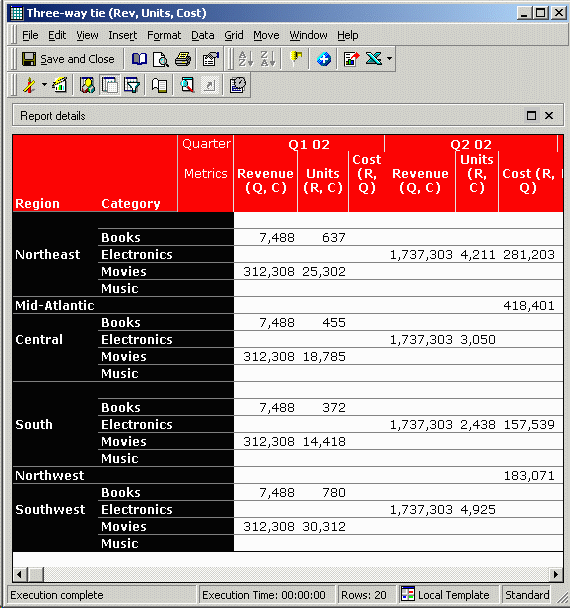
When the metrics are on the template in the order Revenue, Units, Cost, the report returns the following results. For simplicity, only the first two quarters are shown:
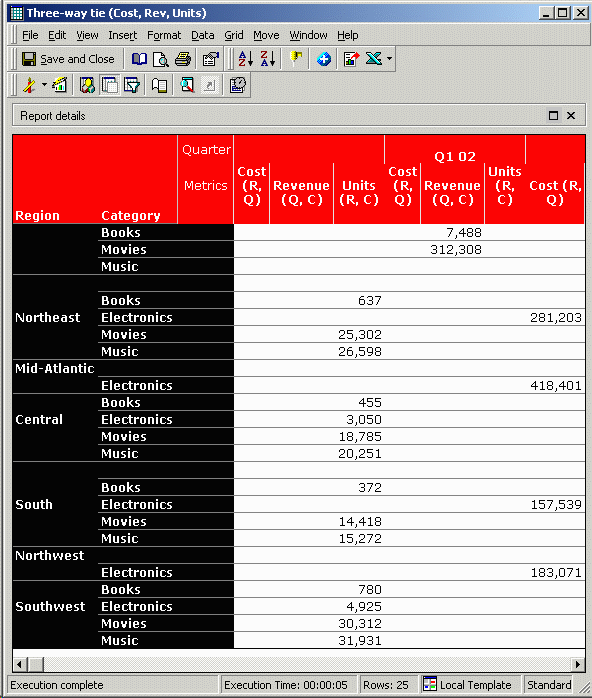
By contrast, when the metrics are on the template in the order Cost, Revenue, Units, the results are dramatically different. Region and Quarter now have null values in the attribute descriptions, whereas in the above report, only Category has null values. Some of the same numbers can be found on both reports, but in different positions:
Note: This is an extreme case with a very sparse (and frankly nonsensical) data set, contrived to illustrate the issue at hand. Most real-world data sets will be significantly less sparse, and most reports will not be constructed artificially. Users should be aware of the possibility of missing values, however.
There is no way for the SQL Generation Engine to determine which result is "better." (In fact, there are three possible result sets, based on which two metrics appear first on the template.) Relative to each other, all three metrics are the same "distance" above report level since they each have two attributes, and all three metrics are equally different from each other. To the SQL Engine, all three results are equally valid. There is no objective criterion to break the tie.
In order to resolve these conflicts, this setting requires additional input from the user in the form of template ordering of metrics. The template order informs the SQL Generation Engine which metrics should appear first in the join path (and thus, which of the possible outcomes is preferred).
In the above reporting scenario, the "Do not do downward outer join" setting is very likely to omit some data from the final result. For data completeness, it is better here to use the standard downward outer join setting, "Preserve all the rows for metrics higher than template level with report filter." This setting uses Cartesian joins to ensure no data loss; however, it will result in a larger data set and slower performance. "Do not do downward outer join" is an alternative to improve performance. Template metric order is used to give report designers control over which final result set is preferable.
There is one exception to the rule that template order determines final pass join order. The SQL Engine will try to place first in the join path the first report level metric it finds on the template (if one is available). It does not search for additional report level metrics. Since report level metrics should generally be first in the join path, it is the user's responsibility when using the "Do not do downward outer join" setting to make sure all report level metrics are first on the template.
It is possible, with OLAP Services, to have one order of metrics on the template and a different display order. This covers the scenario in which the order required to obtain the desired results is not the order the end user wants to see. The report must be converted into a "view report" to set the display order independently. Consult the following Knowledge Base document for details on achieving this:
KB11125: How to control the join order of metrics in the final pass when using the "Do not do downward outer join" VLDB setting in Strategy SQL Generation Engine
The VLDB setting "Do not do downward outer join for databases that support full outer join" is appropriate in the following situations:
