EducationSoftwareStrategy.com
StrategyCommunity

Knowledge Base

Product

Community

Knowledge Base

TopicsBrowse ArticlesDeveloper Zone

Product

Download SoftwareProduct DocumentationSecurity Hub

Education

Tutorial VideosSolution GalleryEducation courses

Community

GuidelinesGrandmastersEvents
x_social-icon_white.svglinkedin_social-icon_white.svg
Strategy logoCommunity

© Strategy Inc. All Rights Reserved.

LegalTerms of UsePrivacy Policy
  1. Home
  2. Topics

KB11144: How to determine the source of privileges assigned to users in MicroStrategy Developer 10.x


Stefan Zepeda

Salesforce Solutions Architect • Strategy


When performing an audit in License Manager, users are listed under licenses that they are currently using. These privileges can be inherited from security roles, can be assigned directly to the user, or can be inherited from any group to which the user belongs including the "everyone" group. This document demonstrates how to determine the source of such privileges:
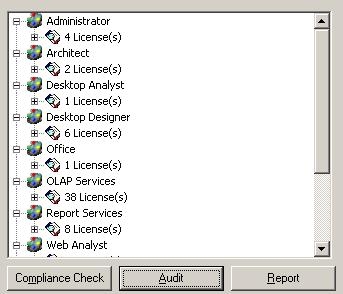
ka02R000000kbxPQAQ_0EM440000002Fn5.jpeg

 
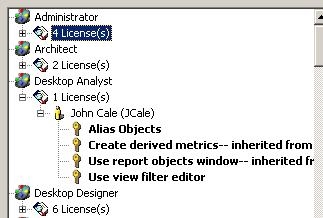
To see which privilege is causing a user to hit a particular license, expand the user name. The privileges listed are the ones associated with that user:
 

ka02R000000kbxPQAQ_0EM440000002Fmp.jpeg

 
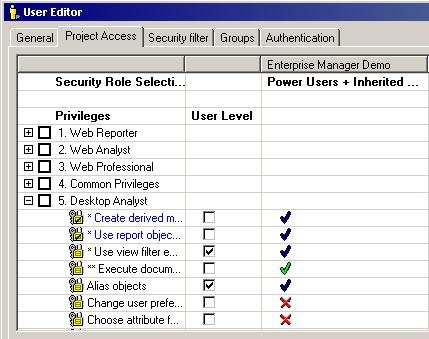
Opening this user in Strategy Developer through User Manager, select the project access tab and locate the license area for the licenses listed in License Manager:
ka02R000000kbxPQAQ_0EM440000002Fmq.jpeg

 
Privileges that are inherited from either a group or security role cannot be de-selected at the user level. Such privileges must be de-selected from the group or security role from which the user is inheriting it.
 
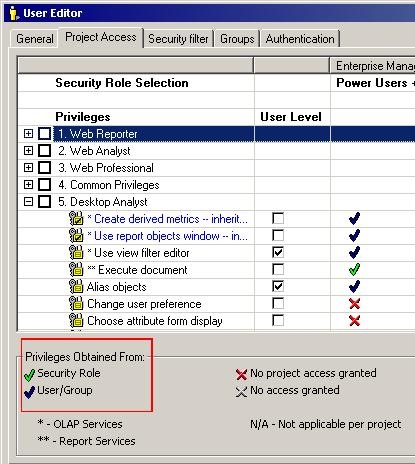
The color of the check mark indicates whether the privilege is being inherited from the user/group level or from a security role. Blue indicates it is being inherited from either the user level or the group level. Green indicates the privilege is assigned to a security role which is assigned to the user. A key to these colored check marks is located at the bottom of the user manager window:
ka02R000000kbxPQAQ_0EM440000002Fmt.jpeg

 
In the above example, notice that four of the privileges are inherited from User/Group level and one is from a security role.
 
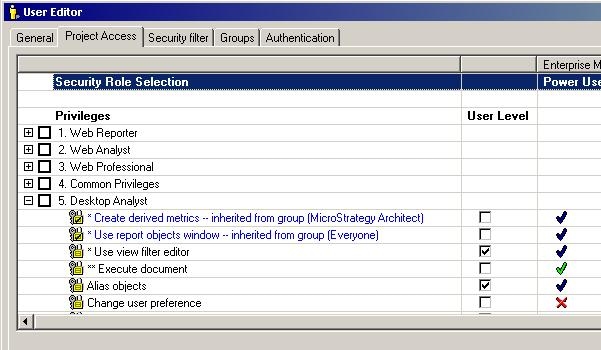
Expand the first column to obtain additional information about the source of the privileges:
ka02R000000kbxPQAQ_0EM440000002Fn3.jpeg

 
In this example, the source of the privileges can now be discerned:
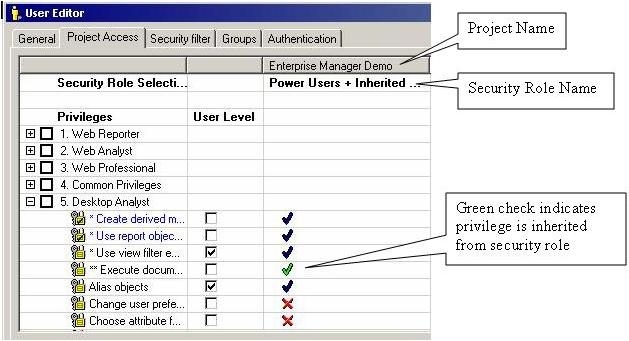
 

  • USER LEVEL PRIVILEGES
    "Use view filter editor" is inherited from the user level as indicated by the checkbox.
     
    "Alias Objects" is inherited from the user level as indicated by the checkbox.
     
    These two privileges can be removed by simply unchecking the privilege in the editor window by clicking on the checkbox in the "User Level" column.
     
  • GROUP LEVEL PRIVILEGES:
    "Create derived metrics" is inherited from a group called "Strategy Architect." This group must be edited to remove the privilege.
     
    "User report objects window" is inherited from the "Everyone" group.
     
    Each of these privileges can be removed by editing the group and unchecking the privilege in the Project Access tab for the group.
     
  • SECURITY ROLE PRIVILEGES:
    "Execute document" is inherited from a security role. The security role can be determined by viewing the security role selected under the Project Name at the top of each column.
     
ka02R000000kbxPQAQ_0EM440000002FnI.jpeg

 
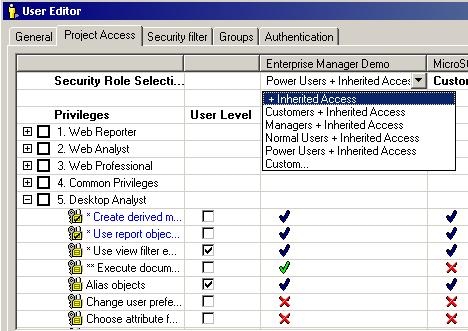
If the user should not have that security role, click on the name of the security role and select "+Inherited Access," as below:
ka02R000000kbxPQAQ_0EM440000002Fn9.jpeg

 
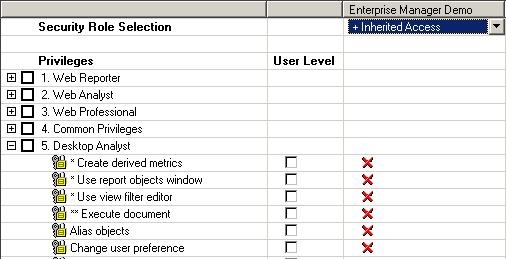
After removing the security role and editing the user privileges and the privileges inherited by the group, the user appears as follows:
 

ka02R000000kbxPQAQ_0EM440000002FnK.jpeg

 
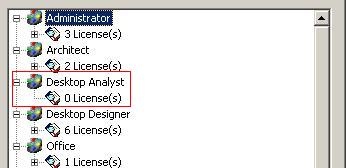
Checking the license audit reveals that this user is no longer using a license for Developer Analyst:
 

ka02R000000kbxPQAQ_0EM440000002FnE.jpeg

 
Note: Restarting the Strategy Intelligence Server may be necessary to ensure that License Manager is displaying changes to user privileges.


Comment

0 comments

Details

Knowledge Article

Published:

June 5, 2017

Last Updated:

June 5, 2017