EducationSoftwareStrategy.com
StrategyCommunity

Knowledge Base

Product

Community

Knowledge Base

TopicsBrowse ArticlesDeveloper Zone

Product

Download SoftwareProduct DocumentationSecurity Hub

Education

Tutorial VideosSolution GalleryEducation courses

Community

GuidelinesGrandmastersEvents
x_social-icon_white.svglinkedin_social-icon_white.svg
Strategy logoCommunity

© Strategy Inc. All Rights Reserved.

LegalTerms of UsePrivacy Policy
  1. Home
  2. Topics

KB11149: How to measure the time spent to answer prompts for a report in MicroStrategy Enterprise Manager?


Community Admin

• Strategy


How to measure the time spent to answer prompts for a report in MicroStrategy Enterprise Manager?

In order to display user interaction time or the time it takes to answer prompts, a Strategy Enterprise Manager report must first be created, per the instructions in the following Strategy Knowledge Base document:
KB8902: How to create a report in MicroStrategy Enterprise Manager that will display each execution step of a job request along with the execution length of each step.
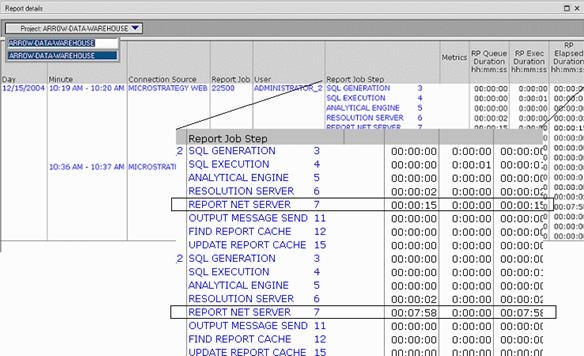
This report will display each execution step of a job request along with the execution length of each step. The screen shot below illustrates an example:
 

ka04W000000OgYnQAK_0EM440000002BmL.jpeg

 
In the above report, the time to answer prompts appears in the Report Net Server step. A report job is first serviced in the Report Net Server and if the report contains a prompt, then the prompt answer will be collected at this step. The prompt answer is then passed onto the Resolution Server by the Report Net Server.


Comment

0 comments

Details

Knowledge Article

Published:

June 14, 2017

Last Updated:

June 14, 2017