EducationSoftwareStrategy.com
StrategyCommunity

Knowledge Base

Product

Community

Knowledge Base

TopicsBrowse ArticlesDeveloper Zone

Product

Download SoftwareProduct DocumentationSecurity Hub

Education

Tutorial VideosSolution GalleryEducation courses

Community

GuidelinesGrandmastersEvents
x_social-icon_white.svglinkedin_social-icon_white.svg
Strategy logoCommunity

© Strategy Inc. All Rights Reserved.

LegalTerms of UsePrivacy Policy
  1. Home
  2. Topics

KB11153: "Some of the columns defining the expression are not located in the same table." error message appears in MicroStrategy Desktop when attempting to concatenate columns from different tables.


Community Admin

• Strategy


Some of the columns defining the expression are not located in the same table." error message appears in MicroStrategy Desktop when attempting to concatenate columns from different tables

While it is possible to concatenate two fields from the same table in the definition of an attribute, it is not possible to select fields from different tables:
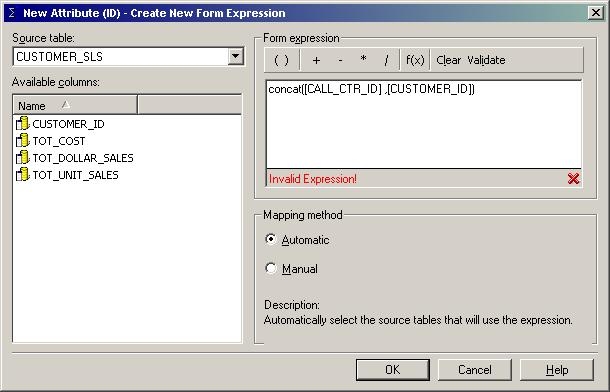
ka04W000000Oc08QAC_0EM440000002FnP.jpeg

 
When attempting to do so, the following error message appears:
 
Some of the columns defining the expression are not located in the same table. Please Define an expression containing columns from the same table before continuing.
To workaround this issue, perform the following steps:
 

  1. Create a database view containing all of the columns that are to be included in the concatenation.
  2. Add the new view to the project using Warehouse catalog (this view will be treated like a table in Strategy.)
  3. Create the attribute and select the new table (view) as the source.

The fields are now located in the same table and may be utilized in the definition of the attribute.


Comment

0 comments

Details

Knowledge Article

Published:

May 31, 2017

Last Updated:

May 31, 2017