When a compound metric is placed in the same template as one of its base metrics, the Metric Join Types don't behave as expected. The following example elaborates on this issue:
In the database warehouse, there are two fact tables, Year_Sales_Fact and Item_Sold_Fact. Data in the two tables are shown below:
|
|
|
|
|
|
Item_Sold_Fact
|
|
|
|
|
|
Year_Sales_Fact
Two facts and one attribute are defined on the tables:
Two simple metrics and one compound metric are defined on the facts:
A simple report is created, with Year, Sales and Unit Sales on the template. When Metric Join Type or Formula Join Type of Unit Sales metric are set to Outer, some notable results are observed.
Scenario 1:
In the metric editor, Unit Sales has the relevant join type set as:
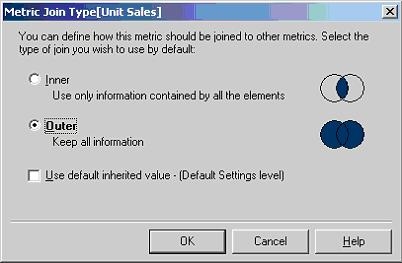
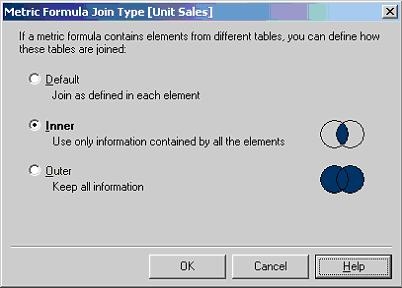
In the report editor, Metric Join Type (Report Data Options > Calculations > Metric Join Type) for two metrics on the template is set as:
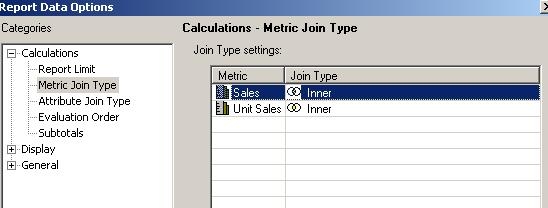
When the report is executed, three passes are generated. The first pass calculates Sales; the second pass calculates Item Sold. The third pass combines the results from the first two passes to generate data for Unit Sales and returns the final result to the end user. An inner join between pass 1 and 2 is performed in pass 3. Only Year 2000 data is returned in the grid:
| select a11.Year_ID Year_ID, |
Conclusion:
Although Metric Join Type for Unit Sales is set as Outer at the metric level (in the metric editor), the report level Metric Join Type overwrites it at the metric level and an inner join is performed between two metrics on the template.
Scenario 2:
As explained in Scenario 1, Metric Join Type at the report level overwrites those at the metric level. For the following two scenarios, only Metric Join Type at the report level will be discussed:
In the metric editor, Unit Sales has the relevant join type set as:
In the report editor, Metric Join Type for two metrics on the template is set as:
Similar to scenario 1, three passes are generated. The first pass calculates Sales; the second pass calculates Item Sold. However, in the third pass, when combining the results from the first two passes to generate data for Unit Sales, a full outer join between pass 1 and 2 is performed. Therefore, as long as a Year has data for either Sales or Item Sold, that Year would appear in the final grid view. With the report level Metric Join Type set as described above, users expect to see only one row of data (Year 2000), but the full outer join performed in calculating the compound metric results in three rows of data returned for the report.
| select a11.Year_ID Year_ID, |
Scenario 3:
In the metric editor, Unit Sales has the relevant join type set as:
In the report editor, Metric Join Type for two metrics on the template are set as:
When the report is executed, the same SQL statement is generated as scenario 2 and three rows of data are returned although both metrics are set to perform an inner join at the report level.
From the discussion of three different scenarios, it can be concluded:
