EducationSoftwareStrategy.com
StrategyCommunity

Knowledge Base

Product

Community

Knowledge Base

TopicsBrowse ArticlesDeveloper Zone

Product

Download SoftwareProduct DocumentationSecurity Hub

Education

Tutorial VideosSolution GalleryEducation courses

Community

GuidelinesGrandmastersEvents
x_social-icon_white.svglinkedin_social-icon_white.svg
Strategy logoCommunity

© Strategy Inc. All Rights Reserved.

LegalTerms of UsePrivacy Policy
  1. Home
  2. Topics

KB11170: Even though a user is disabled in MicroStrategy Intelligence Server, they still receive their scheduled emails through MicroStrategy Narrowcast Server 9.x


Community Admin

• Strategy


SYMPTOM:
A Strategy user has been disabled on the Strategy Intelligence Server:

ka04W000000OdHKQA0_0EM440000002Blp.jpeg

 
However, messages generated by Strategy Narrowcast Server services are still delivered to the user.
 
CAUSE:
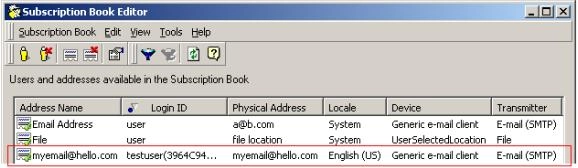
This occurs because the user has not been disabled in Strategy Narrowcast Server, thus their subscription is active:
ka04W000000OdHKQA0_0EM440000002Blr.jpeg

 
ACTION:
Users must be disabled on the Narrowcast Server side to prevent subscriptions from being sent out. Perform the following steps to accomplish this task:
 

  • Open the Narrowcast Subscription Book Editor.
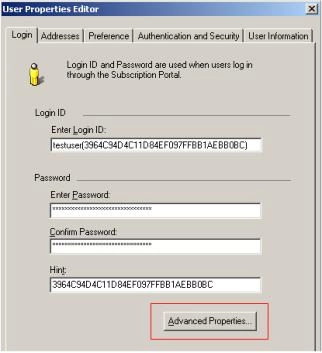
  • Sort by Login ID and locate the user that has been disabled in the Intelligence Server and right-click on any of that user's addresses to edit that user. In this example, the user's name is "testuser," as shown below:
ka04W000000OdHKQA0_0EM440000002Bm7.jpeg
  • Click on the 'Advanced Properties':
ka04W000000OdHKQA0_0EM440000002Bln.jpeg
  • Uncheck the 'Activate this user' checkbox and click OK to return to the Subscription Book editor:
ka04W000000OdHKQA0_0EM440000002Blv.jpeg

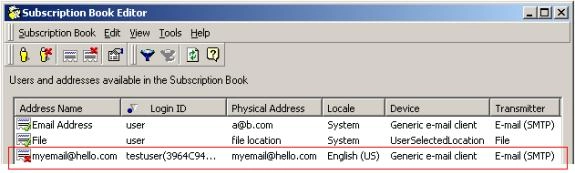
Notice now that all of the user's addresses have been disabled. Each of the user's scheduled deliveries will not be sent:
ka04W000000OdHKQA0_0EM440000002Bm5.jpeg


Comment

0 comments

Details

Knowledge Article

Published:

June 22, 2017

Last Updated:

June 22, 2017