EducationSoftwareStrategy.com
StrategyCommunity

Knowledge Base

Product

Community

Knowledge Base

TopicsBrowse ArticlesDeveloper Zone

Product

Download SoftwareProduct DocumentationSecurity Hub

Education

Tutorial VideosSolution GalleryEducation courses

Community

GuidelinesGrandmastersEvents
x_social-icon_white.svglinkedin_social-icon_white.svg
Strategy logoCommunity

© Strategy Inc. All Rights Reserved.

LegalTerms of UsePrivacy Policy
  1. Home
  2. Topics

KB11180: How to rename SMTP attachments using a control document in MicroStrategy Narrowcast Server 9.x


Community Admin

• Strategy


To rename the attachments that an SMTP service delivers, use the following syntax in a Control Document:
 
If multiple attachments must be renamed, then use the following syntax:
 
Notice that in order to rename multiple attachments, the pipe character must be used as a separator.
 
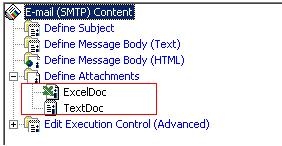
For example, consider the following documents as attachments in an SMTP service:
ka04W000000Ogp0QAC_0EM440000002Bm6.jpeg

 
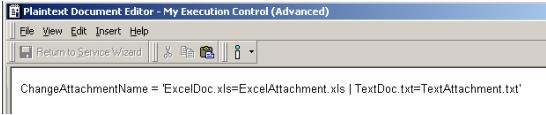
The following Control Document is specified, as shown below:
ka04W000000Ogp0QAC_0EM440000002Bls.jpeg

 
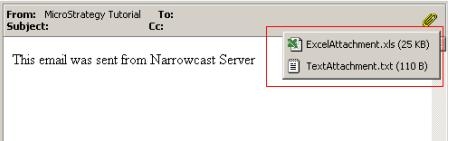
The following will then be delivered:
ka04W000000Ogp0QAC_0EM440000002Blq.jpeg


Comment

0 comments

Details

Knowledge Article

Published:

June 8, 2017

Last Updated:

June 8, 2017