SYMPTOM:
The following steps relate to a scenario in which a user is reporting on the values of a particular metric aggregated at the level of a parent attribute and its child attributes on different reports. For illustrative purposes, using the Strategy Tutorial Project, the parent attribute selected is Customer Region; the child attributes are Customer Region and Customer City.
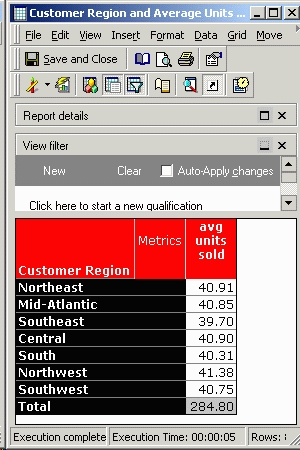
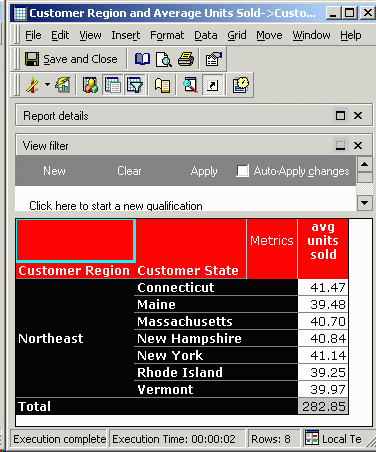
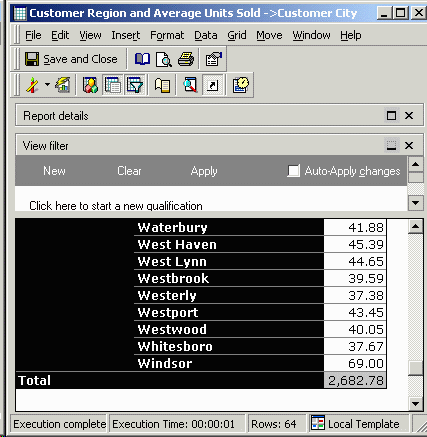
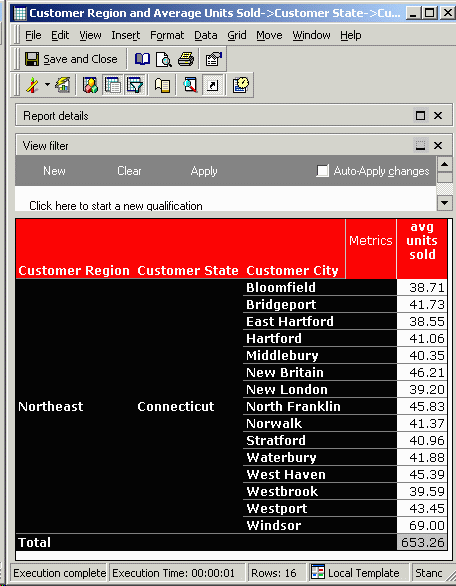
Intuitively, this behavior is not expected. The user might expect the average aggregated at the level of each parent attribute to be equal to the sum of the values as aggregated on the child attribute, divided by the number of elements in the child attribute. So, for example, one might expect the value of "avg units sold" for Customer Region Northeast to be the same as the average of the values of that metric for the Customer Cities belonging to that region.
CAUSE:
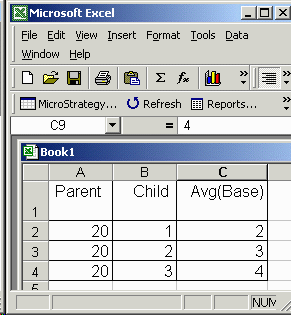
The reason that different values are returned is that the underlying calculation of the average is different at each level of aggregation. This may be illustrated with the following simplified hypothetical example. Consider the following report results which show an AVG(Base) metric aggregated against a parent and child attribute:
This might result from the following underlying values of the Base metric:
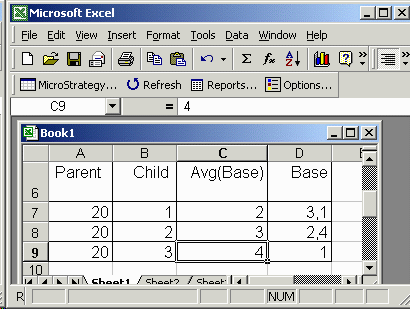
At the level of Parent = 20, the value for Avg(Base) is not (2+3+4)/3 = 3, as might intuitively be expected. It is in fact (3+1+2+4+4)/5 = 2.8.
ACTION:
Users receiving unexpected report results of this nature should therefore review the definition of the "average" metric and the levels at which it is aggregated.
