EducationSoftwareStrategy.com
StrategyCommunity

Knowledge Base

Product

Community

Knowledge Base

TopicsBrowse ArticlesDeveloper Zone

Product

Download SoftwareProduct DocumentationSecurity Hub

Education

Tutorial VideosSolution GalleryEducation courses

Community

GuidelinesGrandmastersEvents
x_social-icon_white.svglinkedin_social-icon_white.svg
Strategy logoCommunity

© Strategy Inc. All Rights Reserved.

LegalTerms of UsePrivacy Policy
  1. Home
  2. Topics

KB11244: "Selections for schedule(s): 'All the Time' are incomplete. Do you want to continue with the selected action and clear those selections?" message appears when scheduling an Administration Task in MicroStrategy 10.x.


Community Admin

• Strategy


SYMPTOM:
When scheduling an Administration task, the following warning message is displayed when saving the schedule:

ka04W000000Obv3QAC_0EM440000002BmC.jpeg

 
Selections for schedule(s): 'All the Time' are incomplete. Do you want to continue with the selected action and clear those selections?
CAUSE:
This message appears because the Administration Task comprises options that have not been selected.
 
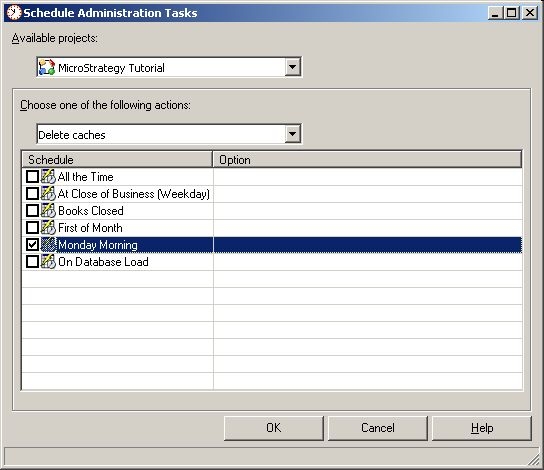
This can occur after an Administrator creates an Administration Task to delete caches every Monday morning, for example:
ka04W000000Obv3QAC_0EM440000002BmE.jpeg

 
After checking the desired schedule, they click OK, and the warning message appears. Note in the screen shot above, the Administrator did not choose any "Option" in the drop-down which culminated in the message being displayed.
 
ACTION:
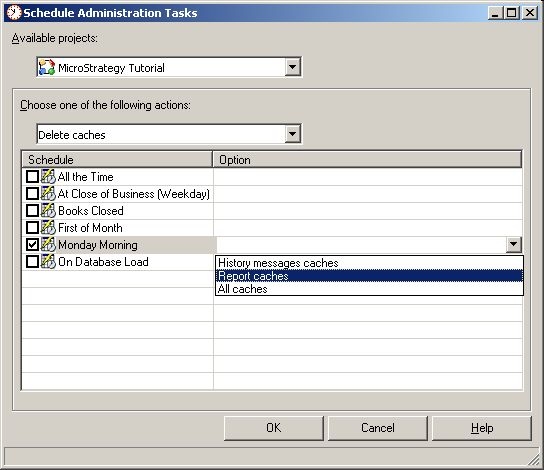
Complete the form by choosing the corresponding options, as shown below:
ka04W000000Obv3QAC_0EM440000002BmG.jpeg

 
11244


Comment

0 comments

Details

Knowledge Article

Published:

June 13, 2017

Last Updated:

June 8, 2018